Cloud Computing คืออะไร — คู่มือระบบ Cloud ฉบับสมบูรณ์ 2026
Cloud Computing คืออะไร เป็นหัวข้อที่ได้รับความสนใจอย่างมากในวงการ IT บทความนี้อธิบายหลักการทำงาน วิธีติดตั้ง และ best practices สำหรับการใช้งานจริง
วิดีโอประกอบการเรียนรู้ | YouTube @icafefx
Cloud Computing คืออะไร
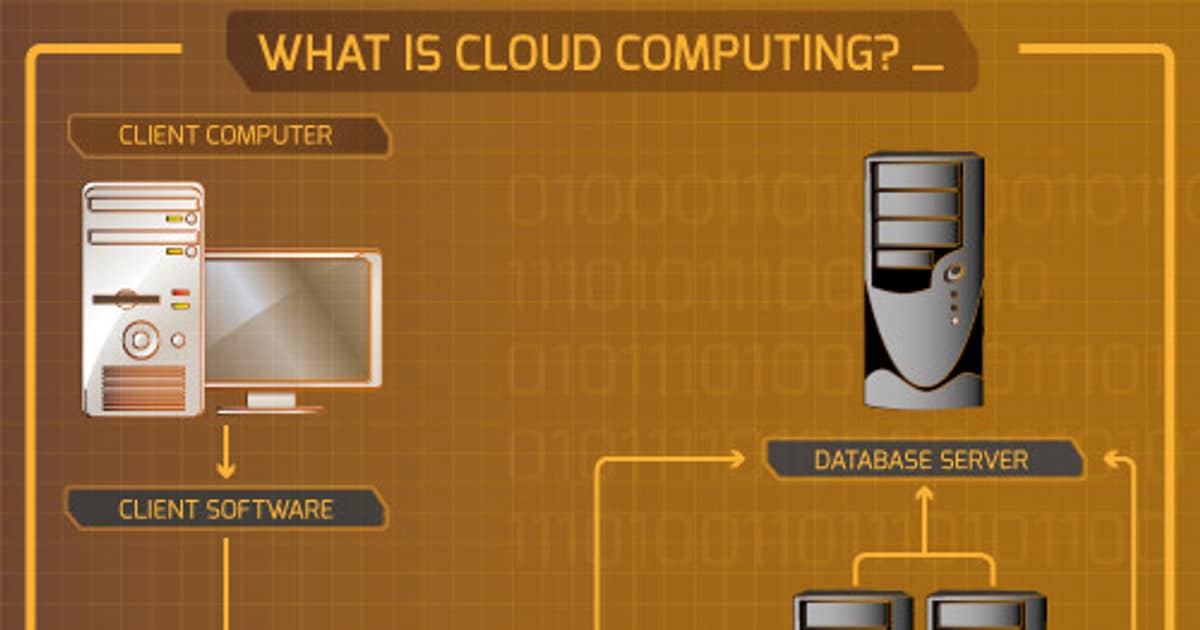
Cloud Computing คือการใช้ทรัพยากรคอมพิวเตอร์ (server, storage, database, network, software) ผ่านอินเทอร์เน็ตแทนที่จะซื้อและดูแล hardware เอง — จ่ายตามที่ใช้จริงเหมือนค่าไฟฟ้า
ตัวอย่างที่คุณใช้ Cloud ทุกวันโดยไม่รู้ตัว:
- Google Drive / iCloud — เก็บไฟล์บน cloud storage
- Gmail / Outlook.com — email บน cloud
- Netflix / YouTube — streaming จาก cloud server
- LINE / WhatsApp — ข้อความเก็บบน cloud
สำหรับธุรกิจและคน IT, Cloud Computing หมายถึงการเช่า server, database, และ service ต่างๆจาก provider เช่น AWS, Azure, GCP แทนการซื้อ server มาตั้งเอง
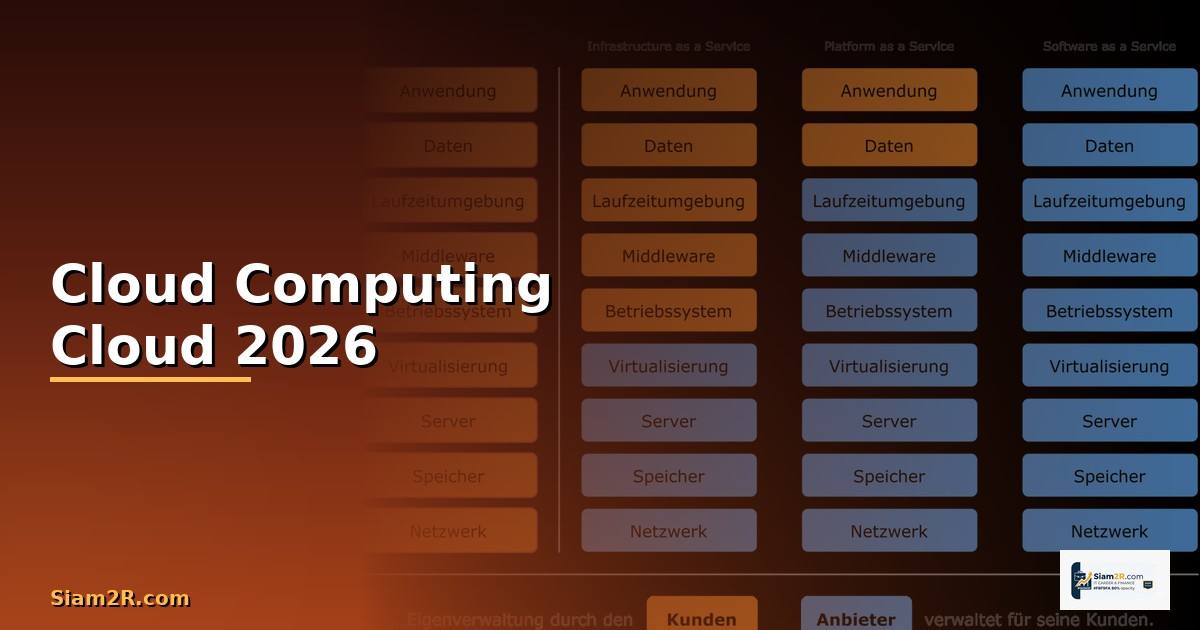
ประเภทของ Cloud: IaaS, PaaS, SaaS
| ประเภท | คำเต็ม | คุณดูแลอะไร | ตัวอย่าง |
|---|---|---|---|
| IaaS | Infrastructure as a Service | OS ขึ้นไป (server, network คุณจัดการเอง) | AWS EC2, DigitalOcean, Vultr |
| PaaS | Platform as a Service | แค่ code (platform จัดการ server ให้) | Heroku, Vercel, Railway, AWS Elastic Beanstalk |
| SaaS | Software as a Service | ไม่ต้องดูแลอะไรใช้งานอย่างเดียว | Gmail, Slack, Salesforce, Notion |
นอกจากนี้ยังมี:
- FaaS (Function as a Service) — รัน function เดี่ยวๆจ่ายตาม execution เช่น AWS Lambda, Cloudflare Workers
- CaaS (Container as a Service) — รัน container โดยไม่ต้องจัดการ server เช่น AWS ECS, Google Cloud Run
- DBaaS (Database as a Service) — database ที่ดูแลให้หมดเช่น AWS RDS, PlanetScale, Supabase
Public vs Private vs Hybrid Cloud
| ประเภท | คำอธิบาย | ข้อดี | ข้อเสีย | เหมาะกับ |
|---|---|---|---|---|
| Public Cloud | แชร์ infrastructure กับลูกค้าอื่น | ราคาถูก, ขยายง่าย | ควบคุมน้อย | Startup, SME, Web app |
| Private Cloud | infrastructure เฉพาะองค์กร | ควบคุมเต็มที่, security สูง | แพง, ดูแลเอง | ธนาคาร, รัฐบาล, Healthcare |
| Hybrid Cloud | ผสม public + private | ยืดหยุ่นสูงสุด | ซับซ้อน | Enterprise ที่มี legacy + ต้อง scale |
เทรนด์ 2026: Multi-cloud (ใช้หลาย provider พร้อมกัน) กำลังเป็นที่นิยมเช่นใช้ AWS สำหรับ compute + GCP สำหรับ BigQuery + Cloudflare สำหรับ CDN
AWS vs Azure vs GCP เปรียบเทียบ 2026
| หัวข้อ | AWS | Azure | GCP |
|---|---|---|---|
| Market Share | ~31% (อันดับ 1) | ~25% (อันดับ 2) | ~11% (อันดับ 3) |
| จุดเด่น | Service มากที่สุด 200+ | Microsoft ecosystem, Enterprise | Data/AI, Kubernetes (GKE) |
| Compute | EC2, Lambda, ECS | Virtual Machines, Functions | Compute Engine, Cloud Run |
| Database | RDS, DynamoDB, Aurora | SQL Database, CosmosDB | Cloud SQL, Spanner, BigQuery |
| AI/ML | SageMaker, Bedrock | Azure OpenAI, ML Studio | Vertex AI, Gemini API |
| Free Tier | 12 เดือน + Always Free | 12 เดือน + Always Free | $300 credit 90 วัน + Always Free |
| เรียนรู้ | ยากแต่ resource เยอะ | ง่ายถ้ารู้ Microsoft | ง่ายสุด UI สะอาด |
แนะนำสำหรับมือใหม่: เริ่มจาก AWS เพราะ market share สูงสุดหา tutorial เยอะที่สุดและ demand ในตลาดงานสูงที่สุด
เริ่มต้นใช้ Cloud สำหรับมือใหม่

ตัวอย่าง deploy เว็บไซต์บน AWS (ฟรี 12 เดือน):
- AMI: Ubuntu Server 24.04 LTS
- Instance type: t3.micro (free tier)
- Storage: 30 GB gp3 (free tier)
- Security Group: Allow SSH (22), HTTP (80), HTTPS (443)
3. SSH เข้า server
ssh -i mykey.pem ubuntu@ec2-xx-xx-xx-xx.compute-1.amazonaws.com
4. ติดตั้ง Nginx
sudo apt update && sudo apt install -y nginx
sudo systemctl enable nginx
5. ติดตั้ง SSL ฟรีจาก Let's Encrypt
sudo apt install -y certbot python3-certbot-nginx
sudo certbot --nginx -d mydomain.com
เว็บไซต์พร้อมใช้งาน!
Cloud Architecture ที่ดี
หลักการออกแบบ Cloud Architecture ตาม AWS Well-Architected Framework:
- Security — IAM least privilege, encrypt ทุกอย่าง, VPC แยก network
- Reliability — Multi-AZ, auto-scaling, health check, backup อัตโนมัติ
- Performance — เลือก instance type ที่เหมาะ, ใช้ CDN (CloudFront), caching (ElastiCache)
- Cost Optimization — ใช้ Reserved Instances, Spot Instances, auto-scaling ลดขนาดเมื่อไม่ใช้
- Sustainability — เลือก region ที่ใช้พลังงานสะอาด, right-sizing instances
Architecture ตัวอย่างสำหรับ Web App:
User → CloudFront (CDN) → ALB (Load Balancer)
- ECS/EKS (Container) → RDS (Database)
- S3 (Static files, Backup)
- ElastiCache (Redis cache)
- CloudWatch (Monitoring)
ค่าใช้จ่ายและการประหยัด
Cloud แพงกว่าที่คิดถ้าไม่ระวังเทคนิคประหยัด:
- Right-sizing — อย่าเลือก instance ใหญ่เกินไปดู CPU/RAM utilization แล้วลดขนาด
- Reserved Instances — จอง 1-3 ปีประหยัดได้ 30-60%
- Spot Instances — ใช้ capacity เหลือราคาถูก 60-90% (แต่อาจถูกยกเลิก)
- Auto-scaling — ลด instance เมื่อ traffic น้อย (กลางคืน, วันหยุด)
- S3 Lifecycle — ย้ายข้อมูลเก่าไป Glacier (ถูกกว่า 90%)
- ปิด dev/test environment — ตอนไม่ใช้เปิดเฉพาะเวลาทำงาน
ค่าใช้จ่ายเฉลี่ยต่อเดือนตามขนาด:
| ขนาด | ตัวอย่าง | ค่าใช้จ่าย/เดือน |
|---|---|---|
| เว็บเล็ก (blog) | 1 EC2 + RDS + S3 | $15-30 (~500-1,000 บาท) |
| Startup (1,000 users/วัน) | 2 EC2 + RDS + CDN | $100-300 (~3,500-10,000 บาท) |
| SME (10,000 users/วัน) | Auto-scaling + HA | $500-2,000 (~17,000-70,000 บาท) |
Security บน Cloud
Cloud provider ดูแล security ของ infrastructure ให้ ("Security OF the cloud") แต่คุณต้องดูแล security ของสิ่งที่คุณวางบน cloud เอง ("Security IN the cloud"):
- IAM — ใช้ least privilege ทุก user/role ให้สิทธิ์เท่าที่จำเป็น
- MFA — เปิด MFA ทุก account โดยเฉพาะ root account
- VPC — แยก network ด้วย private subnet, NAT gateway
- Encryption — เข้ารหัสข้อมูลทั้ง at-rest (KMS) และ in-transit (TLS)
- Security Group — อนุญาตเฉพาะ port/IP ที่จำเป็น
- CloudTrail — log ทุก API call เพื่อ audit
- GuardDuty — ตรวจจับ threat อัตโนมัติ
Certificate สาย Cloud
| Certificate | Provider | ระดับ | เหมาะกับ |
|---|---|---|---|
| AWS Cloud Practitioner | AWS | พื้นฐาน | เริ่มต้นไม่ต้องมี technical background |
| AWS Solutions Architect Associate | AWS | กลาง | Cloud Engineer, DevOps (cert ที่ต้องมี) |
| AWS DevOps Professional | AWS | สูง | Senior DevOps Engineer |
| Azure Fundamentals (AZ-900) | Microsoft | พื้นฐาน | เริ่มต้นสาย Azure |
| GCP Associate Cloud Engineer | กลาง | Cloud Engineer ที่ใช้ GCP | |
| CKA (Certified Kubernetes Admin) | CNCF | กลาง-สูง | Kubernetes admin ทุก cloud |
เส้นทางอาชีพสาย Cloud ที่แนะนำ:
- เริ่มต้น: สอบ AWS Cloud Practitioner หรือ AZ-900 เพื่อเข้าใจภาพรวม Cloud ใช้เวลาเตรียมตัว 2-4 สัปดาห์ค่าสอบประมาณ $100
- ขั้นกลาง: สอบ AWS Solutions Architect Associate เป็น cert ที่ได้รับการยอมรับมากที่สุดในวงการใช้เวลาเตรียมตัว 2-3 เดือนเน้นทำ hands-on lab จริงๆ
- ขั้นสูง: เลือกเชี่ยวชาญเฉพาะทางเช่น DevOps Professional, Security Specialty หรือ Machine Learning Specialty ตามสายงานที่สนใจ
- เสริม: เรียนรู้ Terraform (Infrastructure as Code), Kubernetes (Container Orchestration) และ CI/CD pipeline เพื่อเพิ่มมูลค่าให้ตัวเองในตลาดงาน
Q: Cloud แพงกว่าซื้อ server เองไหม?
A: ระยะสั้น cloud ถูกกว่า (ไม่ต้องลงทุน hardware) ระยะยาว 3-5 ปีถ้า workload คงที่ dedicated server อาจถูกกว่าแต่ cloud ได้เรื่อง flexibility, scaling, และไม่ต้องดูแล hardware