OSI Model 7 Layers
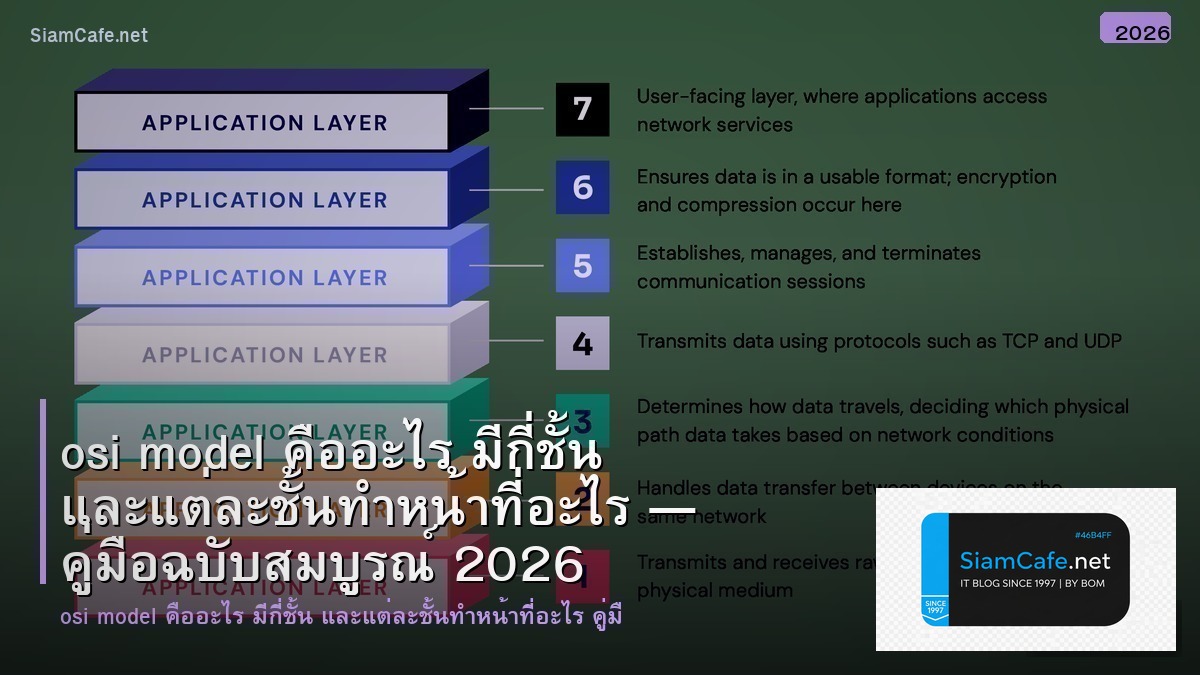
OSI Model Open Systems Interconnection 7 Layers Physical Data Link Network Transport Session Presentation Application Protocol TCP/IP ISO Reference Model
| Layer | ชื่อ | หน้าที่ | Protocol/Device |
|---|---|---|---|
| 7 | Application | User Interface | HTTP, FTP, DNS, SMTP |
| 6 | Presentation | Encryption, Format | SSL/TLS, JPEG, ASCII |
| 5 | Session | Connection Management | NetBIOS, RPC, PPTP |
| 4 | Transport | Reliable Delivery | TCP, UDP |
| 3 | Network | Routing, IP Address | IP, ICMP, OSPF, BGP |
| 2 | Data Link | MAC Address, Framing | Ethernet, Wi-Fi, ARP |
| 1 | Physical | Bits, Signals | Cable, Hub, Fiber |
แต่ละ Layer ทำอะไร
# osi_layers.py — OSI Model Details
from dataclasses import dataclass, field
from typing import List
@dataclass
class OSILayer:
number: int
name: str
thai_name: str
function: str
data_unit: str
protocols: List[str]
devices: List[str]
security: List[str]
layers = [
OSILayer(7, "Application", "ชั้นแอปพลิเคชัน",
"ให้บริการ Network แก่ User Applications",
"Data",
["HTTP/HTTPS", "FTP/SFTP", "DNS", "SMTP/IMAP", "SSH", "SNMP"],
["Firewall (L7)", "Load Balancer (L7)", "WAF"],
["Input Validation", "Authentication", "WAF Rules"]),
OSILayer(6, "Presentation", "ชั้นนำเสนอ",
"แปลงรูปแบบข้อมูล เข้ารหัส บีบอัด",
"Data",
["SSL/TLS", "JPEG", "GIF", "ASCII", "MPEG"],
["SSL Accelerator"],
["TLS 1.3", "Certificate Management", "Encryption"]),
OSILayer(5, "Session", "ชั้นเซสชัน",
"จัดการ Session เปิด/ปิด Connection",
"Data",
["NetBIOS", "RPC", "PPTP", "SIP"],
["Gateway"],
["Session Timeout", "Token Management"]),
OSILayer(4, "Transport", "ชั้นขนส่ง",
"ส่งข้อมูลแบบ Reliable (TCP) หรือ Fast (UDP)",
"Segment/Datagram",
["TCP", "UDP", "QUIC", "SCTP"],
["Firewall (L4)", "Load Balancer (L4)"],
["Port Security", "Rate Limiting", "SYN Flood Protection"]),
OSILayer(3, "Network", "ชั้นเครือข่าย",
"Routing หาเส้นทาง ใช้ IP Address",
"Packet",
["IPv4", "IPv6", "ICMP", "OSPF", "BGP", "ARP"],
["Router", "L3 Switch", "Firewall"],
["ACL", "IPSec VPN", "Anti-spoofing"]),
OSILayer(2, "Data Link", "ชั้นเชื่อมต่อข้อมูล",
"จัดการ Frame ใช้ MAC Address",
"Frame",
["Ethernet", "Wi-Fi (802.11)", "PPP", "VLAN"],
["Switch", "Bridge", "NIC"],
["Port Security", "802.1X", "VLAN Segmentation"]),
OSILayer(1, "Physical", "ชั้นกายภาพ",
"ส่ง Bits ผ่านสาย สัญญาณไฟฟ้า/แสง",
"Bits",
["Ethernet (Physical)", "USB", "Fiber Optic", "Wi-Fi Radio"],
["Hub", "Repeater", "Cable", "Fiber"],
["Physical Security", "Cable Shielding"]),
]
print("=== OSI 7 Layers ===")
for layer in layers:
print(f"\n Layer {layer.number}: {layer.name} ({layer.thai_name})")
print(f" Function: {layer.function}")
print(f" Data Unit: {layer.data_unit}")
print(f" Protocols: {', '.join(layer.protocols[:4])}")
print(f" Devices: {', '.join(layer.devices[:3])}")
print(f" Security: {', '.join(layer.security[:2])}")
Python Network Programming
# network.py — Network Programming Examples
import socket
# === Layer 4: TCP Client/Server ===
# TCP Server
# server = socket.socket(socket.AF_INET, socket.SOCK_STREAM)
# server.setsockopt(socket.SOL_SOCKET, socket.SO_REUSEADDR, 1)
# server.bind(('0.0.0.0', 8080))
# server.listen(5)
# print("Server listening on port 8080")
#
# while True:
# client, addr = server.accept()
# print(f"Connection from {addr}")
# data = client.recv(1024)
# client.send(b"HTTP/1.1 200 OK\r\n\r\nHello!")
# client.close()
# TCP Client
# client = socket.socket(socket.AF_INET, socket.SOCK_STREAM)
# client.connect(('example.com', 80))
# client.send(b"GET / HTTP/1.1\r\nHost: example.com\r\n\r\n")
# response = client.recv(4096)
# print(response.decode())
# client.close()
# === Layer 3: ICMP Ping ===
# import subprocess
# result = subprocess.run(['ping', '-c', '4', '8.8.8.8'],
# capture_output=True, text=True)
# print(result.stdout)
# === Layer 7: HTTP Client ===
# import requests
# response = requests.get('https://api.example.com/health')
# print(f"Status: {response.status_code}")
# print(f"Headers: {dict(response.headers)}")
# Network Troubleshooting by Layer
troubleshoot = {
"Layer 1 (Physical)": {
"symptoms": "ไม่มี Link Light, สายหลุด",
"checks": "ตรวจสาย, ตรวจ Port, ตรวจ NIC",
"tools": "Cable Tester, show interface status",
},
"Layer 2 (Data Link)": {
"symptoms": "MAC ไม่เจอ, VLAN ผิด",
"checks": "show mac address-table, show vlan",
"tools": "Wireshark (Frame), arp -a",
},
"Layer 3 (Network)": {
"symptoms": "Ping ไม่ได้, Route ผิด",
"checks": "ping, traceroute, show ip route",
"tools": "tracert, pathping, MTR",
},
"Layer 4 (Transport)": {
"symptoms": "Port ไม่เปิด, Connection Timeout",
"checks": "telnet host port, netstat -an",
"tools": "nmap, ss -tulpn, tcpdump",
},
"Layer 7 (Application)": {
"symptoms": "HTTP Error, DNS ไม่ Resolve",
"checks": "curl, nslookup, dig",
"tools": "Browser DevTools, Postman, curl -v",
},
}
print("\n=== Troubleshooting by Layer ===")
for layer, info in troubleshoot.items():
print(f"\n [{layer}]")
for k, v in info.items():
print(f" {k}: {v}")
OSI กับ TCP/IP เปรียบเทียบ
# comparison.py — OSI vs TCP/IP
from dataclasses import dataclass
from typing import List
@dataclass
class ModelComparison:
osi_layers: str
tcpip_layer: str
protocols: List[str]
description: str
comparisons = [
ModelComparison("Layer 7,6,5", "Application",
["HTTP", "FTP", "DNS", "SMTP", "SSH", "TLS"],
"รวม 3 ชั้นบนเป็นชั้นเดียว จัดการ Application ทั้งหมด"),
ModelComparison("Layer 4", "Transport",
["TCP", "UDP", "QUIC"],
"เหมือนกัน ส่งข้อมูลระหว่าง Process (Port-to-Port)"),
ModelComparison("Layer 3", "Internet",
["IP", "ICMP", "OSPF", "BGP"],
"เหมือนกัน Routing หาเส้นทาง (Host-to-Host)"),
ModelComparison("Layer 2,1", "Network Interface",
["Ethernet", "Wi-Fi", "ARP"],
"รวม 2 ชั้นล่างเป็นชั้นเดียว จัดการ Physical + Data Link"),
]
print("=== OSI vs TCP/IP ===")
print(f" {'OSI Layers':<15} {'TCP/IP Layer':<20} {'Protocols'}")
for c in comparisons:
protos = ", ".join(c.protocols[:4])
print(f" {c.osi_layers:<15} {c.tcpip_layer:<20} {protos}")
print(f" {c.description}")
# Encapsulation Process
encapsulation = [
{"layer": 7, "action": "Application สร้าง Data", "added": "HTTP Headers"},
{"layer": 4, "action": "Transport แบ่ง Segments", "added": "TCP/UDP Header (Port)"},
{"layer": 3, "action": "Network สร้าง Packets", "added": "IP Header (IP Address)"},
{"layer": 2, "action": "Data Link สร้าง Frames", "added": "MAC Header + FCS"},
{"layer": 1, "action": "Physical ส่ง Bits", "added": "Electrical/Optical Signal"},
]
print(f"\n\nEncapsulation Process:")
for e in encapsulation:
print(f" Layer {e['layer']}: {e['action']}")
print(f" Added: {e['added']}")
เคล็ดลับ
- จำง่าย: Please Do Not Throw Sausage Pizza Away (Physical-Application)
- Troubleshoot: เริ่มจาก Layer 1 ขึ้นไป ตรวจสายก่อน
- TCP/IP: ใช้งานจริงบน Internet เป็น TCP/IP ไม่ใช่ OSI
- Wireshark: ใช้ Wireshark ดู Traffic ทุก Layer เรียนรู้ได้เร็ว
- Security: ป้องกันทุก Layer ไม่ใช่แค่ Firewall Layer 3-4
การนำความรู้ไปประยุกต์ใช้งานจริง

แหล่งเรียนรู้ที่แนะนำ ได้แก่ Official Documentation ที่อัพเดทล่าสุดเสมอ Online Course จาก Coursera Udemy edX ช่อง YouTube คุณภาพทั้งไทยและอังกฤษ และ Community อย่าง Discord Reddit Stack Overflow ที่ช่วยแลกเปลี่ยนประสบการณ์กับนักพัฒนาทั่วโลก
OSI Model คืออะไร
มาตรฐานอ้างอิง 7 ชั้น สื่อสารข้อมูลเครือข่าย แต่ละชั้นหน้าที่เฉพาะ ISO Troubleshoot ออกแบบ Protocol
OSI Model มีกี่ชั้น
7 ชั้น Physical Data Link Network Transport Session Presentation Application แต่ละชั้น Protocol Device หน้าที่ต่างกัน
TCP/IP Model ต่างจาก OSI อย่างไร
TCP/IP 4 ชั้น ใช้จริงบน Internet OSI 7 ชั้น Reference Model TCP/IP รวม Session Presentation Application เป็นชั้นเดียว
ทำไมต้องเรียน OSI Model
เข้าใจ Network Troubleshoot ตรงชั้น ออกแบบ Network Security สื่อสารทีม CCNA CompTIA พื้นฐาน IT สำคัญ
สรุป
OSI Model 7 Layers Physical Data Link Network Transport Session Presentation Application TCP/IP Protocol Encapsulation Troubleshooting Network Programming Security Wireshark CCNA