Go Testing คืออะไร? สอน Unit Test, Table-Driven Test, Benchmark สำหรับ Go Developer 2026
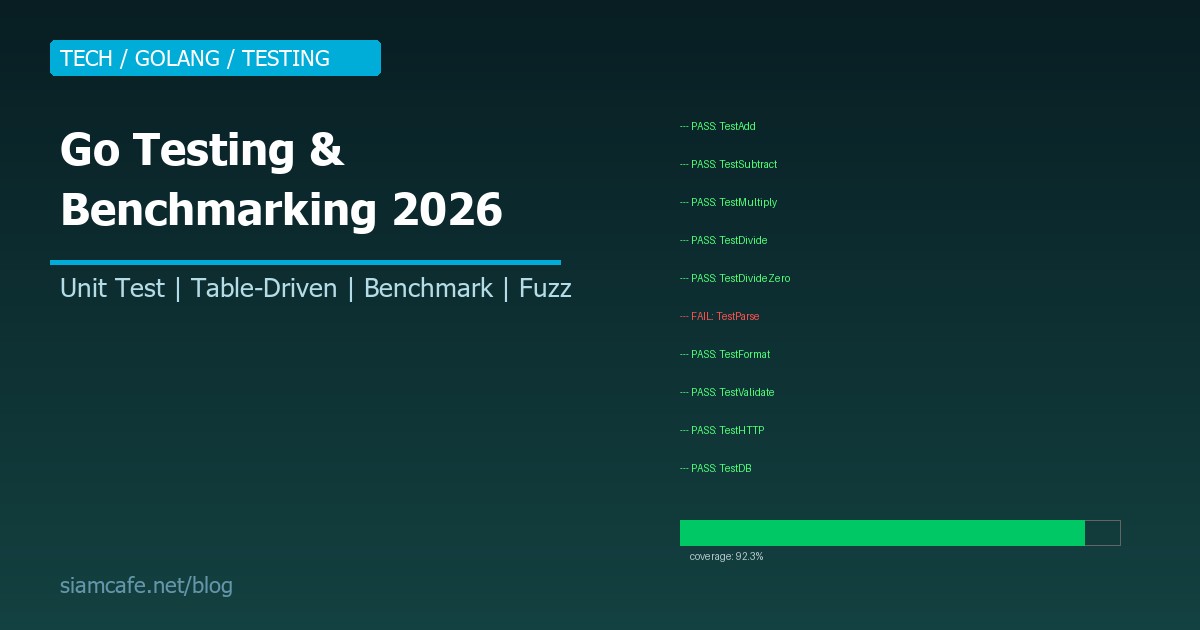
Go ออกแบบ Testing มาเป็นส่วนหนึ่งของภาษาตั้งแต่แรก — testing package อยู่ใน Standard library, go test เป็น Built-in command ไม่ต้องติดตั้ง Framework เพิ่ม ปรัชญาของ Go คือ "Testing should be simple" ไม่ต้องมี Magic, Annotation, หรือ Decorator แค่เขียน Function ที่ชื่อขึ้นต้นด้วย Test ก็พอ
Go Testing พื้นฐาน

กฎการตั้งชื่อ
- ไฟล์ Test ต้องลงท้ายด้วย
_test.go - Function Test ต้องขึ้นต้นด้วย
Test(Capital T) - Parameter ต้องเป็น
*testing.T - ไฟล์ Test อยู่ใน Package เดียวกับ Code ที่ทดสอบ (หรือ
_testpackage สำหรับ Black-box testing)
เขียน Test แรก
// math_test.go
package math

import "testing"

func TestAdd(t *testing.T) {
    result := Add(2, 3)
    if result != 5 {
        t.Errorf("Add(2, 3) = %d; want 5", result)
    }
}

func TestSubtract(t *testing.T) {
    result := Subtract(10, 3)
    if result != 7 {
        t.Errorf("Subtract(10, 3) = %d; want 7", result)
    }
}

func TestDivide(t *testing.T) {
    result, err := Divide(10, 2)
    if err != nil {
        t.Fatalf("Divide(10, 2) returned error: %v", err)
    }
    if result != 5.0 {
        t.Errorf("Divide(10, 2) = %f; want 5.0", result)
    }
}

func TestDivideByZero(t *testing.T) {
    _, err := Divide(10, 0)
    if err == nil {
        t.Error("Divide(10, 0) should return error")
    }
}
# รัน Test
go test ./... # ทุก Package
go test ./math # เฉพาะ Package math
go test -v ./... # Verbose output
go test -run TestAdd ./math # เฉพาะ Test ที่ match "TestAdd"
go test -count=1 ./... # ไม่ใช้ CacheTable-Driven Tests — วิธี Idiomatic Go
Table-Driven Test คือ Pattern ที่ Go developers ใช้มากที่สุด แทนที่จะเขียน Test function แยกสำหรับแต่ละ Case ให้รวมทุก Case ไว้ใน Table (Slice of struct) แล้ว Loop ทดสอบ:
อ่านเพิ่ม: pnpm คืออะไร? Package Manager ที่เร็วและประหยัด Disk กว่า np · อ่านเพิ่ม: Rust Programming คืออะไร? สอน Rust จาก 0 สำหรับ Developer ที · อ่านเพิ่ม: Docker Compose 2026 สร้าง Home Lab Self-Hosted Services ที่บ
- เพิ่ม Test case ง่าย — แค่เพิ่ม Row ใน Table
- ลด Code ซ้ำซ้อน — Logic ทดสอบเขียนครั้งเดียว
t.Run()ทำให้เห็นว่า Case ไหน Fail- เป็นมาตรฐานของ Go community ทุกคนอ่านเข้าใจ
Subtests (t.Run) และ Test Helpers (t.Helper)
// Subtests — จัดกลุ่ม Test
func TestUserService(t *testing.T) {
    t.Run("Create", func(t *testing.T) {
        t.Run("valid user", func(t *testing.T) { /* ... */ })
        t.Run("duplicate email", func(t *testing.T) { /* ... */ })
        t.Run("invalid email", func(t *testing.T) { /* ... */ })
    })

    t.Run("Get", func(t *testing.T) {
        t.Run("existing user", func(t *testing.T) { /* ... */ })
        t.Run("non-existing user", func(t *testing.T) { /* ... */ })
    })
}

// Run เฉพาะ subtest:
// go test -run TestUserService/Create/valid_user

// Test Helper — ฟังก์ชันช่วย (ไม่นับเป็น Test)
func assertEqual(t *testing.T, got, want interface{}) {
    t.Helper() // ← สำคัญ! ทำให้ Error message แสดง Line ของ Caller ไม่ใช่ Helper
    if got != want {
        t.Errorf("got %v; want %v", got, want)
    }
}

func TestWithHelper(t *testing.T) {
    assertEqual(t, Add(2, 3), 5)     // Error จะชี้ไปที่บรรทัดนี้
    assertEqual(t, Add(-1, 1), 0)
}
Testify — Popular Testing Library
// go get github.com/stretchr/testify

import (
    "testing"
    "github.com/stretchr/testify/assert"
    "github.com/stretchr/testify/require"
)

func TestWithTestify(t *testing.T) {
    // assert — ถ้า Fail ยังรัน Test ต่อ
    assert.Equal(t, 5, Add(2, 3))
    assert.NotEqual(t, 0, Add(2, 3))
    assert.True(t, Add(2, 3) > 0)
    assert.Contains(t, "hello world", "world")
    assert.Nil(t, err)
    assert.NotNil(t, result)
    assert.Len(t, slice, 3)

    // require — ถ้า Fail หยุด Test ทันที (เหมือน t.Fatal)
    result, err := Divide(10, 2)
    require.NoError(t, err)       // ถ้า Error → หยุดเลย ไม่ต้อง check result
    require.Equal(t, 5.0, result)

    // assert.Error สำหรับ Expected errors
    _, err = Divide(10, 0)
    assert.Error(t, err)
    assert.ErrorContains(t, err, "divide by zero")
}
Coverage
รัน Test พร้อม Coverage
go test -cover ./...
Output: coverage: 85.2% of statements
สร้าง Coverage profile
go test -coverprofile=coverage.out ./...
ดู Coverage แบบ HTML (เปิด Browser)
go tool cover -html=coverage.out
ดู Coverage ทีละ Function
go tool cover -func=coverage.out
Coverage เฉพาะ Package
go test -coverprofile=coverage.out -coverpkg=./... ./...
ตั้ง Minimum coverage ใน CI:
go test -coverprofile=coverage.out ./...
COVERAGE=$(go tool cover -func=coverage.out | tail -1 | awk '{print $3}' | tr -d '%')
if (( $(echo "$COVERAGE < 80" | bc -l) )); then
echo "Coverage $COVERAGE% is below 80%"
exit 1
fi
Benchmarking
// Benchmark functions ขึ้นต้นด้วย Benchmark + parameter *testing.B

func BenchmarkAdd(b *testing.B) {
    for i := 0; i < b.N; i++ {
        Add(2, 3)
    }
}

func BenchmarkDivide(b *testing.B) {
    for i := 0; i < b.N; i++ {
        Divide(10.0, 3.0)
    }
}

// Benchmark with allocation reporting
func BenchmarkStringConcat(b *testing.B) {
    b.ReportAllocs()  // รายงาน Memory allocation
    for i := 0; i < b.N; i++ {
        s := ""
        for j := 0; j < 100; j++ {
            s += "a"
        }
    }
}

func BenchmarkStringBuilder(b *testing.B) {
    b.ReportAllocs()
    for i := 0; i < b.N; i++ {
        var sb strings.Builder
        for j := 0; j < 100; j++ {
            sb.WriteString("a")
        }
        _ = sb.String()
    }
}
รัน Benchmark
go test -bench=. ./...
go test -bench=BenchmarkAdd ./...
go test -bench=. -benchmem ./... # รวม Memory allocation
go test -bench=. -count=5 ./... # รัน 5 ครั้ง (สำหรับ benchstat)
go test -bench=. -benchtime=5s ./... # รันนานขึ้น (default 1s)
Output ตัวอย่าง:
BenchmarkAdd-8 1000000000 0.2891 ns/op
BenchmarkStringConcat-8 15241 78542 ns/op 26456 B/op 99 allocs/op
BenchmarkStringBuilder-8 234567 5123 ns/op 752 B/op 7 allocs/op
↑ Builder เร็วกว่า 15 เท่า!
เปรียบเทียบ Benchmark ด้วย benchstat:
go install golang.org/x/perf/cmd/benchstat@latest
go test -bench=. -count=10 ./... > old.txt
(ปรับปรุง Code)
go test -bench=. -count=10 ./... > new.txt
benchstat old.txt new.txt
Fuzz Testing (Go 1.18+)
# รัน Fuzz test
go test -fuzz=FuzzDivide ./...
go test -fuzz=FuzzDivide -fuzztime=30s ./...   # รัน 30 วินาที
go test -fuzz=FuzzDivide -fuzztime=1000x ./... # รัน 1000 iterations

# Fuzz corpus ถูกเก็บใน testdata/fuzz/
# ถ้าพบ Bug → Go สร้างไฟล์ใน testdata/fuzz/FuzzDivide/ → ใช้เป็น Regression test
Race Detection
Go มี Built-in Race detector — ตรวจจับ Data race
รัน Test with Race detection
go test -race ./...
Build with Race detection
go build -race -o myapp
Run with Race detection
go run -race main.go
Output เมื่อพบ Race:
WARNING: DATA RACE
Write at 0x00c0000b4018 by goroutine 7:
main.increment()
/path/main.go:15 +0x48
Previous read at 0x00c0000b4018 by goroutine 8:
main.getCount()
/path/main.go:20 +0x38
ใช้ -race ตอน Test เสมอ! อย่าลืมใส่ใน CI
(อย่าใช้ใน Production — ช้าลง 2-10x, ใช้ Memory มากขึ้น 5-10x)
Test Fixtures และ Golden Files
// Test fixtures — ข้อมูลทดสอบเก็บใน testdata/
// Go จะ ignore directory ชื่อ testdata ตอน Build

// testdata/input.json
// testdata/expected_output.json

func TestProcessData(t *testing.T) {
    // Read input fixture
    input, err := os.ReadFile("testdata/input.json")
    require.NoError(t, err)

    result := ProcessData(input)

    // Golden file pattern — ถ้า -update flag → เขียน expected output ใหม่
    golden := "testdata/expected_output.json"
    if *update {
        os.WriteFile(golden, result, 0644)
    }

    expected, err := os.ReadFile(golden)
    require.NoError(t, err)
    assert.JSONEq(t, string(expected), string(result))
}

// Flag สำหรับ Update golden files
var update = flag.Bool("update", false, "update golden files")

func TestMain(m *testing.M) {
    flag.Parse()
    os.Exit(m.Run())
}

// รัน: go test -update ./...  (อัปเดต Golden files)
// รัน: go test ./...          (เปรียบเทียบกับ Golden files)
TestMain — Setup/Teardown
// TestMain ใช้สำหรับ Setup/Teardown ที่ทำครั้งเดียว (ไม่ใช่ทุก Test)

func TestMain(m *testing.M) {
    // Setup — ทำก่อน Test ทั้งหมด
    fmt.Println("=== SETUP ===")
    db := setupDatabase()
    defer db.Close()

    // Run all tests
    code := m.Run()

    // Teardown — ทำหลัง Test ทั้งหมด
    fmt.Println("=== TEARDOWN ===")
    cleanupDatabase()

    os.Exit(code)
}

// สำหรับ Per-test setup/teardown ใช้ t.Cleanup():
func TestSomething(t *testing.T) {
    resource := createResource()
    t.Cleanup(func() {
        resource.Close() // ถูกเรียกหลัง Test จบ (แม้ Fail)
    })
    // ... test ...
}
go test Flags
| Flag | หน้าที่ | ตัวอย่าง |
|---|---|---|
-v | Verbose output | go test -v ./... |
-run REGEX | รันเฉพาะ Test ที่ match | go test -run TestAdd ./... |
-count N | รัน N ครั้ง (ไม่ Cache) | go test -count=1 ./... |
-parallel N | จำนวน Test ที่รัน Parallel | go test -parallel 4 ./... |
-race | เปิด Race detector | go test -race ./... |
-cover | แสดง Coverage | go test -cover ./... |
-coverprofile | สร้าง Coverage file | go test -coverprofile=c.out ./... |
-bench REGEX | รัน Benchmark | go test -bench=. ./... |
-benchmem | รายงาน Memory ใน Benchmark | go test -bench=. -benchmem ./... |
-fuzz REGEX | รัน Fuzz test | go test -fuzz=Fuzz ./... |
-timeout D | Timeout (default 10m) | go test -timeout 30s ./... |
-short | Skip Long-running tests | go test -short ./... |
-failfast | หยุดทันทีเมื่อ Test แรก Fail | go test -failfast ./... |
Integration Tests
// แยก Integration test ด้วย Build tag หรือ -short flag

// === วิธีที่ 1: ใช้ -short flag ===
func TestDatabaseIntegration(t *testing.T) {
    if testing.Short() {
        t.Skip("skipping integration test in short mode")
    }
    // ... integration test ที่ต้อง Database จริง ...
}

// รัน: go test ./...         (รัน Integration test ด้วย)
// รัน: go test -short ./...  (ข้าม Integration test)

// === วิธีที่ 2: ใช้ Build tag ===
//go:build integration

package mypackage

func TestDatabaseIntegration(t *testing.T) {
    // ... integration test ...
}

// รัน: go test -tags=integration ./...
CI Integration
# GitHub Actions — Go test pipeline
# .github/workflows/test.yml

name: Go Test
on: [push, pull_request]

jobs:
  test:
    runs-on: ubuntu-latest
    steps:
      - uses: actions/checkout@v4
      - uses: actions/setup-go@v5
        with:
          go-version: '1.22'

      - name: Run tests
        run: go test -v -race -coverprofile=coverage.out ./...

      - name: Check coverage
        run: |
          COVERAGE=$(go tool cover -func=coverage.out | tail -1 | awk '{print $3}' | tr -d '%')
          echo "Coverage: $COVERAGE%"
          if (( $(echo "$COVERAGE < 80" | bc -l) )); then
            echo "Coverage below 80%!"
            exit 1
          fi

      - name: Upload coverage
        uses: codecov/codecov-action@v3
        with:
          file: ./coverage.out
Testing Best Practices
- ใช้ Table-Driven Tests เป็นหลัก: มาตรฐานของ Go community ง่ายต่อการเพิ่ม Case
- Test ชื่อ function ให้สื่อ:
TestUser_Create_DuplicateEmail_ReturnsErrorดีกว่าTestUser2 - ใช้ t.Helper(): สำหรับ Helper function เพื่อให้ Error message แสดง Line ที่ถูกต้อง
- ใช้ t.Parallel(): สำหรับ Test ที่ Independent เร่งเวลารัน
- ใช้ -race ทุกครั้ง: ตอน Dev และ CI เสมอ จับ Data race ก่อน Production
- Coverage ไม่ใช่ทุกอย่าง: 80% coverage ที่ Test สิ่งสำคัญ ดีกว่า 100% coverage ที่ Test แค่ Happy path
- Benchmark เมื่อจำเป็น: อย่า Optimize ก่อน Benchmark ถ้าไม่มีตัวเลข ≠ ไม่มี Optimization
- Fuzz test สำหรับ Parser/Validator: ฟังก์ชันที่รับ Input จาก User ควร Fuzz
Go Testing ง่ายกว่าภาษาอื่นมาก เพราะทุกอย่าง Built-in ไม่ต้อง Config ไม่ต้องติดตั้ง Framework แค่ go test ./... ก็เริ่มได้ เริ่มเขียน Test วันนี้ แล้วคุณจะรู้สึกมั่นใจทุกครั้งที่ Deploy Code ขึ้น Production