Airflow DAG Design High Availability HA Setup —
Apache Airflow คืออะไร
Apache Airflow เป็น open source workflow orchestration platform สำหรับ programmatically author, schedule และ monitor workflows ใช้ Python เขียน DAGs (Directed Acyclic Graphs) กำหนด task dependencies และ execution order พัฒนาโดย Airbnb และเป็น Apache top-level project ตั้งแต่ปี 2019
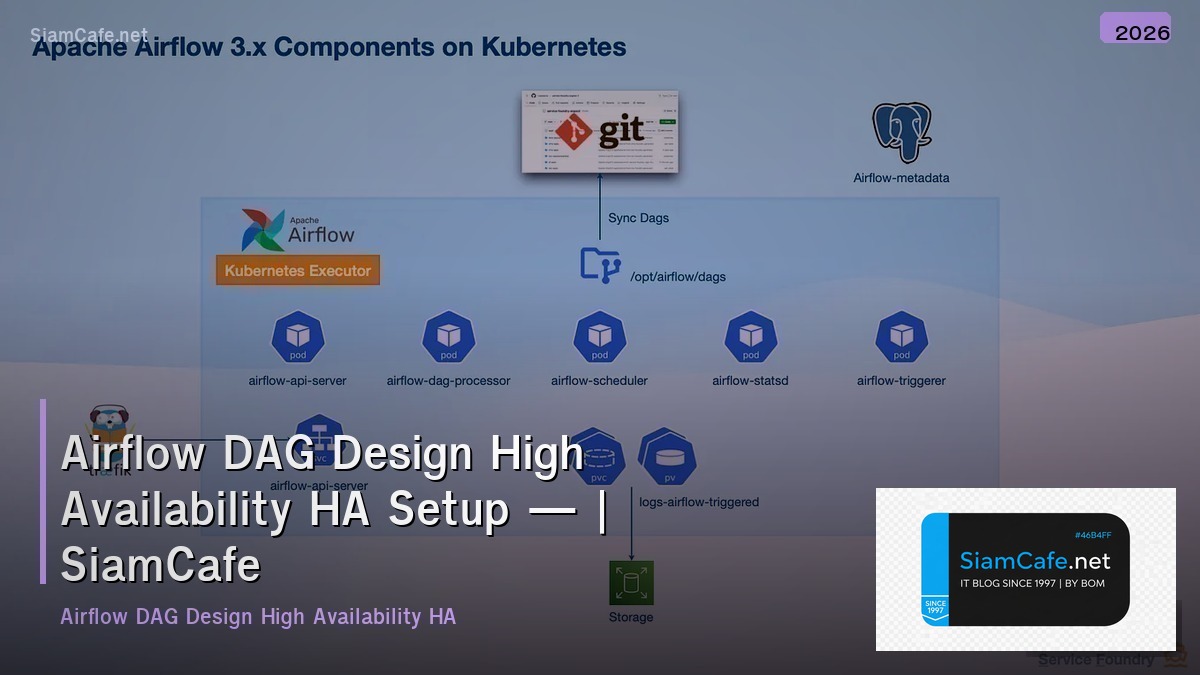
Components หลักของ Airflow ได้แก่ Web Server ให้ UI สำหรับ monitor DAGs, Scheduler ตัดสินใจว่า task ไหนต้อง run เมื่อไหร่, Executor ทำหน้าที่ run tasks จริง (Local, Celery, Kubernetes), Metadata Database เก็บ state ของทุก DAGs และ tasks (PostgreSQL/MySQL), Workers process ที่ run tasks จริง (สำหรับ CeleryExecutor/KubernetesExecutor)
อ่านเพิ่ม: Docker Compose ตัวอย่าง Config สำหรับ Self-hosted Apps · ดูรายละเอียด Docker Compose ตัวอย่าง Config สำหรับ Self-hosted Apps · อ่านเพิ่ม: AWS Iam คืออะไร — คู่มือ IT Infrastructure 2026 — คู่มือฉบับ
High Availability (HA) สำหรับ Airflow สำคัญมากสำหรับ production เพราะถ้า Airflow ล่ม workflows ทั้งหมดจะหยุดทำงาน ส่งผลกระทบต่อ data pipelines, ETL jobs, ML training และ business processes HA setup ต้อง redundancy ทุก component ไม่มี single point of failure
ติดตั้ง Airflow แบบ High Availability
Setup Airflow HA บน Kubernetes
# === Airflow HA Installation ===


# 1. Prerequisites

# ===================================

# - Kubernetes cluster (3+ nodes)

# - Helm 3

# - PostgreSQL (managed, e.g., Cloud SQL / RDS)

# - Redis (for CeleryExecutor)


# 2. Install Airflow via Helm

helm repo add apache-airflow https://airflow.apache.org

helm repo update


# 3. Create values.yaml for HA configuration

cat > airflow-values.yaml << 'EOF'

# Airflow HA Configuration

executor: CeleryExecutor


# Web Server — Multiple replicas with LoadBalancer

webserver:

  replicas: 2

  resources:

    requests:

      cpu: "500m"

      memory: "1Gi"

    limits:

      cpu: "2"

      memory: "4Gi"

  service:

    type: LoadBalancer

  livenessProbe:

    initialDelaySeconds: 15

    periodSeconds: 10

  readinessProbe:

    initialDelaySeconds: 15

    periodSeconds: 10


# Scheduler — HA Scheduler (Airflow 2.0+)

scheduler:

  replicas: 2  # HA scheduler

  resources:

    requests:

      cpu: "1"

      memory: "2Gi"

    limits:

      cpu: "4"

      memory: "8Gi"


# Workers — Auto-scaling

workers:

  replicas: 3

  resources:

    requests:

      cpu: "1"

      memory: "2Gi"

    limits:

      cpu: "4"

      memory: "8Gi"

  keda:

    enabled: true

    minReplicaCount: 2

    maxReplicaCount: 10


# Triggerer for deferrable operators

triggerer:

  replicas: 2

  resources:

    requests:

      cpu: "500m"

      memory: "512Mi"


# External PostgreSQL (HA)

postgresql:

  enabled: false


data:

  metadataConnection:

    user: airflow

    pass: secretpassword

    protocol: postgresql

    host: airflow-db.xxxx.rds.amazonaws.com

    port: 5432

    db: airflow

    sslmode: require


# External Redis (HA)

redis:

  enabled: false


data:

  brokerUrl: redis://:password@redis-cluster.xxxx.cache.amazonaws.com:6379/0


# DAGs sync via Git

dags:

  gitSync:

    enabled: true

    repo: https://github.com/my-org/airflow-dags.git

    branch: main

    rev: HEAD

    depth: 1

    maxFailures: 3

    subPath: "dags"

    period: 60s


# Logging to S3

config:

  AIRFLOW__LOGGING__REMOTE_LOGGING: "True"

  AIRFLOW__LOGGING__REMOTE_BASE_LOG_FOLDER: "s3://airflow-logs/logs"

  AIRFLOW__LOGGING__REMOTE_LOG_CONN_ID: "aws_default"

  AIRFLOW__CORE__PARALLELISM: "64"

  AIRFLOW__CORE__MAX_ACTIVE_TASKS_PER_DAG: "32"

  AIRFLOW__SCHEDULER__MIN_FILE_PROCESS_INTERVAL: "30"

EOF


# 4. Deploy

helm install airflow apache-airflow/airflow \

    --namespace airflow \

    --create-namespace \

    -f airflow-values.yaml


# 5. Verify HA

kubectl get pods -n airflow

# Should see: 2 webservers, 2 schedulers, 3+ workers, 2 triggerers


echo "Airflow HA deployed"
DAG Design Best Practices
เขียน DAGs ที่ดีสำหรับ production
!/usr/bin/env python3
dags/etl_pipeline.py — Production DAG Example
"""
ETL Pipeline DAG with best practices:
- Idempotent tasks
- Proper error handling
- SLA monitoring
- Task groups for organization
- Dynamic task generation
"""
from datetime import datetime, timedelta
from airflow import DAG
from airflow.decorators import dag, task, task_group
from airflow.operators.python import PythonOperator
from airflow.operators.empty import EmptyOperator
from airflow.providers.postgres.operators.postgres import PostgresOperator
from airflow.utils.trigger_rule import TriggerRule
from airflow.models import Variable
Best Practice 1: Default args with retry and SLA
default_args = {
"owner": "data-team",
"depends_on_past": False,
"email": ["alerts@example.com"],
"email_on_failure": True,
"email_on_retry": False,
"retries": 3,
"retry_delay": timedelta(minutes=5),
"retry_exponential_backoff": True,
"max_retry_delay": timedelta(minutes=60),
"execution_timeout": timedelta(hours=2),
"sla": timedelta(hours=4),
}
Best Practice 2: Use @dag decorator
@dag(
dag_id="etl_pipeline_v2",
default_args=default_args,
description="Production ETL Pipeline",
schedule="0 2 * * *", # Daily at 2 AM
start_date=datetime(2025, 1, 1),
catchup=False,
max_active_runs=1,
tags=["etl", "production", "data-team"],
)
# Best Practice 3: Task Groups
@task_group(group_id="extract")
@task(task_id="extract_users")
ds = context["ds"]
# Extract users for date partition
return {"rows": 50000, "date": ds}
@task(task_id="extract_orders")
ds = context["ds"]
return {"rows": 120000, "date": ds}
@task(task_id="extract_products")
return {"rows": 5000}
return extract_users(), extract_orders(), extract_products()
@task_group(group_id="transform")
@task(task_id="transform_and_join")
# Idempotent: overwrite partition, not append
return {"transformed_rows": 100000}
return transform(extracted)
@task_group(group_id="load")
@task(task_id="load_to_warehouse")
return {"loaded": True}
return load(transformed)
@task(task_id="quality_check")
# Data quality validation
checks = {
"row_count_valid": True,
"no_nulls_in_pk": True,
"referential_integrity": True,
}
failed = [k for k, v in checks.items() if not v]
if failed:
raise ValueError(f"Quality checks failed: {failed}")
return checks
# Best Practice 4: Proper task dependencies
start = EmptyOperator(task_id="start")
end = EmptyOperator(task_id="end", trigger_rule=TriggerRule.ALL_SUCCESS)
extracted = extract_data()
transformed = transform_data(extracted)
loaded = load_data(transformed)
qc = quality_check()
start >> extracted >> transformed >> loaded >> qc >> end
Best Practice 5: Instantiate DAG
etl_dag = etl_pipeline()
HA Architecture Patterns
Architecture patterns สำหรับ Airflow HA
Monitoring และ Alerting
Monitor Airflow HA cluster
Troubleshooting และ Disaster Recovery
แก้ปัญหาและ DR สำหรับ Airflow
=== Troubleshooting & DR ===
1. Common Issues and Fixes
Issue: Scheduler not picking up new DAGs
Fix:
kubectl rollout restart deployment/airflow-scheduler -n airflow
Check: AIRFLOW__SCHEDULER__MIN_FILE_PROCESS_INTERVAL setting
Issue: Tasks stuck in "queued" state
Fix:
airflow tasks clear <dag_id> -t <task_id> -s <start_date> -e <end_date>
Check Redis connection and worker status
Issue: Database connection pool exhausted
Fix:
Increase AIRFLOW__DATABASE__SQL_ALCHEMY_POOL_SIZE
Add PgBouncer as connection pooler
Check for long-running transactions
Issue: Worker OOMKilled
Fix:
Increase worker memory limits
Optimize task memory usage
Use KubernetesPodOperator for heavy tasks
2. Database Backup and Restore
Backup (daily cron)
pg_dump -h airflow-db.rds.amazonaws.com \
-U airflow -d airflow \
--format=custom \
-f /backups/airflow_$(date +%Y%m%d).dump
Restore
pg_restore -h airflow-db.rds.amazonaws.com \
-U airflow -d airflow \
--clean --if-exists \
/backups/airflow_20250115.dump
3. DR Runbook
cat > dr_runbook.md << 'EOF'
Airflow DR Runbook
# Scenario 1: Single Worker Failure
- Impact: Minimal, tasks reassigned to other workers
- Action: Worker auto-recovers via Kubernetes
- RTO: < 5 minutes (automatic)
# Scenario 2: Scheduler Failure
- Impact: No new tasks scheduled
- Action: HA scheduler takes over automatically
- RTO: < 30 seconds (automatic failover)
# Scenario 3: Database Failure
- Impact: All Airflow operations stop
- Action: RDS Multi-AZ automatic failover
- RTO: < 5 minutes
- Verify: Check /health endpoint after failover
# Scenario 4: Full Cluster Failure
- Impact: Complete outage
- Action:
1. Switch DNS to DR region
2. Restore DB from latest backup
3. Deploy Airflow in DR cluster
4. Sync DAGs from Git
5. Resume paused DAGs
- RTO: 30-60 minutes
- RPO: Last DB backup (hourly)
EOF
4. Automated Recovery Script
cat > recover.sh << 'SHEOF'
!/bin/bash
set -e
echo "Checking Airflow health..."
HEALTH=$(curl -s http://localhost:8080/health)
if [ "$SCHEDULER" != "healthy" ]; then
echo "Scheduler unhealthy, restarting..."
kubectl rollout restart deployment/airflow-scheduler -n airflow
sleep 30
Re-check
HEALTH=$(curl -s http://localhost:8080/health)
if [ "$SCHEDULER" != "healthy" ]; then
echo "CRITICAL: Scheduler still unhealthy after restart"
Send alert
exit 1
fi
fi
echo "Airflow health: OK"
SHEOF
chmod +x recover.shecho "Troubleshooting and DR configured"
FAQ คำถามที่พบบ่อย
Q: CeleryExecutor กับ KubernetesExecutor เลือกใช้อย่างไร?
A: CeleryExecutor เหมาะเมื่อต้องการ task startup เร็ว (< 1 วินาที), workload สม่ำเสมอ, ต้องการ worker pool พร้อมใช้ตลอด ข้อเสีย resources ถูกจองแม้ไม่มี tasks KubernetesExecutor เหมาะเมื่อ tasks ต้องการ resources แตกต่างกันมาก, ต้องการ isolation ระหว่าง tasks, ต้องการ scale to zero เมื่อไม่มีงาน ข้อเสีย task startup ช้ากว่า (10-30 วินาที) สำหรับ HA แนะนำ CeleryKubernetesExecutor ที่รวมข้อดีทั้งสอง tasks ทั่วไปใช้ Celery tasks หนักใช้ KubernetesPodOperator
Q: Airflow 2.x HA Scheduler ทำงานอย่างไร?
A: ตั้งแต่ Airflow 2.0 สามารถรัน multiple schedulers ได้ โดยใช้ database row-level locks ป้องกัน race conditions schedulers ทำงาน active-active ไม่ใช่ active-standby ทุก scheduler parse DAGs และ schedule tasks พร้อมกัน database lock ป้องกันไม่ให้ task ถูก schedule ซ้ำ ถ้า scheduler ตัวใดตัวหนึ่งล่ม ตัวที่เหลือทำงานต่อได้ทันที ไม่มี downtime แนะนำรัน 2 schedulers สำหรับ HA
Q: DAG ที่ดีควรออกแบบอย่างไร?
A: หลักการสำคัญ Idempotent ทุก task run ซ้ำได้ให้ผลเหมือนเดิม (ใช้ UPSERT ไม่ใช่ INSERT), Atomic แต่ละ task ทำงานเดียว succeed หรือ fail ทั้งหมด, Small tasks แยก tasks ให้เล็ก ง่ายต่อ retry และ debug, No hardcoded values ใช้ Variables และ Connections, Proper dependencies กำหนด dependencies ให้ถูกต้อง ใช้ task groups จัดกลุ่ม, Testing เขียน unit tests สำหรับ DAGs, Documentation เพิ่ม doc strings และ tags
Q: Airflow กับ Prefect ต่างกันอย่างไร?
A: Airflow เป็น schedule-driven (DAGs run ตาม schedule), มี web UI ครบ, community ใหญ่ที่สุด, HA support ดี, ซับซ้อนในการ setup Prefect เป็น event-driven ได้ด้วย, Pythonic API ง่ายกว่า, cloud-native, dynamic workflows ง่ายกว่า, setup ง่ายกว่า สำหรับ production ที่ต้องการ stability และ HA แนะนำ Airflow สำหรับ team เล็กที่ต้องการ simplicity แนะนำ Prefect