OSI Model 7 Layers
OSI Model Open Systems Interconnection 7 Layers Physical Data Link Network Transport Session Presentation Application TCP/IP Protocol เครือข่าย Troubleshoot
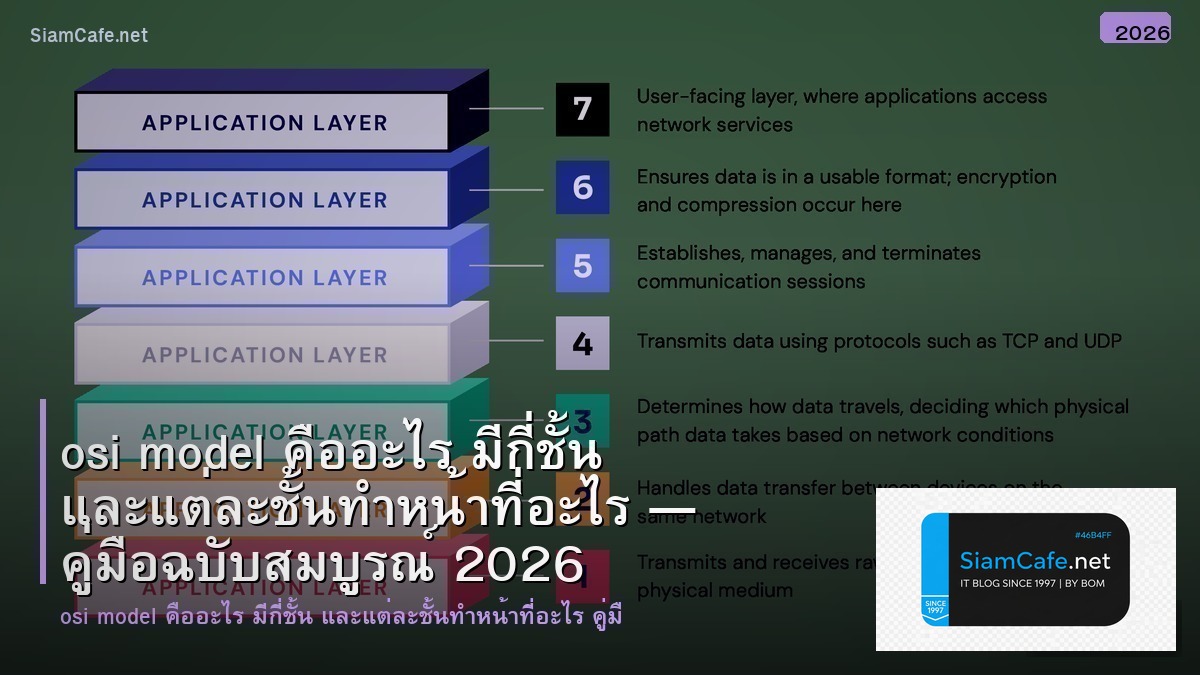
| Layer | ชื่อ | หน้าที่ | Protocol/อุปกรณ์ | PDU |
|---|---|---|---|---|
| 7 | Application | User Interface | HTTP DNS SMTP FTP | Data |
| 6 | Presentation | Encoding/Encryption | SSL/TLS JPEG ASCII | Data |
| 5 | Session | Session Management | NetBIOS RPC | Data |
| 4 | Transport | End-to-End Delivery | TCP UDP | Segment |
| 3 | Network | Routing/Addressing | IP ICMP Router | Packet |
| 2 | Data Link | Frame/MAC | Ethernet Switch | Frame |
| 1 | Physical | Bits/Signals | Cable Hub NIC | Bits |
แต่ละ Layer ทำอะไร
# === OSI Model Layer Analysis ===
# Layer 1: Physical — ตรวจสอบสายและสัญญาณ
# ethtool eth0 # ดู Link Status
# ip link show # ดู Interface Status
# mii-tool eth0 # ดู Link Speed
# Layer 2: Data Link — MAC Address และ ARP
# arp -a # ดู ARP Table
# ip neigh show # ดู Neighbor Table
# tcpdump -i eth0 arp # จับ ARP Packets
# bridge fdb show # ดู MAC Table ของ Bridge
# Layer 3: Network — IP และ Routing
# ip addr show # ดู IP Address
# ip route show # ดู Routing Table
# ping 8.8.8.8 # ทดสอบ Connectivity
# traceroute 8.8.8.8 # ดูเส้นทาง
# mtr 8.8.8.8 # Ping + Traceroute
# Layer 4: Transport — Port และ Connection
# ss -tulnp # ดู Listening Ports
# netstat -an # ดู Connection ทั้งหมด
# telnet host 80 # ทดสอบ Port
# nc -zv host 443 # Check Port Open
# Layer 7: Application — DNS, HTTP
# nslookup example.com # ตรวจ DNS
# dig example.com # DNS Query Detail
# curl -I https://example.com # HTTP Headers
# wget --spider https://example.com # Check URL
from dataclasses import dataclass
from typing import List
@dataclass
class LayerInfo:
layer: int
name: str
protocols: List[str]
devices: List[str]
troubleshoot: str
layers = [
LayerInfo(7, "Application", ["HTTP", "DNS", "SMTP", "FTP", "SSH"],
["Firewall L7", "Load Balancer"], "curl, nslookup, dig"),
LayerInfo(4, "Transport", ["TCP", "UDP"],
["Firewall L4"], "ss, netstat, telnet, nc"),
LayerInfo(3, "Network", ["IP", "ICMP", "OSPF", "BGP"],
["Router", "L3 Switch"], "ping, traceroute, ip route"),
LayerInfo(2, "Data Link", ["Ethernet", "ARP", "802.1Q"],
["Switch", "Bridge"], "arp, tcpdump, bridge"),
LayerInfo(1, "Physical", ["Ethernet Cable", "Fiber", "Wi-Fi"],
["Hub", "NIC", "Cable"], "ethtool, ip link"),
]
print("=== OSI Layer Troubleshooting ===")
for l in layers:
protos = ", ".join(l.protocols)
devs = ", ".join(l.devices)
print(f"\n [Layer {l.layer}] {l.name}")
print(f" Protocols: {protos}")
print(f" Devices: {devs}")
print(f" Commands: {l.troubleshoot}")
TCP/IP เทียบกับ OSI
# === TCP/IP vs OSI Model ===
# TCP/IP 4 Layers vs OSI 7 Layers
# TCP/IP Application = OSI 7+6+5 (Application+Presentation+Session)
# TCP/IP Transport = OSI 4 (Transport)
# TCP/IP Internet = OSI 3 (Network)
# TCP/IP Network Access = OSI 2+1 (Data Link+Physical)
# Python — Network Programming by Layer
# import socket
#
# # Layer 4: TCP Connection
# sock = socket.socket(socket.AF_INET, socket.SOCK_STREAM)
# sock.connect(('example.com', 80))
#
# # Layer 7: HTTP Request
# request = "GET / HTTP/1.1\r\nHost: example.com\r\n\r\n"
# sock.send(request.encode())
# response = sock.recv(4096)
# print(response.decode())
# sock.close()
#
# # Layer 3: ICMP Ping (requires root)
# import subprocess
# result = subprocess.run(['ping', '-c', '4', '8.8.8.8'],
# capture_output=True, text=True)
# print(result.stdout)
@dataclass
class ProtocolMapping:
tcpip_layer: str
osi_layers: str
protocols: str
port: str
mappings = [
ProtocolMapping("Application", "Layer 7", "HTTP/HTTPS", "80/443"),
ProtocolMapping("Application", "Layer 7", "DNS", "53"),
ProtocolMapping("Application", "Layer 7", "SSH", "22"),
ProtocolMapping("Application", "Layer 7", "SMTP", "25/587"),
ProtocolMapping("Application", "Layer 7", "FTP", "20/21"),
ProtocolMapping("Transport", "Layer 4", "TCP", "—"),
ProtocolMapping("Transport", "Layer 4", "UDP", "—"),
ProtocolMapping("Internet", "Layer 3", "IP/ICMP", "—"),
ProtocolMapping("Network Access", "Layer 1-2", "Ethernet/Wi-Fi", "—"),
]
print("\n=== Protocol Mapping ===")
print(f" {'TCP/IP':<18} {'OSI':<12} {'Protocol':<15} {'Port'}")
for m in mappings:
print(f" {m.tcpip_layer:<18} {m.osi_layers:<12} {m.protocols:<15} {m.port}")
Troubleshooting Scenarios
# === Troubleshooting by Layer ===
@dataclass
class TroubleshootCase:
problem: str
layer: str
cause: str
solution: str
command: str
cases = [
TroubleshootCase(
"เปิดเว็บไม่ได้", "Layer 7", "DNS ไม่ Resolve",
"เปลี่ยน DNS Server เป็น 8.8.8.8", "nslookup example.com"),
TroubleshootCase(
"Ping ไม่ได้", "Layer 3", "IP ผิด หรือ Route ไม่มี",
"ตรวจ IP Address และ Routing Table", "ip addr; ip route"),
TroubleshootCase(
"เน็ตหลุดบ่อย", "Layer 1", "สาย LAN หลวม/เสีย",
"เปลี่ยนสาย LAN ตรวจ LED", "ethtool eth0"),
TroubleshootCase(
"SSH ไม่ได้", "Layer 4", "Port 22 ถูก Block",
"ตรวจ Firewall เปิด Port 22", "telnet host 22"),
TroubleshootCase(
"เว็บช้ามาก", "Layer 4", "TCP Window Size เล็ก",
"ปรับ TCP Buffer Size", "ss -i; sysctl net.core"),
TroubleshootCase(
"MAC Address ซ้ำ", "Layer 2", "IP Conflict",
"ตรวจ ARP Table หา Duplicate", "arp -a | sort"),
]
print("Troubleshooting Scenarios:")
for c in cases:
print(f"\n [{c.layer}] Problem: {c.problem}")
print(f" Cause: {c.cause}")
print(f" Solution: {c.solution}")
print(f" Command: {c.command}")
# Certification Topics
certs = {
"CCNA": "OSI Model เป็นหัวข้อหลัก ออกสอบทุกรอบ",
"CompTIA Network+": "OSI Model ต้องรู้ทุก Layer",
"CompTIA Security+": "เข้าใจ Attack ตาม Layer",
"AWS SAA": "เข้าใจ VPC Networking ตาม Layer 3-4",
}
print(f"\n\nCertification Topics:")
for cert, topic in certs.items():
print(f" [{cert}]: {topic}")
เคล็ดลับ
- Bottom-Up: Troubleshoot จาก Layer 1 ขึ้นไป Layer 7
- Ping: Ping ได้ = Layer 1-3 ปกติตรวจ Layer 4-7 ต่อ
- DNS: เว็บเปิดไม่ได้ตรวจ DNS ก่อนเสมอ
- tcpdump: ใช้ tcpdump จับ Packet วิเคราะห์ทุก Layer
- จำ: All People Seem To Need Data Processing (Layer 7-1)
OSI Model คืออะไร
แบบจำลอง 7 ชั้นสื่อสารเครือข่าย ISO Physical Data Link Network Transport Session Presentation Application Protocol อุปกรณ์
ทำไมต้องเรียนรู้ OSI Model
เข้าใจเครือข่าย Troubleshoot เป็นระบบทีละ Layer สื่อสารทีมออกแบบเครือข่ายสอบ CCNA Network+ Security+
TCP/IP กับ OSI ต่างกันอย่างไร
OSI 7 Layers ทฤษฎี TCP/IP 4 Layers ใช้จริงรวม Layer 5-7 เป็น Application รวม Layer 1-2 เป็น Network Access อินเทอร์เน็ต
Troubleshoot ด้วย OSI Model อย่างไร
Layer 1 สาย LED Layer 2 MAC ARP Layer 3 IP ping traceroute Layer 4 Port Firewall Layer 7 DNS HTTP curl จากล่างขึ้นบน
สรุป
OSI Model 7 Layers Physical Data Link Network Transport Session Presentation Application TCP/IP Protocol Troubleshoot ping traceroute DNS HTTP Router Switch Firewall CCNA
อ่านเพิ่มเติม: สอนเทรด Forex | XM Signal | IT Hardware | อาชีพ IT