SiamCafe.net Blog
Technology

การตั้ง trailing stop บนมือถือ

การตง trailing stop บน มอ ถอ
การตั้ง trailing stop บนมือถือ | SiamCafe Blog
2025-09-07· อ. บอม — SiamCafe.net· 1,739 คำ

การตั้ง Trailing Stop บนมือถือ

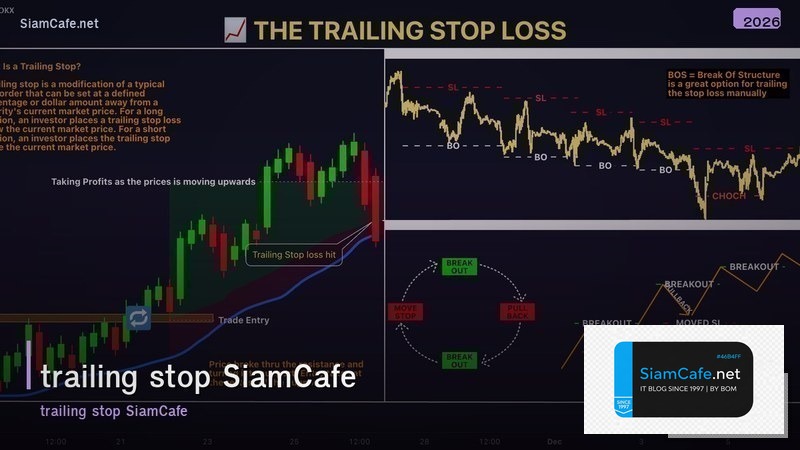
Trailing Stop เป็นคำสั่งที่ช่วยล็อคกำไรอัตโนมัติโดยเลื่อน Stop Loss ตามราคาที่เคลื่อนที่ในทิศทางที่เราเทรดถ้าราคาขึ้น Stop Loss จะเลื่อนขึ้นตามแต่ถ้าราคาลง Stop Loss จะไม่เลื่อนลงทำให้ล็อคกำไรได้การตั้ง Trailing Stop บนมือถือทำได้ผ่านแอป MetaTrader 4/5, Binance, TradingView และแอปโบรกเกอร์อื่นๆบทความนี้อธิบายวิธีตั้ง Trailing Stop บนมือถือทุกแพลตฟอร์มหลักการทำงานและกลยุทธ์การใช้งาน

Trailing Stop ทำงานอย่างไร

# trailing_stop.py — Trailing Stop mechanism
import json

class TrailingStopMechanism:
    CONCEPT = {
        "buy_position": {
            "name": "Trailing Stop สำหรับ Buy (Long)",
            "mechanism": "Stop Loss เลื่อนขึ้นตามราคา — ห่างจากราคาสูงสุดตาม distance ที่ตั้ง",
            "example": "Buy ที่ 100, ตั้ง trailing 5 → SL เริ่ม 95 → ราคาขึ้น 110 → SL เลื่อนเป็น 105 → ราคาลง 105 → ปิดที่ 105 (กำไร 5)",
        },
        "sell_position": {
            "name": "Trailing Stop สำหรับ Sell (Short)",
            "mechanism": "Stop Loss เลื่อนลงตามราคา — ห่างจากราคาต่ำสุดตาม distance",
            "example": "Sell ที่ 100, ตั้ง trailing 5 → SL เริ่ม 105 → ราคาลง 90 → SL เลื่อนเป็น 95 → ราคาขึ้น 95 → ปิดที่ 95 (กำไร 5)",
        },
    }

    TYPES = {
        "fixed_pips": {
            "name": "Fixed Pips/Points",
            "description": "ตั้ง trailing distance เป็น pips คงที่ เช่น 50 pips",
            "best_for": "Forex, CFDs",
        },
        "percentage": {
            "name": "Percentage (%)",
            "description": "ตั้ง trailing distance เป็น % เช่น 2% จากราคาสูงสุด",
            "best_for": "Stocks, Crypto",
        },
        "atr_based": {
            "name": "ATR-based",
            "description": "ตั้ง trailing distance ตาม ATR indicator เช่น 2x ATR",
            "best_for": "ทุกตลาด — ปรับตาม volatility อัตโนมัติ",
        },
    }

    def show_concept(self):
        print("=== Trailing Stop Mechanism ===\n")
        for key, concept in self.CONCEPT.items():
            print(f"[{concept['name']}]")
            print(f"  {concept['mechanism']}")
            print(f"  Example: {concept['example']}")
            print()

    def show_types(self):
        print("=== Trailing Stop Types ===")
        for key, t in self.TYPES.items():
            print(f"  [{t['name']}] {t['description']} — Best: {t['best_for']}")

    def simulation(self):
        print(f"\n=== Price Simulation (Buy + Trailing 50 pips) ===")
        prices = [1.1000, 1.1020, 1.1050, 1.1080, 1.1060, 1.1100, 1.1120, 1.1090, 1.1070, 1.1050]
        trailing = 0.0050
        entry = prices[0]
        highest = entry
        sl = entry - trailing
        
        for i, price in enumerate(prices):
            if price > highest:
                highest = price
                sl = highest - trailing
            triggered = price <= sl
            status = "CLOSED" if triggered else "OPEN"
            print(f"  Bar {i+1}: Price={price:.4f} | High={highest:.4f} | SL={sl:.4f} [{status}]")
            if triggered:
                pnl = (sl - entry) * 10000
                print(f"  → Closed at {sl:.4f} | P&L: {pnl:+.0f} pips")
                break

ts = TrailingStopMechanism()
ts.show_concept()
ts.show_types()
ts.simulation()

วิธีตั้ง Trailing Stop บน MT4/MT5 มือถือ

# mt_mobile.py — MT4/MT5 mobile trailing stop guide
import json

class MT4MT5Mobile:
    MT4_STEPS = {
        "name": "MetaTrader 4 (MT4) Mobile",
        "steps": [
            "1. เปิดแอป MT4 → ไปที่ Trade tab",
            "2. กดค้างที่ position ที่ต้องการ → เมนูจะขึ้นมา",
            "3. เลือก 'Trailing Stop'",
            "4. เลือก distance: 15, 20, 35, 50 pips หรือ Custom",
            "5. กด OK — Trailing Stop จะเริ่มทำงาน",
            "6. ดูสถานะ: SL จะเปลี่ยนอัตโนมัติเมื่อราคาเคลื่อนที่",
        ],
        "note": "MT4 mobile trailing stop ทำงานบน server — ปิดแอปแล้วยังทำงานต่อ (ขึ้นกับโบรกเกอร์)",
    }

    MT5_STEPS = {
        "name": "MetaTrader 5 (MT5) Mobile",
        "steps": [
            "1. เปิดแอป MT5 → ไปที่ Trade tab",
            "2. กดค้าง (long press) ที่ open position",
            "3. เลือก 'Trailing Stop' จากเมนู",
            "4. ตั้ง distance เป็น points (1 pip = 10 points สำหรับ 5-digit broker)",
            "5. กด Set — Trailing Stop เริ่มทำงาน",
            "6. ยกเลิก: กดค้างอีกครั้ง → Trailing Stop → None",
        ],
        "note": "MT5 trailing stop ทำงานบน client — ต้องเปิดแอปค้างไว้ (บางโบรกเกอร์ทำงานบน server)",
    }

    LIMITATIONS = {
        "mt4_mobile": "บาง version ไม่มี trailing stop บน mobile — ต้องใช้ desktop",
        "connection": "ต้อง connected กับ server — ถ้า disconnect trailing stop อาจไม่ทำงาน",
        "minimum": "Trailing distance ต้อง >= minimum stop level ของโบรกเกอร์ (ปกติ 15-50 pips)",
        "slippage": "ช่วง volatility สูง อาจเกิด slippage — ราคาปิดไม่ตรง SL",
    }

    def show_mt4(self):
        print(f"=== {self.MT4_STEPS['name']} ===\n")
        for step in self.MT4_STEPS["steps"]:
            print(f"  {step}")
        print(f"\n  Note: {self.MT4_STEPS['note']}")

    def show_mt5(self):
        print(f"\n=== {self.MT5_STEPS['name']} ===\n")
        for step in self.MT5_STEPS["steps"]:
            print(f"  {step}")

    def show_limitations(self):
        print(f"\n=== Limitations ===")
        for key, limit in self.LIMITATIONS.items():
            print(f"  [{key}] {limit}")

mt = MT4MT5Mobile()
mt.show_mt4()
mt.show_mt5()
mt.show_limitations()

วิธีตั้งบนแพลตฟอร์มอื่นๆ

# other_platforms.py — Trailing stop on other platforms
import json

class OtherPlatforms:
    PLATFORMS = {
        "binance": {
            "name": "Binance (Crypto)",
            "steps": [
                "เปิดแอป Binance → เข้า Trade",
                "เลือก Stop-Limit → เปิด Trailing Stop",
                "ตั้ง Callback Rate (%) เช่น 1%, 2%, 5%",
                "ตั้ง Activation Price (ราคาเริ่มทำงาน)",
                "กด Place Order",
            ],
            "note": "Binance trailing stop เป็น % based — ทำงานบน server (ปิดแอปได้)",
        },
        "tradingview": {
            "name": "TradingView (ผ่าน broker)",
            "steps": [
                "เปิด TradingView app → เชื่อมต่อ broker",
                "เปิด position → คลิกที่ order",
                "เลือก Trailing Stop option",
                "ตั้ง distance (pips/points/%)",
                "Confirm order",
            ],
            "note": "ขึ้นกับ broker ที่เชื่อมต่อ — ไม่ใช่ทุก broker รองรับ",
        },
        "bitkub": {
            "name": "Bitkub (ไทย Crypto)",
            "steps": [
                "Bitkub ยังไม่มี trailing stop ในแอป",
                "ทางเลือก: ใช้ Bitkub API + Python bot",
                "หรือใช้ 3rd party tools เช่น 3Commas, Cornix",
            ],
            "note": "ต้องเขียน bot เอง หรือใช้ external service",
        },
        "streaming": {
            "name": "Streaming (หุ้นไทย)",
            "steps": [
                "เปิดแอป Streaming → เข้า Portfolio",
                "เลือกหุ้นที่ถืออยู่",
                "ตั้ง Stop Loss แบบ manual (ไม่มี trailing auto)",
                "ทางเลือก: ใช้ Settrade API + Python bot",
            ],
            "note": "ตลาดหุ้นไทยส่วนใหญ่ไม่มี trailing stop อัตโนมัติ",
        },
    }

    def show_platforms(self):
        print("=== Trailing Stop on Different Platforms ===\n")
        for key, platform in self.PLATFORMS.items():
            print(f"[{platform['name']}]")
            for step in platform["steps"][:4]:
                print(f"  • {step}")
            print(f"  Note: {platform['note']}")
            print()

platforms = OtherPlatforms()
platforms.show_platforms()

Python Trailing Stop Bot

# trailing_bot.py — Python trailing stop bot
import json
import random

class TrailingStopBot:
    CODE = """
# trailing_stop_bot.py — Automated trailing stop
import time

class TrailingStopBot:
    def __init__(self, symbol, entry_price, direction, trail_pips, lot_size=0.01):
        self.symbol = symbol
        self.entry = entry_price
        self.direction = direction  # 'buy' or 'sell'
        self.trail_distance = trail_pips * 0.0001  # Convert pips to price
        self.lot = lot_size
        self.active = True
        
        if direction == 'buy':
            self.highest = entry_price
            self.stop_loss = entry_price - self.trail_distance
        else:
            self.lowest = entry_price
            self.stop_loss = entry_price + self.trail_distance
    
    def update(self, current_price):
        if not self.active:
            return None
        
        if self.direction == 'buy':
            if current_price > self.highest:
                self.highest = current_price
                self.stop_loss = self.highest - self.trail_distance
            
            if current_price <= self.stop_loss:
                self.active = False
                pnl = (self.stop_loss - self.entry) / 0.0001
                return {"action": "CLOSE", "price": self.stop_loss, "pnl_pips": pnl}
        
        else:  # sell
            if current_price < self.lowest:
                self.lowest = current_price
                self.stop_loss = self.lowest + self.trail_distance
            
            if current_price >= self.stop_loss:
                self.active = False
                pnl = (self.entry - self.stop_loss) / 0.0001
                return {"action": "CLOSE", "price": self.stop_loss, "pnl_pips": pnl}
        
        return {"action": "HOLD", "sl": self.stop_loss, "price": current_price}

# Usage
bot = TrailingStopBot(
    symbol="EURUSD",
    entry_price=1.1000,
    direction="buy",
    trail_pips=30,
)

# Simulate price ticks
prices = [1.1000, 1.1015, 1.1030, 1.1050, 1.1040, 1.1060, 1.1080, 1.1070, 1.1055, 1.1050]
for price in prices:
    result = bot.update(price)
    if result:
        print(f"Price: {price:.4f} | SL: {bot.stop_loss:.4f} | {result['action']}")
        if result['action'] == 'CLOSE':
            print(f"  Closed! P&L: {result['pnl_pips']:+.0f} pips")
            break
"""

    def show_code(self):
        print("=== Trailing Stop Bot ===")
        print(self.CODE[:600])

    def demo(self):
        print(f"\n=== Bot Demo ===")
        entry = 1.1000
        trail = 0.0030
        highest = entry
        sl = entry - trail
        prices = [1.1000, 1.1015, 1.1030, 1.1050, 1.1040, 1.1060, 1.1080, 1.1070, 1.1055, 1.1050]
        
        for i, price in enumerate(prices):
            if price > highest:
                highest = price
                sl = highest - trail
            triggered = price <= sl
            status = "CLOSED" if triggered else "HOLD"
            print(f"  Tick {i+1}: {price:.4f} | High: {highest:.4f} | SL: {sl:.4f} [{status}]")
            if triggered:
                pnl = (sl - entry) / 0.0001
                print(f"  → P&L: {pnl:+.0f} pips")
                break

bot = TrailingStopBot()
bot.show_code()
bot.demo()

กลยุทธ์การใช้ Trailing Stop

# strategies.py — Trailing stop strategies
import json

class TrailingStrategies:
    STRATEGIES = {
        "fixed": {
            "name": "Fixed Distance",
            "description": "ตั้ง trailing distance คงที่ เช่น 30-50 pips",
            "pros": "ง่าย, เข้าใจได้ทันที",
            "cons": "ไม่ปรับตาม market conditions",
            "best_for": "มือใหม่, trending markets",
        },
        "atr": {
            "name": "ATR-based Trailing",
            "description": "ใช้ ATR × multiplier เป็น distance (เช่น 2× ATR)",
            "pros": "ปรับตาม volatility อัตโนมัติ",
            "cons": "ต้องคำนวณ ATR, ซับซ้อนกว่า fixed",
            "best_for": "ทุกตลาด, ทุก timeframe",
        },
        "swing": {
            "name": "Swing Point Trailing",
            "description": "เลื่อน SL ไปใต้ swing low ล่าสุด (Buy) หรือเหนือ swing high (Sell)",
            "pros": "เคารพ market structure, SL มีเหตุผล",
            "cons": "ต้อง monitor chart, ไม่ automate ง่าย",
            "best_for": "Swing traders, ผู้มีประสบการณ์",
        },
        "breakeven_first": {
            "name": "Break-even + Trailing",
            "description": "เมื่อกำไร X pips → เลื่อน SL ไป break-even → แล้วค่อย trail",
            "pros": "ปลอดภัย — ไม่ขาดทุนหลังจาก BE",
            "cons": "อาจโดน stop out ที่ BE ก่อน trend ไปต่อ",
            "best_for": "Conservative traders",
        },
        "partial_close": {
            "name": "Partial Close + Trailing",
            "description": "ปิด 50% ที่ TP1 → trail อีก 50% ที่เหลือ",
            "pros": "ล็อคกำไรบางส่วน + ปล่อยส่วนที่เหลือวิ่ง",
            "cons": "Position size เล็กลง",
            "best_for": "ทุกระดับ — balance ระหว่าง lock profit กับ let it run",
        },
    }

    def show_strategies(self):
        print("=== Trailing Stop Strategies ===\n")
        for key, strat in self.STRATEGIES.items():
            print(f"[{strat['name']}]")
            print(f"  {strat['description']}")
            print(f"  Pros: {strat['pros']}")
            print(f"  Best: {strat['best_for']}")
            print()

    def recommended(self):
        print("=== Recommended by Level ===")
        print(f"  มือใหม่: Fixed Distance (30-50 pips Forex, 2-5% Crypto)")
        print(f"  กลาง: ATR-based (2× ATR) + Break-even first")
        print(f"  ขั้นสูง: Swing Point + Partial Close")

strat = TrailingStrategies()
strat.show_strategies()
strat.recommended()

FAQ - คำถามที่พบบ่อย

Q: Trailing Stop กับ Stop Loss ต่างกันอย่างไร?

A: Stop Loss: คงที่ไม่เคลื่อนที่ — ตั้งไว้ที่ไหนัก็อยู่ที่นั่น Trailing Stop: เคลื่อนที่ตามราคา — เลื่อนตามกำไรแต่ไม่เลื่อนกลับ Stop Loss ดี: ป้องกันขาดทุน Trailing Stop ดีกว่า: ป้องกันขาดทุน + ล็อคกำไร

Q: ตั้ง trailing distance เท่าไหร่ดี?

A: Forex: 30-80 pips (ขึ้นกับ pair และ timeframe) Crypto: 2-5% (volatile มากกว่า Forex) หุ้นไทย: 2-5% หรือใต้ support หลักกฎทั่วไป: ใช้ 1.5-2× ATR — ปรับตาม volatility อัตโนมัติตั้งแคบเกิน = โดน stop out บ่อย (whipsaw) ตั้งกว้างเกิน = คืนกำไรเยอะ

Q: Trailing Stop ทำงานเมื่อปิดแอปไหม?

A: ขึ้นกับแพลตฟอร์ม: MT4: ทำงานบน server (บางโบรกเกอร์) — ปิดแอปได้ MT5: ส่วนใหญ่ทำงานบน client — ต้องเปิดแอปค้าง Binance: ทำงานบน server — ปิดแอปได้ตรวจสอบกับโบรกเกอร์ก่อนใช้ — ถ้าทำงานบน client ให้ใช้ VPS แทน

Q: Trailing Stop เหมาะกับ scalping ไหม?

A: ไม่ค่อยเหมาะ — scalping ต้องการ exit ที่แม่นยำ trailing stop อาจช้าเกินไปเหมาะกับ: Swing trading (H4, Daily), Position trading (Weekly) Scalping: ใช้ fixed TP/SL ดีกว่า Day trading: ใช้ trailing stop ได้แต่ตั้ง distance ให้แคบ (10-20 pips)

📖 บทความที่เกี่ยวข้อง

การตั้ง trailing stop ใน streamingอ่านบทความ → trailing stop loss vs trailing stop limitอ่านบทความ → trailing stop ตั้งอย่างไรอ่านบทความ → trailing stop loss calculatorอ่านบทความ → fxdreema trailing stopอ่านบทความ →

📚 ดูบทความทั้งหมด →