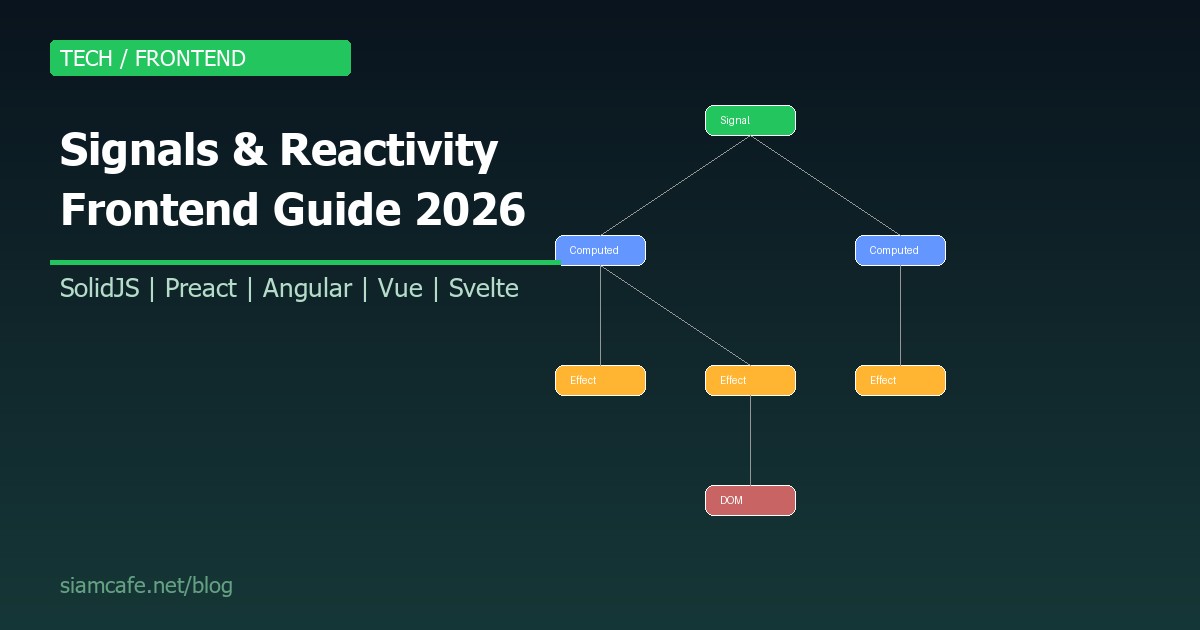
Signals กำลังเปลี่ยนวิธีที่เราเขียน Frontend ในปี 2026 จาก React ที่ Re-render ทั้ง Component tree สู่ Fine-grained reactivity ที่อัพเดทเฉพาะส่วนที่เปลี่ยน Signals เป็น Primitive ที่ง่าย แต่ทรงพลัง ช่วยให้แอปเร็วขึ้น ใช้ Memory น้อยลง และ Developer experience ดีขึ้น
Signals คืออะไร?
Signal คือ Reactive primitive ที่เก็บค่า (value) และแจ้ง (notify) ทุก subscriber เมื่อค่าเปลี่ยน โดยไม่ต้อง Re-render Component ทั้งหมด เป็น Fine-grained reactivity ที่อัพเดทเฉพาะ DOM node ที่ใช้ค่านั้น:
// Concept: Signal
// 1. สร้าง Signal (reactive value)
const count = signal(0);

// 2. อ่านค่า → subscribe อัตโนมัติ
console.log(count.value); // 0

// 3. เปลี่ยนค่า → notify subscribers
count.value = 5; // ทุก subscriber ที่อ่านค่า count จะถูก notify

// 4. Computed → derive value จาก Signals อื่น
const doubled = computed(() => count.value * 2);
// doubled.value = 10 (อัพเดทอัตโนมัติเมื่อ count เปลี่ยน)

// 5. Effect → side effect เมื่อค่าเปลี่ยน
effect(() => {
    document.title = `Count: ${count.value}`;
    // รันอัตโนมัติเมื่อ count เปลี่ยน
});
Signals vs Virtual DOM (React Re-render Problem)
React ใช้ Virtual DOM ที่ Re-render Component ทั้งหมดเมื่อ State เปลี่ยน แม้แต่ส่วนที่ไม่ได้ใช้ State นั้น:
| React (Virtual DOM) | Signals (Fine-grained) |
|---|---|
| State เปลี่ยน → Re-render ทั้ง Component + Children | Signal เปลี่ยน → อัพเดทเฉพาะ DOM node ที่ใช้ Signal นั้น |
| ต้องใช้ React.memo, useMemo, useCallback เพื่อลด re-render | ไม่ต้อง memoize ระบบจัดการให้ |
| Diff Virtual DOM → Patch Real DOM | อัพเดท Real DOM ตรงๆ (ไม่มี Virtual DOM) |
| Overhead: สร้าง Virtual DOM ทุกรอบ | ไม่มี Overhead จาก Virtual DOM |
| Performance ลดลงเมื่อ Component tree ใหญ่ | Performance ไม่ขึ้นกับขนาด Component tree |
// React: Re-render ทั้ง Component เมื่อ state เปลี่ยน
function Counter() {
    const [count, setCount] = useState(0);
    // ทั้ง function นี้จะรันใหม่ทุกครั้งที่ count เปลี่ยน
    // รวมถึงทุก element ที่ return
    console.log("Component re-rendered!"); // รันทุกครั้ง!
    return (
        <div>
            <p>Count: {count}</p>  {/* ต้องการอัพเดทแค่ตรงนี้ */}
            <p>Static text</p>      {/* แต่ส่วนนี้ก็ถูก re-render ด้วย */}
            <HeavyComponent />       {/* Component ใหญ่ถูก re-render ด้วย! */}
        </div>
    );
}

// SolidJS: อัพเดทเฉพาะ DOM node
function Counter() {
    const [count, setCount] = createSignal(0);
    // function นี้รันครั้งเดียวตอน mount
    console.log("Component setup!"); // รันครั้งเดียว!
    return (
        <div>
            <p>Count: {count()}</p>  {/* เฉพาะ text node นี้ถูกอัพเดท */}
            <p>Static text</p>       {/* ไม่ถูกอัพเดท */}
            <HeavyComponent />        {/* ไม่ถูก re-render */}
        </div>
    );
}
SolidJS Signals
SolidJS เป็น Framework ที่ใช้ Signals เป็นหลัก ออกแบบมาตั้งแต่ต้น ไม่มี Virtual DOM:
import { createSignal, createMemo, createEffect } from "solid-js";

// createSignal: reactive value
const [count, setCount] = createSignal(0);
const [name, setName] = createSignal("World");

// createMemo: derived/computed value (cached)
const greeting = createMemo(() => `Hello, ${name()}! Count: ${count()}`);

// createEffect: side effect
createEffect(() => {
    console.log("Count changed:", count());
    // ทำงานอัตโนมัติเมื่อ count() เปลี่ยน
    // track dependencies อัตโนมัติ
});

// Component (รันครั้งเดียว)
function App() {
    return (
        <div>
            <p>{greeting()}</p>
            <button onClick={() => setCount(c => c + 1)}>+1</button>
            <input value={name()} onInput={e => setName(e.target.value)} />
        </div>
    );
}

// SolidJS Performance:
// - No Virtual DOM diffing
// - Component function รันครั้งเดียว
// - อัพเดทเฉพาะ DOM ที่ใช้ Signal
// - Bundle size เล็ก (~7KB gzipped)
Preact Signals
Preact Signals (@preact/signals) นำ Signals มาใช้กับ Preact (React-compatible library ขนาดเล็ก) และยังใช้กับ React ได้ด้วย:
import { signal, computed, effect } from "@preact/signals";

// signal: reactive value
const count = signal(0);
const name = signal("World");

// computed: derived value
const doubled = computed(() => count.value * 2);

// effect: side effect
effect(() => {
    console.log(`Count is ${count.value}, doubled is ${doubled.value}`);
});

// ใช้ใน Component
function Counter() {
    // count.value ทำให้ Preact รู้ว่า DOM node ไหนใช้ Signal
    return (
        <div>
            <p>Count: {count}</p>  {/* ส่ง Signal ตรงๆ ได้เลย! */}
            <p>Doubled: {doubled}</p>
            <button onClick={() => count.value++}>+1</button>
        </div>
    );
}

// ข้อดีของ Preact Signals:
// - ใช้กับ Preact หรือ React ได้
// - ไม่ต้อง memo, useCallback
// - Signal เป็น Global ได้ (ไม่ต้อง Context)
// - Bundle +1.5KB สำหรับ signals library
Angular Signals
Angular 16+ เพิ่ม Signals เป็น Core primitive แทน RxJS สำหรับ State management:
import { signal, computed, effect } from '@angular/core';

@Component({
    selector: 'app-counter',
    template: `
        <p>Count: {{ count() }}</p>
        <p>Doubled: {{ doubled() }}</p>
        <button (click)="increment()">+1</button>
    `
})
export class CounterComponent {
    // signal: writable signal
    count = signal(0);

    // computed: read-only derived signal
    doubled = computed(() => this.count() * 2);

    constructor() {
        // effect: side effect
        effect(() => {
            console.log('Count:', this.count());
        });
    }

    increment() {
        // update signal
        this.count.update(c => c + 1);
        // หรือ this.count.set(this.count() + 1);
    }
}

// Angular Signals vs RxJS:
// Signals: ง่ายกว่า, synchronous, ไม่ต้อง subscribe/unsubscribe
// RxJS: ซับซ้อนกว่า, async, เหมาะกับ stream/event
// ใช้ร่วมกันได้: toSignal() แปลง Observable → Signal
Vue ref/computed (Signal-like)
Vue 3 ใช้ ref และ computed ซึ่งเป็น Signal-like ตั้งแต่ก่อน Signals จะเป็นกระแส:
import { ref, computed, watchEffect } from 'vue';

// ref = Signal
const count = ref(0);
const name = ref('World');

// computed = Computed Signal
const greeting = computed(() => `Hello, ${name.value}! Count: ${count.value}`);

// watchEffect = Effect
watchEffect(() => {
    console.log('Count changed:', count.value);
});

// ใน <script setup>
<template>
    <p>{{ greeting }}</p>
    <button @click="count++">+1</button>
</template>

// Vue ข้อดี:
// - มี Reactivity system ตั้งแต่ Vue 3 (Composition API)
// - .value unwrap อัตโนมัติใน template
// - Proxy-based reactivity (track deep objects)
// - Vue เป็น Signal ก่อนใครๆ (2020)
Svelte $state (Runes = Signals)
Svelte 5 เปิดตัว Runes ซึ่งเป็น Signals ในชื่อใหม่:
// Svelte 5 Runes

// $state = Signal
let count = $state(0);
let name = $state('World');

// $derived = Computed Signal
let doubled = $derived(count * 2);
let greeting = $derived(`Hello, ${name}! Count: ${count}`);

// $effect = Effect
$effect(() => {
    console.log('Count:', count);
});

// ใน .svelte component
<script>
    let count = $state(0);
    let doubled = $derived(count * 2);
</script>

<p>Count: {count}</p>
<p>Doubled: {doubled}</p>
<button onclick={() => count++}>+1</button>

// Svelte 5 vs Svelte 4:
// Svelte 4: compiler magic ($: reactive statement)
// Svelte 5: explicit Runes ($state, $derived, $effect)
// Runes ทำงานนอก .svelte ได้ (shared state)
// Better TypeScript support
TC39 Proposal: JavaScript Signals
ในปี 2025-2026 มี TC39 Proposal เพื่อเพิ่ม Signals เข้าไปใน JavaScript Standard (ECMAScript):
// TC39 Signals Proposal (Stage 1)
// https://github.com/tc39/proposal-signals

// สร้าง Signal
const counter = new Signal.State(0);

// อ่านค่า
counter.get(); // 0

// เปลี่ยนค่า
counter.set(5);

// Computed Signal
const doubled = new Signal.Computed(() => counter.get() * 2);

// Effect (Watcher)
const watcher = new Signal.subtle.Watcher(() => {
    console.log('Signal changed!');
});
watcher.watch(doubled);

// ข้อดีถ้าเข้า Standard:
// 1. ทุก Framework ใช้ Signal primitive เดียวกัน
// 2. Browser optimize ได้ (native implementation)
// 3. ลด Bundle size (ไม่ต้องแพ็ค Signal library)
// 4. Interop ระหว่าง Frameworks
Signals vs useState (React)
| Feature | React useState | Signals |
|---|---|---|
| Re-render scope | ทั้ง Component + Children | เฉพาะ DOM node ที่ใช้ Signal |
| Memoization | ต้องใช้ useMemo, useCallback, React.memo | ไม่ต้อง (อัตโนมัติ) |
| Global state | ต้องใช้ Context / Redux / Zustand | Signal เป็น Global ได้เลย |
| Derived state | useMemo (ต้องระบุ dependencies) | computed (track อัตโนมัติ) |
| Side effects | useEffect (ต้องระบุ dependencies, cleanup) | effect (track อัตโนมัติ, auto cleanup) |
| Stale closure | ปัญหาบ่อย (stale state ใน closure) | ไม่มีปัญหา (อ่านค่าปัจจุบันเสมอ) |
| Learning curve | Rules of Hooks, dependency arrays | ง่ายกว่า ตรงไปตรงมา |
Signals vs RxJS (Observable)
| Feature | RxJS Observable | Signals |
|---|---|---|
| Nature | Asynchronous stream | Synchronous value |
| Push/Pull | Push-based | Pull-based (lazy evaluation) |
| Subscribe | ต้อง subscribe/unsubscribe | Track อัตโนมัติ |
| Operators | 100+ operators (map, filter, mergeMap...) | computed + effect (เพียงพอสำหรับ UI) |
| Use case | Event streams, WebSocket, HTTP | UI state, reactive DOM |
| Complexity | สูง (ต้องเรียนรู้ operators) | ต่ำ (signal, computed, effect) |
| Memory leak | ลืม unsubscribe = leak | ไม่มีปัญหา |
Performance Benefits
// Benchmark: 1,000 items list, อัพเดท 1 item

// React:
// 1. setState → trigger re-render
// 2. Component function รันใหม่ทั้งหมด
// 3. สร้าง Virtual DOM ใหม่ 1,000 items
// 4. Diff Virtual DOM (compare 1,000 items)
// 5. Patch 1 DOM node
// ผลลัพธ์: ~5-15ms

// SolidJS (Signals):
// 1. setSignal → notify subscribers
// 2. อัพเดท 1 DOM node ตรงๆ
// ผลลัพธ์: ~0.1-0.5ms

// เร็วกว่า 10-100x สำหรับ Fine-grained updates!
เมื่อไหร่ควรใช้ Signals
- ใช้ Signals: UI state ที่เปลี่ยนบ่อย (form input, counter, toggle), Dashboard ที่อัพเดท Real-time, Large lists ที่อัพเดทบางส่วน, Interactive widgets
- ยังใช้ React ได้: โปรเจคที่มี React อยู่แล้วและทำงานดี, ทีมถนัด React, Ecosystem ของ React ยังใหญ่ที่สุด
- ใช้ RxJS ควบคู่: WebSocket real-time data, Complex async workflows, Event composition
Migration จาก React Hooks สู่ Signals
// React Hooks → Preact Signals (ง่ายสุด เพราะ API คล้าย React)

// ก่อน (React):
import { useState, useMemo, useEffect } from 'react';
function App() {
    const [count, setCount] = useState(0);
    const doubled = useMemo(() => count * 2, [count]);
    useEffect(() => {
        document.title = `Count: ${count}`;
    }, [count]);
    return <p>{count} / {doubled}</p>;
}

// หลัง (Preact Signals):
import { signal, computed, effect } from '@preact/signals';
const count = signal(0);
const doubled = computed(() => count.value * 2);
effect(() => { document.title = `Count: ${count.value}`; });
function App() {
    return <p>{count} / {doubled}</p>;
}

// ข้อสังเกต:
// 1. ไม่ต้อง dependency array
// 2. State อยู่นอก Component ได้ (global)
// 3. ไม่มี stale closure
// 4. Component ไม่ re-render
อนาคตของ Frontend Reactivity
- TC39 Signals Standard: ถ้าผ่าน ทุก Framework จะใช้ Signal primitive เดียวกัน ลด fragmentation
- React ปรับตัว: React Compiler (React Forget) พยายามทำ auto-memoization แต่ยังใช้ Virtual DOM
- Framework convergence: SolidJS, Preact, Angular, Vue, Svelte ล้วนเลือก Signals เป็นอนาคต
- Compiler-based: Svelte 5, Solid 2.0 ใช้ Compiler ช่วยให้ Signals syntax สะอาดขึ้น
- Performance ceiling: Signals แทบไม่มี overhead สำหรับ UI updates ทำให้แอปเร็วใกล้เคียง Vanilla JS
สรุป
Signals เป็นอนาคตของ Frontend reactivity ในปี 2026 ทุก Framework ยกเว้น React ได้ใช้ Signals หรือ Signal-like pattern แล้ว (SolidJS, Preact, Angular, Vue, Svelte) และมี TC39 Proposal เพื่อทำให้ Signals เป็น Standard ของ JavaScript
ถ้าคุณเป็น Frontend Developer ในปี 2026 ควรเรียนรู้ Signals ไม่ว่าจะใช้ Framework ไหน เพราะ Concept เดียวกันนี้ใช้ได้กับทุก Framework เริ่มจาก SolidJS หรือ Preact Signals เพื่อเข้าใจ concept แล้วนำไปใช้กับ Framework ที่คุณถนัด