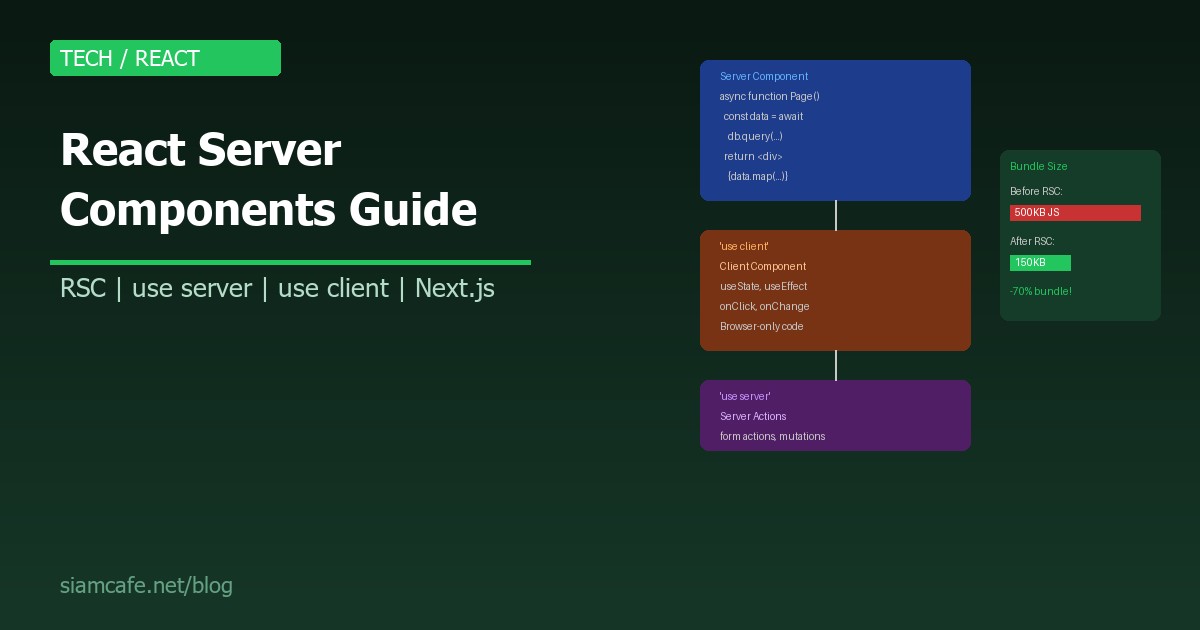
React Server Components (RSC) คือการเปลี่ยนแปลงครั้งใหญ่ที่สุดของ React นับตั้งแต่ React Hooks ออกมาในปี 2019 RSC ทำให้ React Component สามารถ รันบน Server ได้โดยตรง ลด Bundle Size ลงอย่างมาก และเปลี่ยนวิธีคิดเกี่ยวกับ Data Fetching ไปอย่างสิ้นเชิง
ในปี 2026 RSC กลายเป็น มาตรฐานใหม่ ของ React Development โดยเฉพาะเมื่อใช้ร่วมกับ Next.js App Router ซึ่งเป็น Default ตั้งแต่ Next.js 13.4 เป็นต้นมา
Server Component vs Client Component — อะไรต่างกัน?
| Feature | Server Component (Default) | Client Component ('use client') |
|---|---|---|
| รันที่ไหน | Server เท่านั้น | Server (SSR) + Browser |
| JavaScript ถูกส่งไป Client | ไม่ส่ง (0 KB) | ส่ง (รวมใน Bundle) |
| State (useState) | ใช้ไม่ได้ | ใช้ได้ |
| Effects (useEffect) | ใช้ไม่ได้ | ใช้ได้ |
| Event Handlers (onClick) | ใช้ไม่ได้ | ใช้ได้ |
| async/await | ใช้ได้ (Async Component!) | ใช้ไม่ได้โดยตรง |
| Access DB/Filesystem | ได้โดยตรง | ต้องผ่าน API |
| Access Browser API | ไม่ได้ (window, document) | ได้ |
| Re-render | ไม่ Re-render (static HTML) | Re-render ตาม State |
'use client' และ 'use server' Directives
'use client' — ประกาศ Client Component
// components/Counter.tsx
'use client'  // ← ประกาศบรรทัดแรก!

import { useState } from 'react'

export default function Counter() {
  const [count, setCount] = useState(0)

  return (
    <div>
      <p>Count: {count}</p>
      <button onClick={() => setCount(count + 1)}>
        +1
      </button>
    </div>
  )
}

// สิ่งที่ต้องรู้:
// 1. 'use client' ต้องอยู่บรรทัดแรกสุดของไฟล์
// 2. ทุก Component ที่ import จากไฟล์นี้จะเป็น Client Component ด้วย
// 3. ไม่ต้องใส่ 'use client' ทุกไฟล์ — เฉพาะ "boundary" แรก
'use server' — ประกาศ Server Action
// app/actions.ts
'use server'  // ← ทุก function ในไฟล์นี้เป็น Server Action

export async function createPost(formData: FormData) {
  const title = formData.get('title') as string
  const content = formData.get('content') as string

  // เข้าถึง Database ได้ตรง ๆ!
  await db.post.create({
    data: { title, content }
  })

  revalidatePath('/posts')
}

export async function deletePost(id: string) {
  await db.post.delete({ where: { id } })
  revalidatePath('/posts')
}

// หรือใช้ inline ใน Server Component:
export default async function Page() {
  async function handleSubmit(formData: FormData) {
    'use server'  // ← inline server action
    const name = formData.get('name')
    await db.user.create({ data: { name } })
  }

  return (
    <form action={handleSubmit}>
      <input name="name" />
      <button type="submit">Submit</button>
    </form>
  )
}
เมื่อไรใช้ Server vs Client? (Decision Tree)
// Decision Tree สำหรับเลือก Server vs Client Component
//
// คำถามที่ 1: Component ต้องใช้ useState/useEffect ไหม?
//   → ใช่ → CLIENT Component ('use client')
//   → ไม่ → ไปคำถามที่ 2
//
// คำถามที่ 2: Component ต้องรับ Event (onClick, onChange, onSubmit)?
//   → ใช่ → CLIENT Component ('use client')
//   → ไม่ → ไปคำถามที่ 3
//
// คำถามที่ 3: Component ต้องใช้ Browser API (window, document, localStorage)?
//   → ใช่ → CLIENT Component ('use client')
//   → ไม่ → ไปคำถามที่ 4
//
// คำถามที่ 4: Component ต้อง Fetch Data จาก DB/API?
//   → ใช่ → SERVER Component (default, ใช้ async/await)
//   → ไม่ → SERVER Component (default)
//
// สรุป: ถ้าไม่แน่ใจ → ใช้ Server Component (Default)
//        เปลี่ยนเป็น Client เมื่อจำเป็นเท่านั้น!
ตัวอย่าง: ส่วนไหน Server ส่วนไหน Client?
// ตัวอย่าง: Blog Post Page
//
// ┌─────────────────────────────────────┐
// │ Layout (SERVER)                     │
// │ ├─ Header (SERVER)                  │  → Static, ไม่มี interaction
// │ │  └─ NavMenu (CLIENT)              │  → Dropdown, hamburger menu
// │ ├─ PostContent (SERVER)             │  → Fetch จาก DB, render HTML
// │ │  ├─ ShareButtons (CLIENT)         │  → onClick share
// │ │  └─ LikeButton (CLIENT)           │  → useState count
// │ ├─ CommentSection (SERVER)          │  → Fetch comments จาก DB
// │ │  └─ CommentForm (CLIENT)          │  → form input, useState
// │ └─ Footer (SERVER)                  │  → Static content
// └─────────────────────────────────────┘
//
// Server Components: 5 (Layout, Header, PostContent, CommentSection, Footer)
// Client Components: 3 (NavMenu, ShareButtons, LikeButton, CommentForm)
// → Bundle Size ลดลง ~60% เพราะ 5 components ไม่ส่ง JS ไป browser!
Data Fetching ใน RSC — ไม่ต้อง useEffect!
// แบบเก่า (Client Component + useEffect) ❌
'use client'
import { useState, useEffect } from 'react'

export default function PostList() {
  const [posts, setPosts] = useState([])
  const [loading, setLoading] = useState(true)

  useEffect(() => {
    fetch('/api/posts')
      .then(res => res.json())
      .then(data => {
        setPosts(data)
        setLoading(false)
      })
  }, [])

  if (loading) return <p>Loading...</p>
  return <ul>{posts.map(p => <li key={p.id}>{p.title}</li>)}</ul>
}

// แบบใหม่ (Server Component + async/await) ✅
// ไม่ต้อง 'use client' เพราะเป็น Server Component!
import { db } from '@/lib/db'

export default async function PostList() {
  const posts = await db.post.findMany({
    orderBy: { createdAt: 'desc' }
  })

  return (
    <ul>
      {posts.map(p => (
        <li key={p.id}>{p.title}</li>
      ))}
    </ul>
  )
}

// ข้อดี:
// 1. ไม่มี Loading State (render เสร็จบน Server ก่อนส่งไป Client)
// 2. ไม่มี Waterfall (ไม่ต้องรอ JS download → fetch → render)
// 3. ไม่ส่ง Database library ไป Client Bundle
// 4. Code สั้นกว่ามาก!
Streaming กับ Suspense
// Streaming: ส่ง HTML ทีละส่วน ไม่ต้องรอทั้งหมด

import { Suspense } from 'react'

export default function DashboardPage() {
  return (
    <div>
      <h1>Dashboard</h1>

      {/* ส่วนนี้ render เร็ว → ส่งทันที */}
      <UserInfo />

      {/* ส่วนนี้ช้า (query DB) → แสดง Skeleton ก่อน */}
      <Suspense fallback={<ChartSkeleton />}>
        <RevenueChart />  {/* async Server Component */}
      </Suspense>

      {/* อีกส่วนที่ช้า → แสดง Skeleton อีกอัน */}
      <Suspense fallback={<TableSkeleton />}>
        <RecentOrders />  {/* async Server Component */}
      </Suspense>
    </div>
  )
}

// async Server Component ที่ช้า
async function RevenueChart() {
  const data = await fetchRevenueData()  // อาจใช้เวลา 2-3 วินาที
  return <Chart data={data} />
}

// ผลลัพธ์:
// 1. User เห็น h1 + UserInfo ทันที
// 2. RevenueChart แสดง Skeleton → พอ data พร้อม → แสดง Chart
// 3. RecentOrders แสดง Skeleton → พอ data พร้อม → แสดง Table
// → ไม่ต้องรอ 5 วินาทีเพื่อเห็นหน้าว่าง!
RSC กับ Next.js App Router
// Next.js App Router ใช้ RSC เป็น Default!
//
// app/
// ├── layout.tsx        ← Server Component (default)
// ├── page.tsx           ← Server Component (default)
// ├── loading.tsx        ← Auto Suspense boundary
// ├── error.tsx          ← Must be 'use client'
// ├── posts/
// │   ├── page.tsx       ← Server Component (fetch posts)
// │   └── [id]/
// │       └── page.tsx   ← Server Component (fetch single post)
// └── components/
//     ├── Header.tsx     ← Server Component
//     ├── SearchBar.tsx  ← 'use client' (useState for search)
//     └── PostCard.tsx   ← Server Component

// app/posts/page.tsx
import { db } from '@/lib/db'
import PostCard from '@/components/PostCard'

export default async function PostsPage() {
  // Query Database ตรง ๆ ไม่ต้องผ่าน API Route!
  const posts = await db.post.findMany({
    include: { author: true },
    orderBy: { createdAt: 'desc' }
  })

  return (
    <div>
      <h1>All Posts</h1>
      <div className="grid grid-cols-3 gap-4">
        {posts.map(post => (
          <PostCard key={post.id} post={post} />
        ))}
      </div>
    </div>
  )
}

// ไม่ต้องสร้าง API Route (/api/posts)!
// ไม่ต้อง useEffect + fetch!
// ไม่ต้อง Loading state!
// Prisma/DB code ไม่ถูกส่งไป Client!
RSC Benefits — ทำไมต้องเปลี่ยน?
1. Bundle Size ลดลงอย่างมาก
// ตัวอย่าง: Blog Application
//
// แบบเก่า (All Client Components):
// - react: 42KB
// - react-dom: 130KB
// - date-fns: 75KB (สำหรับ format date)
// - highlight.js: 100KB (สำหรับ syntax highlight)
// - markdown-it: 60KB (สำหรับ render markdown)
// - App code: 120KB
// Total Bundle: ~527KB
//
// แบบใหม่ (RSC):
// - react: 42KB
// - react-dom: 130KB (ส่วน client hydration)
// - Client components only: 30KB
// Total Bundle: ~202KB
//
// date-fns, highlight.js, markdown-it → รันบน Server
// → ไม่ถูกส่งไป Client เลย!
// → Bundle ลดลง 62%!
2. Direct Database Access
// Server Component สามารถเข้าถึง:
// ✅ Database (Prisma, Drizzle, raw SQL)
// ✅ File System (fs.readFile)
// ✅ Environment Variables (process.env.SECRET_KEY)
// ✅ Internal APIs / Microservices
// ✅ Cache (Redis, Memcached)
//
// ทั้งหมดนี้ทำได้โดยไม่ต้องสร้าง API Route!
3. No Waterfalls
// แบบเก่า: Client-side Waterfall
// Browser → Download JS → Execute JS → Fetch API → Render
// |___ 500ms ___|___ 200ms __|__ 800ms __|__ 100ms _|
// Total: 1,600ms
//
// แบบใหม่: Server Component
// Server: Fetch Data + Render → Send HTML to Browser
// |________ 800ms ________|______ 100ms ______|
// Total: 900ms (44% เร็วขึ้น!)
RSC Limitations — ข้อจำกัดที่ต้องรู้
| ข้อจำกัด | รายละเอียด | วิธีแก้ |
|---|---|---|
| ไม่มี State | useState, useReducer ใช้ไม่ได้ | แยกส่วน Interactive เป็น Client Component |
| ไม่มี Effects | useEffect, useLayoutEffect ใช้ไม่ได้ | ใช้ Server-side data fetching แทน |
| ไม่มี Browser API | window, document, localStorage ไม่มี | ใช้ Client Component สำหรับ Browser API |
| ไม่มี Event Handlers | onClick, onChange ใช้ไม่ได้ | ใช้ Client Component หรือ Server Actions |
| ไม่ Re-render | Server Component render ครั้งเดียว | ใช้ revalidatePath/revalidateTag |
| Serializable Props | ส่ง Function/Class เป็น Props ไม่ได้ | ส่ง JSON-serializable data เท่านั้น |
RSC vs SSR vs SSG — ต่างกันอย่างไร?
| Feature | SSG (Static) | SSR (Server-Side) | RSC (Server Components) |
|---|---|---|---|
| เมื่อไร render? | Build time | ทุก Request | ทุก Request (แต่ Cache ได้) |
| JS Bundle | ส่งทั้งหมด | ส่งทั้งหมด | ส่งเฉพาะ Client Components |
| Data Freshness | Static (ต้อง Rebuild) | Real-time | Real-time + Cache |
| Hydration | Full Hydration | Full Hydration | Partial Hydration (เฉพาะ Client) |
| Interactive | หลัง Hydration | หลัง Hydration | Client Components พร้อมทันที |
| Bundle Size | ใหญ่ | ใหญ่ | เล็ก (ลด 50-70%) |
Migration จาก Pages Router → App Router
// Pages Router (แบบเก่า)
// pages/posts.tsx
import { GetServerSideProps } from 'next'

export const getServerSideProps: GetServerSideProps = async () => {
  const res = await fetch('https://api.example.com/posts')
  const posts = await res.json()
  return { props: { posts } }
}

export default function PostsPage({ posts }) {
  return (
    <ul>
      {posts.map(p => <li key={p.id}>{p.title}</li>)}
    </ul>
  )
}

// ──────────────────────────────────────────

// App Router (แบบใหม่ RSC)
// app/posts/page.tsx
export default async function PostsPage() {
  const res = await fetch('https://api.example.com/posts')
  const posts = await res.json()

  return (
    <ul>
      {posts.map(p => <li key={p.id}>{p.title}</li>)}
    </ul>
  )
}

// ง่ายกว่ามาก!
// - ไม่ต้อง getServerSideProps
// - ไม่ต้อง export พิเศษ
// - Component เป็น async function ได้เลย
// - fetch ใน Component ตรง ๆ
RSC Patterns ที่ใช้บ่อย
Pattern 1: Server Component Wrapper + Client Component Child
// Fetch data ใน Server → ส่งไป Client Component
// app/posts/[id]/page.tsx (Server)
import LikeButton from '@/components/LikeButton'

export default async function PostPage({ params }) {
  const post = await db.post.findUnique({ where: { id: params.id } })
  const initialLikes = await db.like.count({ where: { postId: params.id } })

  return (
    <article>
      <h1>{post.title}</h1>
      <div dangerouslySetInnerHTML={{ __html: post.content }} />
      {/* Client Component รับ Server Data เป็น Props */}
      <LikeButton postId={post.id} initialLikes={initialLikes} />
    </article>
  )
}
Pattern 2: Composition Pattern
// ส่ง Server Component เป็น children ของ Client Component
// components/Sidebar.tsx (Client)
'use client'
import { useState } from 'react'

export default function Sidebar({ children }) {
  const [isOpen, setIsOpen] = useState(true)

  return (
    <aside style={{ width: isOpen ? 300 : 0 }}>
      <button onClick={() => setIsOpen(!isOpen)}>Toggle</button>
      {isOpen && children}  {/* children เป็น Server Component ได้! */}
    </aside>
  )
}

// app/layout.tsx (Server)
import Sidebar from '@/components/Sidebar'
import NavLinks from '@/components/NavLinks'  // Server Component

export default function Layout({ children }) {
  return (
    <div>
      <Sidebar>
        <NavLinks />  {/* Server Component render บน Server */}
      </Sidebar>
      <main>{children}</main>
    </div>
  )
}
Testing RSC
// Testing Server Components ต่างจาก Client Components

// 1. Server Component Test (ใช้ async)
import { render } from '@testing-library/react'
import PostList from './PostList'

// Mock database
jest.mock('@/lib/db', () => ({
  db: {
    post: {
      findMany: jest.fn().mockResolvedValue([
        { id: '1', title: 'Test Post' }
      ])
    }
  }
}))

test('renders posts', async () => {
  // Server Components เป็น async
  const Component = await PostList()
  const { getByText } = render(Component)
  expect(getByText('Test Post')).toBeInTheDocument()
})

// 2. Integration Test ด้วย Playwright
import { test, expect } from '@playwright/test'

test('posts page loads correctly', async ({ page }) => {
  await page.goto('/posts')
  await expect(page.locator('h1')).toContainText('All Posts')
  // ตรวจว่า posts render จาก Server (ไม่มี loading state)
  await expect(page.locator('article')).toHaveCount.greaterThan(0)
})
สรุป
React Server Components เปลี่ยนวิธีคิดเกี่ยวกับ React ไปอย่างสิ้นเชิง จากเดิมที่ทุกอย่างรันบน Browser ตอนนี้ Component ส่วนใหญ่รันบน Server ลด Bundle Size ลง 50-70% เร่งความเร็วในการโหลดหน้า และทำให้ Data Fetching ง่ายขึ้นมากด้วย async/await โดยตรง
กฎง่าย ๆ ที่ต้องจำ: Default คือ Server Component เปลี่ยนเป็น Client Component ด้วย 'use client' เมื่อต้องการ State, Effects หรือ Event Handlers เท่านั้น ใช้ 'use server' สำหรับ Server Actions (form submissions, mutations) และใช้ Suspense + Streaming เพื่อให้ User เห็นหน้าเร็วที่สุด