Passkeys WebAuthn SaaS Architecture — ระบบยืนยันตัวตนไร้รหัสผ่าน
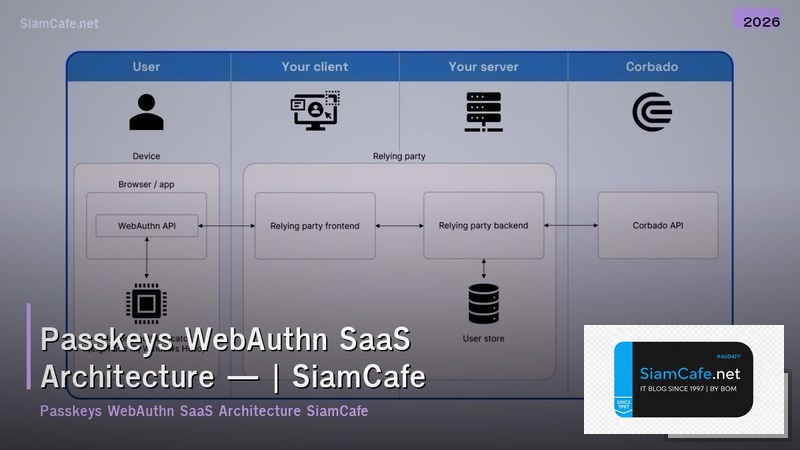

Passkeys WebAuthn

Passkeys WebAuthn FIDO2 Passwordless Authentication Biometric Fingerprint Face ID Public Key Cryptography SaaS Phishing-resistant Cross-device iCloud Google Password Manager
| Auth Method | Phishing-safe | UX | Setup | เหมาะกับ |
|---|---|---|---|---|
| Passkeys | ใช่ 100% | ดีมาก | ปานกลาง | Modern SaaS |
| Password + MFA | บางส่วน | แย่ | ง่าย | Legacy |
| Magic Link | บางส่วน | ดี | ง่าย | Low-friction |
| OAuth (Google) | ใช่ | ดี | ง่าย | Consumer |
| Security Key | ใช่ 100% | ปานกลาง | ยาก | High-security |
WebAuthn Implementation
=== WebAuthn Registration & Authentication ===
npm install @simplewebauthn/server @simplewebauthn/browserServer — Registration (Node.js)
import {
generateRegistrationOptions,
verifyRegistrationResponse,
} from '@simplewebauthn/server';
const rpName = 'My SaaS App';
const rpID = 'app.example.com';
const origin = 'https://app.example.com';
Step 1: Generate registration options
app.post('/api/auth/register/options', async (req, res) => {
const user = await getUser(req.session.userId);
const options = await generateRegistrationOptions({
rpName,
rpID,
userID: user.id,
userName: user.email,
attestationType: 'none',
authenticatorSelection: {
residentKey: 'preferred',
userVerification: 'preferred',
},
});
req.session.challenge = options.challenge;
res.json(options);
});
Step 2: Verify registration
app.post('/api/auth/register/verify', async (req, res) => {
const verification = await verifyRegistrationResponse({
response: req.body,
expectedChallenge: req.session.challenge,
expectedOrigin: origin,
expectedRPID: rpID,
});
if (verification.verified) {
await saveCredential(req.session.userId, {
credentialID: verification.registrationInfo.credentialID,
publicKey: verification.registrationInfo.credentialPublicKey,
counter: verification.registrationInfo.counter,
});
res.json({ success: true });
}
});
Browser — Registration
import { startRegistration } from '@simplewebauthn/browser';
async function registerPasskey() {
const options = await fetch('/api/auth/register/options',
{ method: 'POST' }).then(r => r.json());
const result = await startRegistration(options);
const verification = await fetch('/api/auth/register/verify',
{ method: 'POST', body: JSON.stringify(result) }).then(r => r.json());
if (verification.success) alert('Passkey created!');
}
from dataclasses import dataclass
@dataclass
class PasskeyCredential:
user: str
device: str
authenticator: str
created: str
last_used: str
status: str
credentials = [
PasskeyCredential("user@example.com", "iPhone 15", "Face ID", "2025-01-01", "2025-01-20", "Active"),
PasskeyCredential("user@example.com", "MacBook Pro", "Touch ID", "2025-01-02", "2025-01-20", "Active"),
PasskeyCredential("user@example.com", "Windows PC", "Windows Hello", "2025-01-05", "2025-01-18", "Active"),
PasskeyCredential("admin@example.com", "YubiKey 5", "Security Key", "2025-01-01", "2025-01-20", "Active"),
PasskeyCredential("admin@example.com", "Pixel 8", "Fingerprint", "2025-01-03", "2025-01-19", "Active"),
]
SaaS Architecture
=== Passkeys SaaS Architecture ===
Authentication Flow:
1. User clicks "Sign in with Passkey"
2. Server generates challenge
3. Browser calls navigator.credentials.get()
4. User verifies with biometric
5. Browser sends signed challenge to server
6. Server verifies signature with stored public key
7. Server issues session token (JWT)
Database Schema
CREATE TABLE users (
id UUID PRIMARY KEY,
email VARCHAR(255) UNIQUE NOT NULL,
name VARCHAR(255),
created_at TIMESTAMP DEFAULT NOW()
);
CREATE TABLE passkey_credentials (
id UUID PRIMARY KEY,
user_id UUID REFERENCES users(id),
credential_id BYTEA UNIQUE NOT NULL,
public_key BYTEA NOT NULL,
counter INTEGER DEFAULT 0,
device_name VARCHAR(255),
authenticator_type VARCHAR(50),
created_at TIMESTAMP DEFAULT NOW(),
last_used_at TIMESTAMP
);
CREATE INDEX idx_credential_id ON passkey_credentials(credential_id);
Server — Authentication (Node.js)
import {
generateAuthenticationOptions,
verifyAuthenticationResponse,
} from '@simplewebauthn/server';
app.post('/api/auth/login/options', async (req, res) => {
const options = await generateAuthenticationOptions({
rpID,
userVerification: 'preferred',
});
req.session.challenge = options.challenge;
res.json(options);
});
app.post('/api/auth/login/verify', async (req, res) => {
const credential = await findCredential(req.body.id);
const verification = await verifyAuthenticationResponse({
response: req.body,
expectedChallenge: req.session.challenge,
expectedOrigin: origin,
expectedRPID: rpID,
authenticator: credential,
});
if (verification.verified) {
await updateCounter(credential.id, verification.authenticationInfo.newCounter);
const token = generateJWT(credential.userId);
res.json({ token });
}
});
@dataclass
class AuthMetric:
metric: str
passkey: str
password: str
improvement: str
auth_metrics = [
AuthMetric("Login Time", "2.5s", "12s", "4.8x faster"),
AuthMetric("Success Rate", "99.2%", "85%", "+14.2%"),
AuthMetric("Phishing Attacks", "0", "150/month", "100% eliminated"),
AuthMetric("Support Tickets (password)", "0", "200/month", "100% eliminated"),
AuthMetric("Account Takeover", "0", "5/month", "100% eliminated"),
AuthMetric("User Satisfaction", "4.8/5", "3.2/5", "+50%"),
]
Migration Strategy
# === Password to Passkey Migration ===

# Phase 1: Add Passkey Option (Month 1-2)
# - Add "Create Passkey" in account settings
# - Show passkey prompt after password login
# - Track adoption rate
#
# Phase 2: Encourage Passkeys (Month 3-4)
# - Show passkey prompt on every login
# - Offer incentive (premium feature trial)
# - Email campaign about passkey benefits
#
# Phase 3: Passkey-preferred (Month 5-6)
# - Default to passkey login
# - Password as fallback
# - Nudge remaining users
#
# Phase 4: Password-optional (Month 7+)
# - Allow users to remove password
# - Keep password as recovery option
# - Monitor adoption metrics

migration_metrics = {
 "Total Users": "50,000",
 "Passkey Enrolled": "32,000 (64%)",
 "Passkey-only Users": "18,000 (36%)",
 "Password-only Users": "18,000 (36%)",
 "Avg Passkeys per User": "2.3",
 "Monthly Passkey Logins": "180,000",
 "Monthly Password Logins": "45,000",
 "Password Reset Requests": "Down 85%",
 "Support Tickets": "Down 70%",
}

print("Migration Progress:")
for k, v in migration_metrics.items():
 print(f" {k}: {v}")

# Fallback Options
fallbacks = [
 "Magic Link: ส่ง Email one-time login link",
 "OTP: ส่ง SMS/Email 6-digit code",
 "Recovery Code: Pre-generated one-time codes",
 "Password: Keep as last resort",
 "Admin Override: Manual identity verification",
]

print(f"\n\nFallback Authentication:")
for i, f in enumerate(fallbacks, 1):
 print(f" {i}. {f}")
เคล็ดลับ
- Gradual: ค่อยๆ Migrate ไม่บังคับทันที
- Multi-device: ให้ User สร้าง Passkey หลายอุปกรณ์
- Fallback: มี Magic Link หรือ OTP สำรอง
- UX: ทำ UI สร้าง Passkey ง่ายที่สุด 1-2 คลิก
- Monitor: ติดตาม Adoption Rate ทุกสัปดาห์
Passkeys คืออะไร
ยืนยันตัวตนไม่ใช้รหัสผ่าน Public Key Cryptography Biometric ลายนิ้วมือ Face ID PIN ปลอดภัย ไม่ Phishing Cross-device iCloud Google
WebAuthn คืออะไร
W3C Standard API Browser Authenticator Fingerprint Face ID Security Key FIDO2 Chrome Safari Firefox Edge navigator.credentials
Passkeys ปลอดภัยกว่ารหัสผ่านอย่างไร
ไม่มี Password ขโมย Phishing Domain-bound Brute Force Credential Stuffing Private Key อุปกรณ์ Biometric Challenge Replay Attack
Implement Passkeys ใน SaaS อย่างไร
SimpleWebAuthn Node.js py_webauthn Python Registration Authentication Credential Database Multiple Passkeys Fallback Magic Link OTP
สรุป
Passkeys WebAuthn FIDO2 Passwordless Biometric SaaS Architecture Public Key Phishing-resistant SimpleWebAuthn Migration Cross-device Security Production