OSI Model 7 Layers
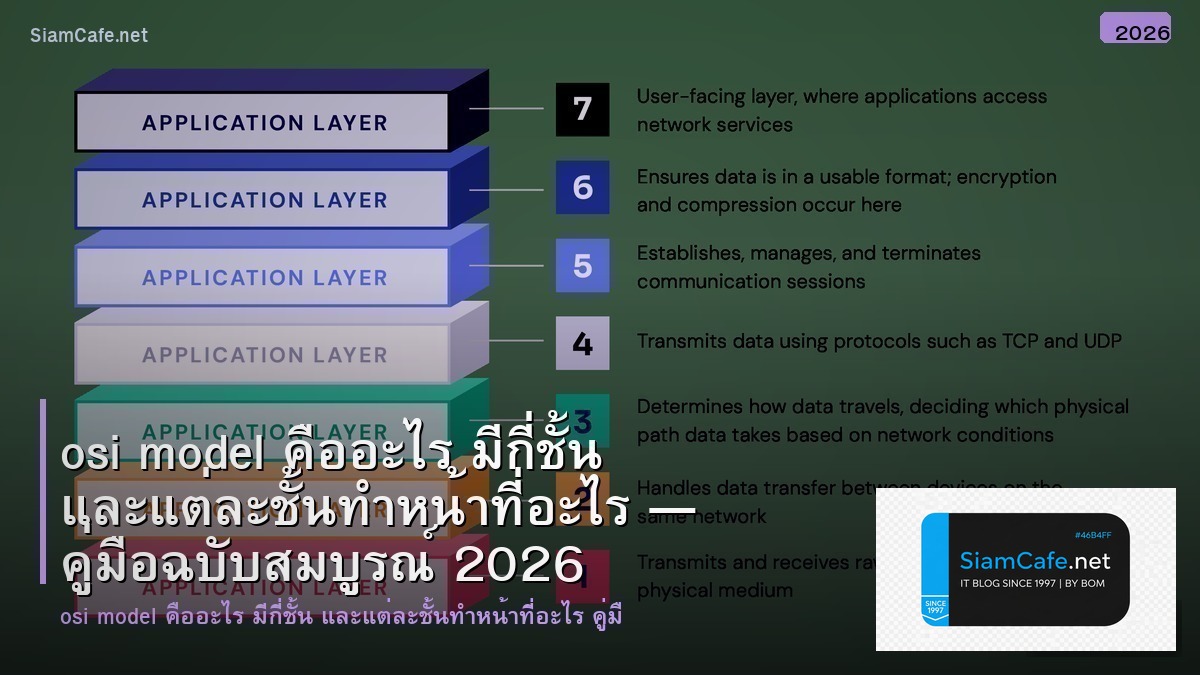
OSI Model Open Systems Interconnection 7 Layers แต่ละชั้นหน้าที่เฉพาะ ISO มาตรฐานอ้างอิงออกแบบแก้ไขปัญหาเครือข่าย
| Layer | ชื่อ | หน้าที่ | Protocol/อุปกรณ์ | PDU |
|---|---|---|---|---|
| 7 | Application | บริการให้ผู้ใช้ | HTTP, FTP, DNS, SMTP | Data |
| 6 | Presentation | แปลงข้อมูล เข้ารหัส | SSL/TLS, JPEG, ASCII | Data |
| 5 | Session | จัดการ Session | NetBIOS, RPC, PPTP | Data |
| 4 | Transport | ส่งข้อมูลถูกต้อง | TCP, UDP | Segment |
| 3 | Network | Routing เส้นทาง | IP, ICMP, Router | Packet |
| 2 | Data Link | MAC Address | Ethernet, Switch, ARP | Frame |
| 1 | Physical | สัญญาณไฟฟ้า | สายเคเบิล, Hub, Fiber | Bit |
รายละเอียดแต่ละ Layer
# osi_model.py — OSI Model 7 Layers
from dataclasses import dataclass, field
from typing import List, Dict
@dataclass
class OSILayer:
number: int
name: str
thai_name: str
function: str
protocols: List[str]
devices: List[str]
pdu: str # Protocol Data Unit
examples: List[str]
security: List[str]
class OSIModel:
"""OSI Reference Model"""
def __init__(self):
self.layers: List[OSILayer] = []
def add_layer(self, layer: OSILayer):
self.layers.append(layer)
def show_all(self):
print(f"\n{'='*60}")
print(f"OSI Model — 7 Layers")
print(f"{'='*60}")
for layer in sorted(self.layers, key=lambda l: l.number, reverse=True):
print(f"\n Layer {layer.number}: {layer.name} ({layer.thai_name})")
print(f" Function: {layer.function}")
print(f" Protocols: {', '.join(layer.protocols)}")
print(f" Devices: {', '.join(layer.devices)}")
print(f" PDU: {layer.pdu}")
print(f" Security: {', '.join(layer.security)}")
def troubleshoot(self, symptom: str):
"""Troubleshoot ตาม Layer"""
troubleshoot_map = {
"no_connection": [1, 2],
"no_internet": [3],
"slow_connection": [4],
"app_error": [7],
"ssl_error": [5, 6],
}
layers = troubleshoot_map.get(symptom, [1, 2, 3])
print(f"\n Troubleshooting: {symptom}")
for num in layers:
layer = next((l for l in self.layers if l.number == num), None)
if layer:
print(f" Check Layer {num} ({layer.name}): {layer.function}")
model = OSIModel()
layers = [
OSILayer(7, "Application", "แอปพลิเคชัน",
"ให้บริการ Network แก่ผู้ใช้และแอปพลิเคชัน",
["HTTP", "HTTPS", "FTP", "SMTP", "DNS", "DHCP", "SSH", "Telnet"],
["Firewall L7", "Load Balancer", "Proxy"],
"Data",
["เปิดเว็บ HTTP", "ส่งอีเมล SMTP", "ดาวน์โหลด FTP", "แปลชื่อ DNS"],
["WAF", "Application Firewall", "DDoS Protection"]),
OSILayer(6, "Presentation", "การนำเสนอ",
"แปลงข้อมูล เข้ารหัส บีบอัด",
["SSL/TLS", "JPEG", "PNG", "GIF", "ASCII", "EBCDIC", "MPEG"],
["ไม่มีอุปกรณ์เฉพาะ"],
"Data",
["HTTPS เข้ารหัส SSL/TLS", "แปลง JPEG PNG", "บีบอัด gzip"],
["Encryption TLS 1.3", "Certificate Management"]),
OSILayer(5, "Session", "เซสชัน",
"จัดการ Session เปิด ปิด ควบคุม",
["NetBIOS", "RPC", "PPTP", "SIP", "L2TP"],
["ไม่มีอุปกรณ์เฉพาะ"],
"Data",
["Login Session", "Video Call Session", "VPN Tunnel"],
["Session Timeout", "Token Management"]),
OSILayer(4, "Transport", "ขนส่ง",
"ส่งข้อมูลถูกต้อง ครบถ้วน ตาม Port",
["TCP", "UDP", "SCTP", "QUIC"],
["Firewall L4", "Load Balancer L4"],
"Segment/Datagram",
["TCP 3-Way Handshake", "UDP Streaming", "Port 80 443"],
["Firewall Port Filtering", "Rate Limiting"]),
OSILayer(3, "Network", "เครือข่าย",
"Routing กำหนดเส้นทาง IP Address",
["IP", "ICMP", "OSPF", "BGP", "ARP", "IPsec"],
["Router", "L3 Switch"],
"Packet",
["ping ICMP", "traceroute", "IP Routing"],
["ACL", "IPsec VPN", "Firewall L3"]),
OSILayer(2, "Data Link", "เชื่อมต่อข้อมูล",
"MAC Address, Error Detection, Frame",
["Ethernet", "Wi-Fi (802.11)", "PPP", "VLAN", "STP"],
["Switch", "Bridge", "NIC", "Access Point"],
"Frame",
["Switch ส่ง Frame ตาม MAC", "VLAN แบ่ง Network", "Wi-Fi"],
["Port Security", "802.1X", "MAC Filtering"]),
OSILayer(1, "Physical", "กายภาพ",
"สัญญาณไฟฟ้า แสง คลื่นวิทยุ",
["Ethernet (สาย)", "Wi-Fi (คลื่น)", "Fiber Optic", "Bluetooth"],
["Hub", "Repeater", "Modem", "สายเคเบิล"],
"Bit",
["สาย Cat6 Ethernet", "Fiber Optic", "Wi-Fi 6"],
["Physical Security", "Signal Jamming Prevention"]),
]
for layer in layers:
model.add_layer(layer)
model.show_all()
model.troubleshoot("no_connection")
Python Network Programming
# network_layers.py — Network Programming ตาม OSI Layer
import socket
import struct
# Layer 4: TCP Socket (Transport)
def tcp_client_example():
"""TCP Client — Layer 4 Transport"""
# sock = socket.socket(socket.AF_INET, socket.SOCK_STREAM)
# sock.connect(("example.com", 80))
# sock.send(b"GET / HTTP/1.1\r\nHost: example.com\r\n\r\n")
# response = sock.recv(4096)
# sock.close()
print(" TCP Client: socket.SOCK_STREAM (Layer 4)")
print(" Connect -> Send -> Receive -> Close")
# Layer 4: UDP Socket (Transport)
def udp_client_example():
"""UDP Client — Layer 4 Transport"""
# sock = socket.socket(socket.AF_INET, socket.SOCK_DGRAM)
# sock.sendto(b"Hello", ("example.com", 53))
# data, addr = sock.recvfrom(4096)
# sock.close()
print(" UDP Client: socket.SOCK_DGRAM (Layer 4)")
print(" SendTo -> ReceiveFrom (No Connection)")
# Layer 3: ICMP Ping (Network)
def ping_example():
"""ICMP Ping — Layer 3 Network"""
# icmp = socket.getprotobyname("icmp")
# sock = socket.socket(socket.AF_INET, socket.SOCK_RAW, icmp)
# # Build ICMP Echo Request
# header = struct.pack("bbHHh", 8, 0, 0, 1, 1)
# sock.sendto(header, ("8.8.8.8", 0))
print(" ICMP Ping: socket.SOCK_RAW (Layer 3)")
print(" Send ICMP Echo Request -> Receive Echo Reply")
# Layer 7: HTTP Request (Application)
def http_example():
"""HTTP Request — Layer 7 Application"""
# import urllib.request
# response = urllib.request.urlopen("https://example.com")
# html = response.read()
print(" HTTP Request: urllib/requests (Layer 7)")
print(" GET/POST -> Response (HTML/JSON)")
# Layer 2: MAC Address (Data Link)
def mac_address_example():
"""MAC Address — Layer 2 Data Link"""
import uuid
mac = ':'.join(['{:02x}'.format((uuid.getnode() >> i) & 0xff)
for i in range(0, 48, 8)][::-1])
print(f" MAC Address: {mac} (Layer 2)")
print("Network Programming by OSI Layer:")
tcp_client_example()
udp_client_example()
ping_example()
http_example()
mac_address_example()
# TCP vs UDP
comparison = {
"Connection": {"TCP": "Connection-oriented (3-Way Handshake)", "UDP": "Connectionless"},
"Reliability": {"TCP": "Reliable (Retransmission)", "UDP": "Unreliable (No Guarantee)"},
"Ordering": {"TCP": "Ordered (Sequence Numbers)", "UDP": "Unordered"},
"Speed": {"TCP": "ช้ากว่า (Overhead)", "UDP": "เร็วกว่า (Lightweight)"},
"Use Case": {"TCP": "Web, Email, File Transfer", "UDP": "DNS, Streaming, Gaming, VoIP"},
"Header": {"TCP": "20-60 bytes", "UDP": "8 bytes"},
}
print(f"\n\nTCP vs UDP:")
for feature, values in comparison.items():
print(f" {feature:<12} TCP: {values['TCP']:<35} UDP: {values['UDP']}")
OSI vs TCP/IP
# osi_vs_tcpip.py — OSI Model vs TCP/IP Model
osi_layers = [
{"osi": "7 Application", "tcpip": "Application", "protocols": "HTTP DNS SMTP"},
{"osi": "6 Presentation", "tcpip": "Application", "protocols": "SSL/TLS JPEG"},
{"osi": "5 Session", "tcpip": "Application", "protocols": "NetBIOS RPC"},
{"osi": "4 Transport", "tcpip": "Transport", "protocols": "TCP UDP"},
{"osi": "3 Network", "tcpip": "Internet", "protocols": "IP ICMP"},
{"osi": "2 Data Link", "tcpip": "Network Access", "protocols": "Ethernet Wi-Fi"},
{"osi": "1 Physical", "tcpip": "Network Access", "protocols": "Cable Fiber"},
]
print("OSI Model vs TCP/IP Model:")
print(f" {'OSI Layer':<20} {'TCP/IP Layer':<18} {'Protocols'}")
print(f" {'-'*60}")
for layer in osi_layers:
print(f" {layer['osi']:<20} {layer['tcpip']:<18} {layer['protocols']}")
# Common Ports
ports = {
20: "FTP Data",
21: "FTP Control",
22: "SSH",
23: "Telnet",
25: "SMTP",
53: "DNS",
67: "DHCP Server",
80: "HTTP",
110: "POP3",
143: "IMAP",
443: "HTTPS",
993: "IMAPS",
3306: "MySQL",
3389: "RDP",
5432: "PostgreSQL",
6379: "Redis",
8080: "HTTP Alt",
27017: "MongoDB",
}
print(f"\n\nCommon Ports:")
for port, service in sorted(ports.items()):
print(f" Port {port:<6} {service}")
เคล็ดลับ
- จำ 7 Layers: Please Do Not Throw Sausage Pizza Away (Physical Data Network Transport Session Presentation Application)
- Troubleshoot: เริ่มจาก Layer 1 ขึ้นไป สายหลุดีไหม IP ถูกไหม Port เปิดีไหม
- TCP vs UDP: TCP เชื่อถือได้ แต่ช้า UDP เร็ว แต่ไม่รับประกัน
- Security: แต่ละ Layer มี Security เฉพาะ Layer 3 IPsec Layer 4 Firewall Layer 7 WAF
- สอบ: CCNA CompTIA Network+ ออกเรื่อง OSI Model ทุกครั้ง
OSI Model คืออะไร
Open Systems Interconnection โมเดลอ้างอิงสื่อสารเครือข่าย 7 Layers ISO มาตรฐานออกแบบแก้ไขปัญหาเครือข่าย
OSI Model มีกี่ Layer อะไรบ้าง
7 Layers Physical Data Link Network Transport Session Presentation Application แต่ละชั้นหน้าที่เฉพาะ PDU ต่างกัน Bit Frame Packet Segment Data
OSI Model กับ TCP/IP Model ต่างกันอย่างไร
OSI 7 Layers ทฤษฎี TCP/IP 4 Layers ใช้จริง TCP/IP รวม Layer 5-7 เป็น Application Layer 1-2 เป็น Network Access TCP/IP มาตรฐาน Internet
ทำไมต้องรู้ OSI Model
เข้าใจเครือข่าย Troubleshoot ตรงจุด Layer ไหนมีปัญหา สอบ CCNA CompTIA สัมภาษณ์งาน IT Network Engineer ออกแบบเครือข่าย Security แต่ละ Layer
สรุป
OSI Model 7 Layers Physical Data Link Network Transport Session Presentation Application แต่ละชั้นหน้าที่เฉพาะ Protocol อุปกรณ์ Security TCP/IP 4 Layers ใช้จริง Troubleshoot เริ่ม Layer 1 ขึ้นไป CCNA CompTIA