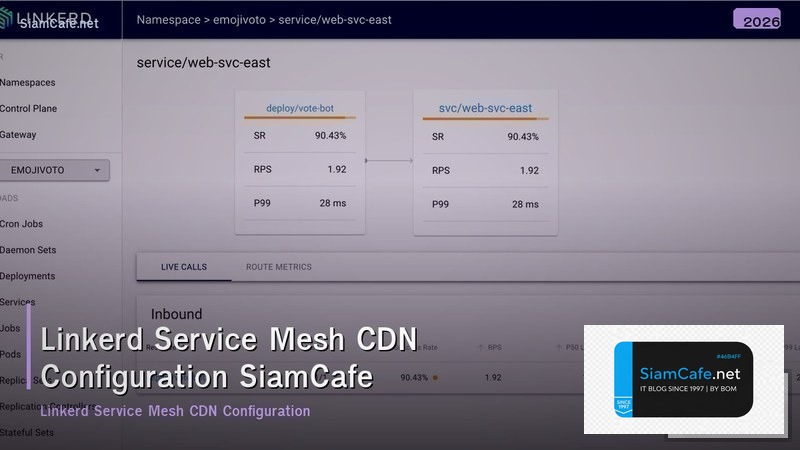
Linkerd Service Mesh CDN Configuration — ตั้งค่า Service Mesh กับ CDN

Linkerd Service Mesh คืออะไร
Linkerd เป็น ultralight service mesh สำหรับ Kubernetes สร้างโดย Buoyant เป็น CNCF graduated project ออกแบบให้เรียบง่าย ใช้งานง่าย resource footprint ต่ำ ต่างจาก Istio ที่ซับซ้อนกว่า Linkerd เน้น simplicity และ performance
Features หลักของ Linkerd ได้แก่ Automatic mTLS เข้ารหัส traffic ระหว่าง services อัตโนมัติ, Observability golden metrics (latency, traffic, errors) สำหรับทุก service, Reliability retries, timeouts, circuit breaking, Load balancing EWMA (Exponentially Weighted Moving Average) ฉลาดกว่า round-robin, Multi-cluster เชื่อมต่อ services ข้าม clusters
CDN (Content Delivery Network) ทำงานร่วมกับ service mesh เพื่อ cache static content ที่ edge ลด load บน backend services Linkerd จัดการ internal traffic ระหว่าง microservices CDN จัดการ external traffic จาก users ทั้งสองทำงานร่วมกันเพื่อให้ได้ performance และ reliability สูงสุด
ติดตั้ง Linkerd บน Kubernetes
Setup Linkerd service mesh
# === Linkerd Installation ===

# 1. Install Linkerd CLI
curl --proto '=https' --tlsv1.2 -sSfL https://run.linkerd.io/install | sh
export PATH=$HOME/.linkerd2/bin:$PATH

# Verify CLI
linkerd version

# 2. Pre-check Kubernetes cluster
linkerd check --pre

# 3. Install Linkerd CRDs
linkerd install --crds | kubectl apply -f -

# 4. Install Linkerd Control Plane
linkerd install | kubectl apply -f -

# Wait for installation
linkerd check

# 5. Install Linkerd Viz (Dashboard)
linkerd viz install | kubectl apply -f -
linkerd viz check

# Access dashboard
linkerd viz dashboard &
# Opens http://localhost:50750

# 6. Inject Sidecar Proxy
# Option A: Annotate namespace (all pods in namespace)
kubectl annotate namespace default linkerd.io/inject=enabled

# Option B: Inject specific deployment
kubectl get deploy my-app -o yaml | linkerd inject - | kubectl apply -f -

# 7. Verify mesh injection
linkerd viz stat deploy -n default
# Shows: NAME, MESHED, SUCCESS, RPS, LATENCY_P50, LATENCY_P99

# 8. Install Linkerd Jaeger (Distributed Tracing)
linkerd jaeger install | kubectl apply -f -

# 9. Install Linkerd Multicluster (Optional)
linkerd multicluster install | kubectl apply -f -

# 10. Verify everything
linkerd check
linkerd viz stat deploy --all-namespaces

echo "Linkerd installed and verified"
CDN Configuration กับ Service Mesh
ตั้งค่า CDN ร่วมกับ Linkerd
# === CDN + Service Mesh Configuration ===

# Architecture:
# User → CDN (Cloudflare/CloudFront) → Ingress → Linkerd Mesh → Services

# 1. Nginx Ingress with Linkerd
cat > k8s/ingress.yaml << 'EOF'
apiVersion: networking.k8s.io/v1
kind: Ingress
metadata:
 name: app-ingress
 annotations:
 nginx.ingress.kubernetes.io/configuration-snippet: |
 proxy_set_header l5d-dst-override $service_name.$namespace.svc.cluster.local:$service_port;
 nginx.ingress.kubernetes.io/proxy-body-size: "50m"
 nginx.ingress.kubernetes.io/proxy-read-timeout: "60"
spec:
 ingressClassName: nginx
 tls:
 - hosts:
 - app.example.com
 secretName: app-tls
 rules:
 - host: app.example.com
 http:
 paths:
 - path: /api
 pathType: Prefix
 backend:
 service:
 name: api-service
 port:
 number: 8080
 - path: /
 pathType: Prefix
 backend:
 service:
 name: frontend-service
 port:
 number: 80
EOF

# 2. Cloudflare CDN Configuration
# ===================================
# DNS: app.example.com → CNAME → k8s-ingress.example.com (proxied)
#
# Cloudflare Settings:
# SSL/TLS: Full (strict)
# Caching:
# - Cache Level: Standard
# - Browser Cache TTL: 4 hours
# - Edge Cache TTL: 2 hours
#
# Page Rules:
# - app.example.com/api/*
# Cache Level: Bypass (dynamic content)
# - app.example.com/static/*
# Cache Level: Cache Everything
# Edge Cache TTL: 1 month
# - app.example.com/*.html
# Cache Level: Standard
# Edge Cache TTL: 1 hour
#
# Transform Rules:
# - Add X-Forwarded-For header
# - Add CF-Connecting-IP header
# - Add X-Real-IP header

# 3. Cache Headers from Backend
cat > k8s/cache-headers-config.yaml << 'EOF'
apiVersion: v1
kind: ConfigMap
metadata:
 name: nginx-cache-config
data:
 cache.conf: |
 # Static assets: cache 30 days
 location ~* \.(css|js|jpg|jpeg|png|gif|ico|svg|woff2|ttf)$ {
 expires 30d;
 add_header Cache-Control "public, immutable";
 add_header CDN-Cache-Control "max-age=2592000";
 }

 # HTML: cache 1 hour, revalidate
 location ~* \.html$ {
 expires 1h;
 add_header Cache-Control "public, must-revalidate";
 }

 # API: no cache
 location /api/ {
 add_header Cache-Control "no-store, no-cache, must-revalidate";
 add_header CDN-Cache-Control "no-store";
 }
EOF

kubectl apply -f k8s/

echo "CDN + Linkerd configured"
Traffic Management และ Routing

จัดการ traffic ใน Linkerd mesh
Security กับ mTLS
Security configuration สำหรับ Linkerd
# === Linkerd Security Configuration ===

# 1. Automatic mTLS
# ===================================
# Linkerd enables mTLS automatically for all meshed services
# No configuration needed - just inject the sidecar

# Verify mTLS:
linkerd viz edges deploy -n default
# Shows: SRC, DST, SRC_P, DST_P, SECURED (should be true)

# Check specific connection:
linkerd viz tap deploy/api-service --to deploy/db-service
# Shows TLS status for each request

# 2. Authorization Policies
cat > k8s/auth-policy.yaml << 'EOF'
# Only allow api-gateway to access api-service
apiVersion: policy.linkerd.io/v1beta2
kind: Server
metadata:
 name: api-service-server
 namespace: default
spec:
 podSelector:
 matchLabels:
 app: api-service
 port: 8080
 proxyProtocol: HTTP/2
---
apiVersion: policy.linkerd.io/v1beta2
kind: ServerAuthorization
metadata:
 name: allow-gateway
 namespace: default
spec:
 server:
 name: api-service-server
 client:
 meshTLS:
 serviceAccounts:
 - name: api-gateway
 namespace: default
---
# Deny all other traffic to api-service
apiVersion: policy.linkerd.io/v1alpha1
kind: AuthorizationPolicy
metadata:
 name: deny-all-api-service
 namespace: default
spec:
 targetRef:
 group: policy.linkerd.io
 kind: Server
 name: api-service-server
 requiredAuthentication:
 - meshTLS:
 identityRefs:
 - kind: ServiceAccount
 name: api-gateway
EOF

kubectl apply -f k8s/auth-policy.yaml

# 3. Network Policies (Kubernetes level)
cat > k8s/network-policy.yaml << 'EOF'
apiVersion: networking.k8s.io/v1
kind: NetworkPolicy
metadata:
 name: api-service-policy
 namespace: default
spec:
 podSelector:
 matchLabels:
 app: api-service
 policyTypes:
 - Ingress
 ingress:
 - from:
 - podSelector:
 matchLabels:
 app: api-gateway
 ports:
 - port: 8080
 protocol: TCP
EOF

# 4. Certificate Rotation
# ===================================
# Linkerd auto-rotates proxy certificates (24h default)
# Trust anchor certificate: rotate annually
# Issuer certificate: rotate quarterly
#
# Check certificate expiry:
linkerd check --proxy
# Look for: "√ certificate config is valid"

# 5. Security Best Practices
# ===================================
# [ ] All services are meshed (sidecar injected)
# [ ] mTLS is enabled (automatic)
# [ ] Authorization policies deny by default
# [ ] Network policies restrict pod-to-pod traffic
# [ ] Trust anchor rotated before expiry
# [ ] Dashboard access restricted (not public)
# [ ] Viz extension uses authentication

echo "Security configured"
Observability และ Monitoring
Monitor Linkerd mesh
FAQ คำถามที่พบบ่อย
Q: Linkerd กับ Istio เลือกอันไหน?
A: Linkerd เหมาะสำหรับทีมที่ต้องการ simplicity ติดตั้งเร็ว (5 นาที), resource usage ต่ำ (proxy ใช้ RAM 10-20MB), learning curve ต่ำ, ไม่ต้อง configure มาก ได้ mTLS, observability, reliability ทันที Istio เหมาะสำหรับทีมที่ต้องการ advanced traffic management (VirtualService, DestinationRule), extensibility ด้วย WASM plugins, integration กับ external authorization, complex routing rules สำหรับ 80% ของ use cases Linkerd เพียงพอและง่ายกว่ามาก เลือก Istio เมื่อต้องการ features ที่ Linkerd ไม่มีจริงๆ
Q: CDN ต้อง configure อะไรเพิ่มเมื่อใช้ Service Mesh?
A: CDN อยู่หน้า service mesh (external traffic) ไม่ต้อง configure CDN พิเศษสำหรับ mesh สิ่งที่ต้องทำ ตั้ง Cache-Control headers ที่ backend ให้ถูกต้อง (static assets cache นาน, API ไม่ cache), CDN terminate SSL แล้วส่งต่อเป็น HTTPS ไปยัง ingress, ตั้ง origin ของ CDN ให้ชี้ไป ingress controller ไม่ใช่ service ตรงๆ, ใช้ CDN-Cache-Control header แยกจาก Cache-Control เพื่อ control CDN caching แยกจาก browser caching
Q: Linkerd ใช้ resources เท่าไหร?
A: Control plane ใช้ RAM ประมาณ 200-500MB ทั้งหมด (destination, identity, proxy-injector) Data plane (sidecar proxy) ใช้ RAM 10-20MB per pod CPU < 1% ต่อ pod เพิ่ม latency ประมาณ 1-2ms per hop (p99) ข้อดี Linkerd ใช้ linkerd2-proxy ที่เขียนด้วย Rust เร็วและ memory-efficient กว่า Envoy ที่ Istio ใช้ (C++) สำหรับ cluster 50 pods Linkerd เพิ่ม resource รวมประมาณ 1-2 GB RAM
Q: มี downtime ไหมเมื่อติดตั้ง Linkerd?
A: ไม่มี downtime ติดตั้ง control plane ไม่กระทบ running pods inject sidecar ทำโดย restart pods (rolling update) ซึ่ง Kubernetes จัดการให้ไม่มี downtime ถ้า replicas > 1 ขั้นตอน ติดตั้ง control plane ก่อน, annotate namespace, restart deployments ทีละ service มี PodDisruptionBudget ป้องกันไม่ให้ pods ลงพร้อมกันหมด ใช้เวลาทั้งหมดประมาณ 10-30 นาทีสำหรับ cluster ขนาดกลาง