Kubernetes RBAC คืออะไร? สอน Role, ClusterRole, ServiceAccount อย่างละเอียด 2026
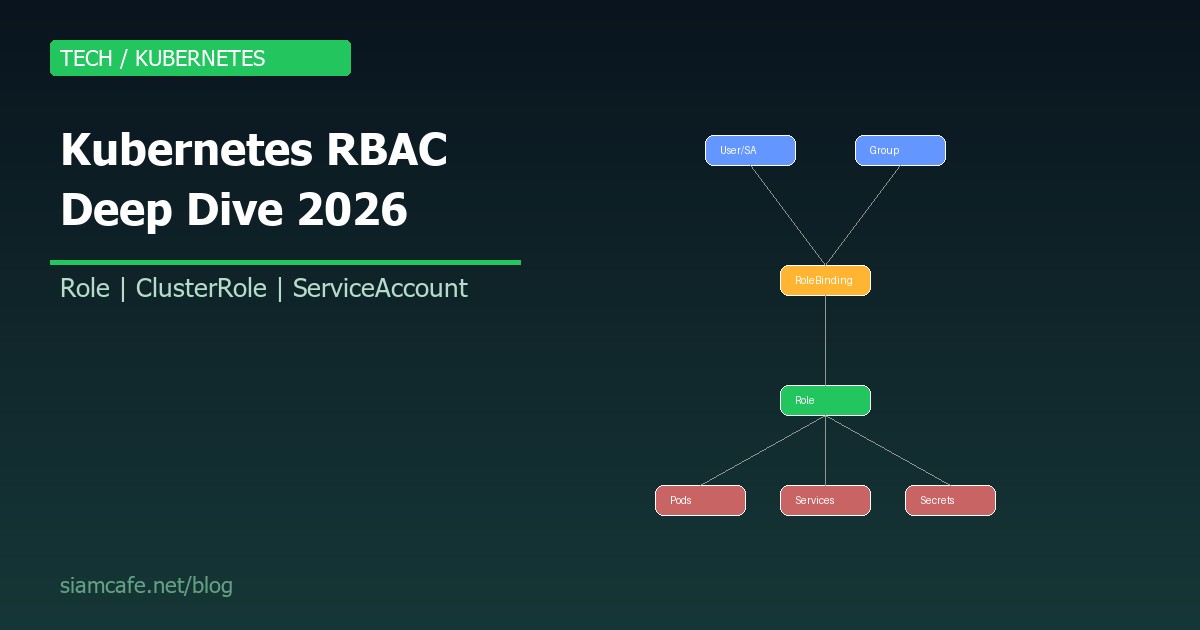
Kubernetes RBAC (Role-Based Access Control) เป็นระบบควบคุมสิทธิ์ใน Kubernetes cluster ที่กำหนดว่า ใคร (Who) สามารถทำ อะไร (What) กับ ทรัพยากรอะไร (Which resources) ใน Namespace ไหน (Where) ถ้าคุณเป็น DevOps Engineer หรือ Platform Engineer การเข้าใจ RBAC อย่างลึกซึ้งเป็นสิ่งจำเป็น
RBAC Fundamentals

RBAC ใน Kubernetes ประกอบด้วย 4 Resources หลัก:
อ่านเพิ่ม: Kubernetes ConfigMap และ Secret คืออะไร? จัดการ Configuratio · อ่านเพิ่ม: Helm Chart สร้างเอง คืออะไร? สอนสร้าง Custom Helm Chart สำหร · อ่านเพิ่ม: cert-manager คืออะไร? สอนจัดการ TLS Certificate อัตโนมัติบน
| Resource | Scope | หน้าที่ |
|---|---|---|
| Role | Namespace | กำหนดสิทธิ์ใน Namespace เดียว |
| ClusterRole | Cluster-wide | กำหนดสิทธิ์ทั้ง Cluster หรือ Non-namespaced resources |
| RoleBinding | Namespace | ผูก Role/ClusterRole กับ User/Group/ServiceAccount ใน Namespace |
| ClusterRoleBinding | Cluster-wide | ผูก ClusterRole กับ User/Group/ServiceAccount ทั้ง Cluster |
Role
# Role: อนุญาตให้ get, list, watch pods ใน namespace "development"
apiVersion: rbac.authorization.k8s.io/v1
kind: Role
metadata:
  namespace: development
  name: pod-reader
rules:
- apiGroups: [""]          # "" = core API group
  resources: ["pods"]
  verbs: ["get", "list", "watch"]
- apiGroups: [""]
  resources: ["pods/log"]
  verbs: ["get"]
ClusterRole
# ClusterRole: อนุญาตให้จัดการ Nodes (cluster-wide resource)
apiVersion: rbac.authorization.k8s.io/v1
kind: ClusterRole
metadata:
  name: node-manager
rules:
- apiGroups: [""]
  resources: ["nodes"]
  verbs: ["get", "list", "watch", "patch"]
- apiGroups: [""]
  resources: ["nodes/status"]
  verbs: ["get", "patch"]

---
# ClusterRole ยังใช้กับ Namespaced resources ได้
# เมื่อผูกกับ RoleBinding = สิทธิ์ใน Namespace นั้น
# เมื่อผูกกับ ClusterRoleBinding = สิทธิ์ทุก Namespace
apiVersion: rbac.authorization.k8s.io/v1
kind: ClusterRole
metadata:
  name: deployment-manager
rules:
- apiGroups: ["apps"]
  resources: ["deployments"]
  verbs: ["get", "list", "watch", "create", "update", "patch", "delete"]
- apiGroups: [""]
  resources: ["services"]
  verbs: ["get", "list", "watch", "create", "update", "patch", "delete"]
RoleBinding
# RoleBinding: ผูก Role "pod-reader" กับ User "jane"
apiVersion: rbac.authorization.k8s.io/v1
kind: RoleBinding
metadata:
  name: read-pods
  namespace: development
subjects:
- kind: User
  name: jane
  apiGroup: rbac.authorization.k8s.io
roleRef:
  kind: Role
  name: pod-reader
  apiGroup: rbac.authorization.k8s.io

---
# ผูก ClusterRole กับ RoleBinding (จำกัดใน Namespace)
apiVersion: rbac.authorization.k8s.io/v1
kind: RoleBinding
metadata:
  name: dev-deployment-manager
  namespace: development
subjects:
- kind: Group
  name: dev-team
  apiGroup: rbac.authorization.k8s.io
roleRef:
  kind: ClusterRole
  name: deployment-manager
  apiGroup: rbac.authorization.k8s.io
ClusterRoleBinding
# ClusterRoleBinding: ให้สิทธิ์ทั้ง Cluster
apiVersion: rbac.authorization.k8s.io/v1
kind: ClusterRoleBinding
metadata:
  name: cluster-admin-binding
subjects:
- kind: User
  name: admin@example.com
  apiGroup: rbac.authorization.k8s.io
roleRef:
  kind: ClusterRole
  name: cluster-admin
  apiGroup: rbac.authorization.k8s.io
ServiceAccount
Default ServiceAccount
ทุก Namespace มี Default ServiceAccount ที่ Pods ใช้โดยอัตโนมัติ:
ดู ServiceAccounts
kubectl get serviceaccounts -n default
Default ServiceAccount มีสิทธิ์น้อยมาก (เกือบไม่มีสิทธิ์)
Best practice: สร้าง Custom ServiceAccount สำหรับแต่ละ Application
Custom ServiceAccount
# สร้าง ServiceAccount
apiVersion: v1
kind: ServiceAccount
metadata:
  name: app-service-account
  namespace: production

---
# Role สำหรับ Application
apiVersion: rbac.authorization.k8s.io/v1
kind: Role
metadata:
  namespace: production
  name: app-role
rules:
- apiGroups: [""]
  resources: ["configmaps", "secrets"]
  verbs: ["get", "list", "watch"]
- apiGroups: [""]
  resources: ["pods"]
  verbs: ["get", "list"]

---
# ผูก Role กับ ServiceAccount
apiVersion: rbac.authorization.k8s.io/v1
kind: RoleBinding
metadata:
  name: app-role-binding
  namespace: production
subjects:
- kind: ServiceAccount
  name: app-service-account
  namespace: production
roleRef:
  kind: Role
  name: app-role
  apiGroup: rbac.authorization.k8s.io

---
# ใช้ ServiceAccount ใน Pod
apiVersion: apps/v1
kind: Deployment
metadata:
  name: my-app
  namespace: production
spec:
  template:
    spec:
      serviceAccountName: app-service-account
      automountServiceAccountToken: true
      containers:
      - name: app
        image: my-app:latest
ServiceAccount Token
# Kubernetes 1.24+: Token ไม่ถูกสร้างอัตโนมัติ
# ต้องสร้าง TokenRequest API หรือ Secret

# วิธีที่ 1: TokenRequest (Recommended - Short-lived)
kubectl create token app-service-account -n production --duration=3600s

# วิธีที่ 2: Long-lived token via Secret
apiVersion: v1
kind: Secret
metadata:
  name: app-sa-token
  namespace: production
  annotations:
    kubernetes.io/service-account.name: app-service-account
type: kubernetes.io/service-account-token
Common RBAC Patterns
Pattern 1: Dev Team (Read-only + Deploy)
# Dev Team: ดูได้ทุกอย่าง, Deploy ได้เฉพาะ Namespace ของตัวเอง
apiVersion: rbac.authorization.k8s.io/v1
kind: ClusterRole
metadata:
  name: dev-team-viewer
rules:
- apiGroups: ["", "apps", "batch"]
  resources: ["*"]
  verbs: ["get", "list", "watch"]

---
apiVersion: rbac.authorization.k8s.io/v1
kind: Role
metadata:
  namespace: dev-team-ns
  name: dev-team-deployer
rules:
- apiGroups: ["apps"]
  resources: ["deployments", "replicasets"]
  verbs: ["get", "list", "watch", "create", "update", "patch", "delete"]
- apiGroups: [""]
  resources: ["services", "configmaps"]
  verbs: ["get", "list", "watch", "create", "update", "patch"]
- apiGroups: [""]
  resources: ["secrets"]
  verbs: ["get", "list"]  # ห้าม create/update secrets
Pattern 2: Ops Team (Full Namespace Control)
apiVersion: rbac.authorization.k8s.io/v1
kind: ClusterRole
metadata:
  name: ops-team-admin
rules:
- apiGroups: ["", "apps", "batch", "networking.k8s.io"]
  resources: ["*"]
  verbs: ["*"]
- apiGroups: ["rbac.authorization.k8s.io"]
  resources: ["roles", "rolebindings"]
  verbs: ["get", "list", "watch"]  # ดู RBAC ได้ แต่แก้ไม่ได้
Pattern 3: CI/CD Pipeline
apiVersion: v1
kind: ServiceAccount
metadata:
  name: cicd-deployer
  namespace: production

---
apiVersion: rbac.authorization.k8s.io/v1
kind: Role
metadata:
  namespace: production
  name: cicd-role
rules:
- apiGroups: ["apps"]
  resources: ["deployments"]
  verbs: ["get", "list", "patch", "update"]
  # ไม่ให้ create/delete — ป้องกัน Pipeline สร้าง/ลบ Deployment
- apiGroups: [""]
  resources: ["configmaps"]
  verbs: ["get", "list", "create", "update", "patch"]
- apiGroups: [""]
  resources: ["pods"]
  verbs: ["get", "list", "watch"]
  # ไม่ให้ delete pods — ป้องกัน Pipeline ลบ Pods
Pattern 4: Monitoring (Read-only Cluster-wide)
apiVersion: rbac.authorization.k8s.io/v1
kind: ClusterRole
metadata:
  name: monitoring-reader
rules:
- apiGroups: [""]
  resources: ["pods", "services", "endpoints", "nodes", "namespaces"]
  verbs: ["get", "list", "watch"]
- apiGroups: ["apps"]
  resources: ["deployments", "replicasets", "statefulsets", "daemonsets"]
  verbs: ["get", "list", "watch"]
- apiGroups: ["metrics.k8s.io"]
  resources: ["pods", "nodes"]
  verbs: ["get", "list"]
- nonResourceURLs: ["/metrics", "/healthz"]
  verbs: ["get"]
Aggregated ClusterRoles
# Aggregated ClusterRole: รวมสิทธิ์จากหลาย ClusterRoles
apiVersion: rbac.authorization.k8s.io/v1
kind: ClusterRole
metadata:
  name: monitoring-view
  labels:
    rbac.example.com/aggregate-to-monitoring: "true"
rules:
- apiGroups: ["monitoring.coreos.com"]
  resources: ["prometheusrules", "servicemonitors"]
  verbs: ["get", "list", "watch"]

---
# Aggregated ClusterRole ที่รวม roles ที่มี label ตรง
apiVersion: rbac.authorization.k8s.io/v1
kind: ClusterRole
metadata:
  name: aggregate-monitoring
aggregationRule:
  clusterRoleSelectors:
  - matchLabels:
      rbac.example.com/aggregate-to-monitoring: "true"
rules: []  # rules จะถูกเติมอัตโนมัติจาก aggregation
Debugging RBAC
kubectl auth can-i
# ตรวจสอบสิทธิ์ของตัวเอง
kubectl auth can-i create pods
kubectl auth can-i delete deployments -n production
kubectl auth can-i '*' '*'  # admin check

# ตรวจสอบสิทธิ์ของ User อื่น
kubectl auth can-i create pods --as jane
kubectl auth can-i delete deployments --as jane -n production

# ตรวจสอบสิทธิ์ของ ServiceAccount
kubectl auth can-i get secrets   --as system:serviceaccount:production:app-service-account   -n production

# ดูทุกสิทธิ์ของ User
kubectl auth can-i --list --as jane
kubectl auth can-i --list --as jane -n development
Audit Logs
# เปิด Audit logging ใน kube-apiserver:
# --audit-log-path=/var/log/kubernetes/audit.log
# --audit-policy-file=/etc/kubernetes/audit-policy.yaml

# audit-policy.yaml
apiVersion: audit.k8s.io/v1
kind: Policy
rules:
# Log RBAC failures
- level: Metadata
  resources:
  - group: ""
    resources: ["pods", "secrets", "configmaps"]
  verbs: ["create", "update", "delete"]

# ค้นหา RBAC denial ใน Audit logs:
# grep "Forbidden" /var/log/kubernetes/audit.log | jq '.user.username, .objectRef'
RBAC + Admission Controllers (OPA)
# OPA Gatekeeper ช่วยเพิ่ม Policy layer เหนือ RBAC:
# RBAC: ใครทำอะไรได้
# OPA: ทำได้ แต่ต้องตรงตามเงื่อนไข

# ตัวอย่าง: ทุก Pod ต้องมี resource limits
apiVersion: constraints.gatekeeper.sh/v1beta1
kind: K8sRequiredResources
metadata:
  name: require-resource-limits
spec:
  match:
    kinds:
    - apiGroups: [""]
      kinds: ["Pod"]
  parameters:
    limits:
    - cpu
    - memory

# ตัวอย่าง: ห้ามใช้ image tag "latest"
apiVersion: constraints.gatekeeper.sh/v1beta1
kind: K8sDisallowedTags
metadata:
  name: no-latest-tag
spec:
  match:
    kinds:
    - apiGroups: [""]
      kinds: ["Pod"]
  parameters:
    tags: ["latest"]
RBAC กับ External Identity (OIDC, LDAP)
# Kubernetes API Server + OIDC Provider (เช่น Keycloak, Okta, Azure AD)
# kube-apiserver flags:
# --oidc-issuer-url=https://keycloak.example.com/realms/kubernetes
# --oidc-client-id=kubernetes
# --oidc-username-claim=email
# --oidc-groups-claim=groups

# User "jane@example.com" อยู่ใน Group "dev-team" บน Keycloak
# Kubernetes RBAC:
apiVersion: rbac.authorization.k8s.io/v1
kind: RoleBinding
metadata:
  name: dev-team-binding
  namespace: development
subjects:
- kind: Group
  name: dev-team              # ตรงกับ OIDC groups claim
  apiGroup: rbac.authorization.k8s.io
roleRef:
  kind: ClusterRole
  name: dev-team-deployer
  apiGroup: rbac.authorization.k8s.io
Common RBAC Mistakes
- ให้ cluster-admin ทุกคน: อันตรายมาก ทุกคนสามารถลบ Production ได้ ใช้ Least privilege เสมอ
- ใช้ Default ServiceAccount: Default SA มีสิทธิ์น้อย แต่ถ้าถูก Compromise ก็อันตราย สร้าง Custom SA สำหรับแต่ละ App
- ไม่ปิด automountServiceAccountToken: ถ้า Pod ไม่ต้องเรียก Kubernetes API ให้ปิด
automountServiceAccountToken: false - Orphaned RoleBindings: ลบ User แล้วลืมลบ RoleBinding ทำให้ User ใหม่ที่ชื่อเหมือนกันได้สิทธิ์ที่ไม่ควรได้
- Too permissive wildcards: ใช้
resources: ["*"]หรือverbs: ["*"]โดยไม่จำเป็น - ไม่แยก Namespace: ใส่ทุกอย่างใน Default namespace ทำให้ RBAC ไม่มีประสิทธิภาพ
- ไม่ Review RBAC เป็นประจำ: สิทธิ์ที่เคยจำเป็นอาจไม่จำเป็นแล้ว
RBAC Best Practices Checklist
| Checklist | รายละเอียด |
|---|---|
| Least Privilege | ให้สิทธิ์น้อยที่สุดที่จำเป็น เพิ่มทีหลังเมื่อต้องการ |
| ใช้ Groups แทน Users | จัดการสิทธิ์ผ่าน Group ง่ายกว่าจัดการรายคน |
| แยก Namespace | แต่ละทีม/แอพมี Namespace ของตัวเอง |
| Custom ServiceAccount | สร้าง SA เฉพาะสำหรับแต่ละ Application |
| ปิด automount | ถ้า Pod ไม่เรียก K8s API ให้ปิด automountServiceAccountToken |
| Audit RBAC | Review สิทธิ์ทุก Quarter ลบ Orphaned bindings |
| ใช้ OIDC | ผูก Identity กับ Corporate Identity Provider |
| CI/CD SA แยก | ServiceAccount สำหรับ CI/CD มีสิทธิ์จำกัด (deploy only) |
| ห้าม edit RBAC ใน Prod | RBAC changes ต้องผ่าน GitOps / Code review |
| Enable Audit logs | บันทึกทุก API call เพื่อตรวจสอบย้อนหลัง |
RBAC Automation
สร้าง RBAC จาก Audit logs:
1. เปิด Audit logging
2. ให้ User ใช้งาน Cluster ปกติ
3. วิเคราะห์ Audit logs ว่า User เรียก API อะไรบ้าง
4. สร้าง Role ที่ครอบคลุมเฉพาะ API ที่ User ใช้จริง
Tools:
- audit2rbac: สร้าง RBAC จาก Audit logs
https://github.com/liggitt/audit2rbac
- rbac-lookup: ดู RBAC bindings ง่ายๆ
kubectl krew install rbac-lookup
kubectl rbac-lookup jane
- rakkess: ดู Access matrix
kubectl krew install access-matrix
kubectl access-matrix --as jane -n development
สรุป
Kubernetes RBAC เป็นระบบที่ทรงพลังสำหรับการควบคุมสิทธิ์ใน Cluster การเข้าใจ Role, ClusterRole, RoleBinding, ClusterRoleBinding และ ServiceAccount อย่างลึกซึ้ง ช่วยให้คุณออกแบบ Security policies ที่ปลอดภัยตามหลัก Least Privilege
เริ่มต้นด้วยการ Audit สิทธิ์ปัจจุบัน ใช้ kubectl auth can-i ตรวจสอบ จากนั้นออกแบบ RBAC policies สำหรับแต่ละทีมและ Application แยก Namespace ใช้ Custom ServiceAccount และ Review RBAC เป็นประจำ เพราะ Security ที่ดีเริ่มจากการจัดการสิทธิ์ที่ดี