Technology

ClickHouse Analytics Low Code No Code
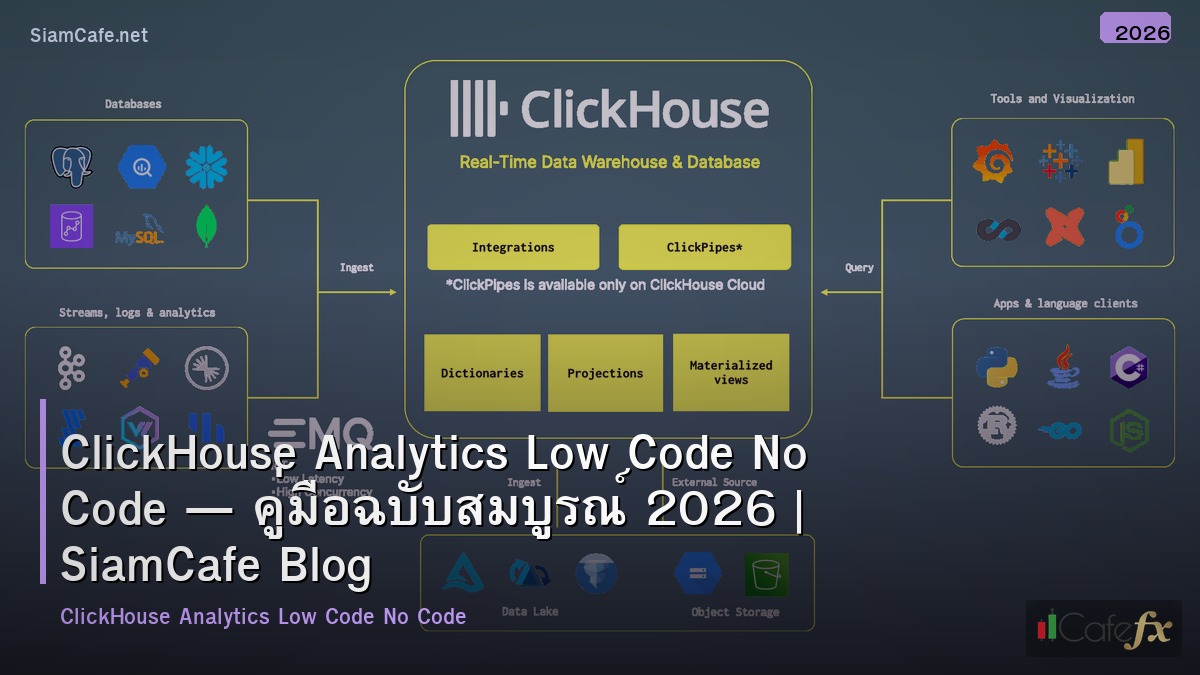

clickhouse analytics low code no code
ClickHouse Analytics Low Code No Code | SiamCafe Blog
2025-11-18· อ. บอม — SiamCafe.net· 1,706 คำ

ClickHouse Analytics Low Code No Code คืออะไร
ClickHouse เป็น open-source columnar database ที่ออกแบบมาสำหรับ OLAP (Online Analytical Processing) queries บน datasets ขนาดใหญ่ ประมวลผลได้หลายพันล้าน rows ต่อวินาที Low Code/No Code คือแนวทางพัฒนาแอปพลิเคชันที่ใช้ visual interfaces แทนการเขียน code ช่วยให้ผู้ที่ไม่ใช่ developer สามารถสร้าง analytics dashboards, reports และ data pipelines ได้ การรวม ClickHouse กับ Low Code/No Code platforms ช่วยให้ทีม business สามารถ query และ visualize ข้อมูลขนาดใหญ่ได้ด้วยตัวเอง โดยไม่ต้องรอ data engineers
ClickHouse Fundamentals

# clickhouse_basics.py — ClickHouse fundamentals
import json

class ClickHouseBasics:
    FEATURES = {
        "columnar": {
            "name": "Columnar Storage",
            "description": "เก็บข้อมูลแบบ column-oriented — อ่านเฉพาะ columns ที่ต้องการ ไม่ต้องอ่านทั้ง row",
            "benefit": "เร็วกว่า row-based DB 10-100x สำหรับ analytics queries",
        },
        "compression": {
            "name": "High Compression",
            "description": "Columnar data compress ได้ดีมาก — data ซ้ำๆ ใน column เดียวกัน",
            "benefit": "ประหยัด storage 5-10x เทียบกับ row-based",
        },
        "vectorized": {
            "name": "Vectorized Query Execution",
            "description": "ประมวลผลทีละ batch (vector) ไม่ใช่ทีละ row — ใช้ CPU SIMD instructions",
            "benefit": "ใช้ CPU ได้เต็มประสิทธิภาพ",
        },
        "sql": {
            "name": "SQL Compatible",
            "description": "ใช้ SQL syntax คุ้นเคย — SELECT, JOIN, GROUP BY, window functions",
            "benefit": "ไม่ต้องเรียนภาษาใหม่ — SQL analysts ใช้ได้ทันที",
        },
        "real_time": {
            "name": "Real-time Ingestion",
            "description": "Insert ข้อมูลได้ real-time — Kafka, HTTP, file imports",
            "benefit": "Dashboard อัพเดทข้อมูลล่าสุดได้ทันที",
        },
    }

    EXAMPLE_QUERIES = """
-- ClickHouse SQL examples

-- 1. Create analytics table
CREATE TABLE events (
    event_date Date,
    event_time DateTime,
    user_id UInt64,
    event_type String,
    page_url String,
    duration_ms UInt32,
    country LowCardinality(String)
) ENGINE = MergeTree()
PARTITION BY toYYYYMM(event_date)
ORDER BY (event_date, user_id, event_time);

-- 2. Aggregate query (billions of rows in seconds)
SELECT
    toDate(event_time) AS date,
    country,
    count() AS events,
    uniq(user_id) AS unique_users,
    avg(duration_ms) AS avg_duration
FROM events
WHERE event_date >= today() - 30
GROUP BY date, country
ORDER BY date DESC, events DESC;

-- 3. Funnel analysis
SELECT
    level,
    count() AS users,
    round(count() / max(count()) OVER () * 100, 1) AS pct
FROM (
    SELECT user_id, windowFunnel(86400)(event_time, 
        event_type = 'page_view',
        event_type = 'add_to_cart',
        event_type = 'purchase'
    ) AS level
    FROM events
    WHERE event_date >= today() - 7
    GROUP BY user_id
)
GROUP BY level ORDER BY level;
"""

    def show_features(self):
        print("=== ClickHouse Features ===\n")
        for key, feat in self.FEATURES.items():
            print(f"[{feat['name']}]")
            print(f"  {feat['description']}")
            print(f"  Benefit: {feat['benefit']}")
            print()

    def show_queries(self):
        print("=== Example Queries ===")
        print(self.EXAMPLE_QUERIES[:500])

ch = ClickHouseBasics()
ch.show_features()
ch.show_queries()

Low Code/No Code Platforms

# lowcode.py — Low Code/No Code platforms for ClickHouse
import json

class LowCodePlatforms:
    PLATFORMS = {
        "metabase": {
            "name": "Metabase",
            "type": "No Code BI",
            "clickhouse": "Native ClickHouse driver",
            "features": "Visual query builder, dashboards, alerts, embedding",
            "cost": "Open source (free) / Pro ($85/user/mo)",
            "best_for": "Business users สร้าง dashboards ด้วยตัวเอง",
        },
        "grafana": {
            "name": "Grafana",
            "type": "Low Code Dashboards",
            "clickhouse": "Official ClickHouse plugin",
            "features": "Time series dashboards, alerting, variables, annotations",
            "cost": "Open source (free) / Cloud (from $0)",
            "best_for": "Real-time monitoring + analytics dashboards",
        },
        "superset": {
            "name": "Apache Superset",
            "type": "No Code BI",
            "clickhouse": "SQLAlchemy ClickHouse driver",
            "features": "SQL Lab, chart builder, dashboards, row-level security",
            "cost": "Open source (free)",
            "best_for": "SQL analysts + visual exploration",
        },
        "retool": {
            "name": "Retool",
            "type": "Low Code Apps",
            "clickhouse": "ClickHouse integration",
            "features": "Drag-drop UI builder, SQL queries, workflows, RBAC",
            "cost": "Free (5 users) / Team ($10/user/mo)",
            "best_for": "Internal tools + admin panels บน ClickHouse data",
        },
        "n8n": {
            "name": "n8n",
            "type": "No Code Automation",
            "clickhouse": "HTTP/SQL node",
            "features": "Workflow automation, ETL, triggers, 400+ integrations",
            "cost": "Open source (free) / Cloud (from €20/mo)",
            "best_for": "Automated data pipelines + alerts",
        },
    }

    def show_platforms(self):
        print("=== Low Code/No Code Platforms ===\n")
        for key, platform in self.PLATFORMS.items():
            print(f"[{platform['name']}] ({platform['type']})")
            print(f"  ClickHouse: {platform['clickhouse']}")
            print(f"  Features: {platform['features']}")
            print(f"  Cost: {platform['cost']}")
            print(f"  Best for: {platform['best_for']}")
            print()

platforms = LowCodePlatforms()
platforms.show_platforms()

Python ClickHouse Integration

# ch_integration.py — Python ClickHouse tools
import json

class ClickHouseIntegration:
    CODE = """
# clickhouse_analytics.py — ClickHouse analytics toolkit
import clickhouse_connect
import pandas as pd
import json
from datetime import datetime, timedelta

class ClickHouseAnalytics:
    def __init__(self, host='localhost', port=8123, database='default'):
        self.client = clickhouse_connect.get_client(
            host=host, port=port, database=database
        )
    
    def query_to_df(self, sql, params=None):
        '''Execute query and return DataFrame'''
        result = self.client.query(sql, parameters=params)
        return pd.DataFrame(
            result.result_rows,
            columns=result.column_names
        )
    
    def daily_metrics(self, days=30):
        '''Get daily metrics summary'''
        sql = '''
        SELECT
            toDate(event_time) AS date,
            count() AS total_events,
            uniq(user_id) AS unique_users,
            countIf(event_type = 'purchase') AS purchases,
            sumIf(amount, event_type = 'purchase') AS revenue
        FROM events
        WHERE event_date >= today() - %(days)s
        GROUP BY date
        ORDER BY date DESC
        '''
        return self.query_to_df(sql, {'days': days})
    
    def top_pages(self, limit=20):
        '''Get top pages by views'''
        sql = '''
        SELECT
            page_url,
            count() AS views,
            uniq(user_id) AS unique_visitors,
            avg(duration_ms) / 1000 AS avg_duration_sec
        FROM events
        WHERE event_type = 'page_view'
          AND event_date >= today() - 7
        GROUP BY page_url
        ORDER BY views DESC
        LIMIT %(limit)s
        '''
        return self.query_to_df(sql, {'limit': limit})
    
    def user_segmentation(self):
        '''Segment users by activity'''
        sql = '''
        SELECT
            CASE
                WHEN total_events >= 100 THEN 'power_user'
                WHEN total_events >= 10 THEN 'active'
                WHEN total_events >= 1 THEN 'casual'
                ELSE 'inactive'
            END AS segment,
            count() AS users,
            round(avg(total_events), 1) AS avg_events
        FROM (
            SELECT user_id, count() AS total_events
            FROM events
            WHERE event_date >= today() - 30
            GROUP BY user_id
        )
        GROUP BY segment
        ORDER BY users DESC
        '''
        return self.query_to_df(sql)
    
    def export_for_dashboard(self, output='dashboard_data.json'):
        '''Export data for no-code dashboard'''
        data = {
            'daily_metrics': self.daily_metrics(30).to_dict('records'),
            'top_pages': self.top_pages(10).to_dict('records'),
            'segments': self.user_segmentation().to_dict('records'),
            'generated_at': datetime.utcnow().isoformat(),
        }
        with open(output, 'w') as f:
            json.dump(data, f, indent=2, default=str)
        return output

# analytics = ClickHouseAnalytics('clickhouse-host', 8123)
# df = analytics.daily_metrics(30)
# analytics.export_for_dashboard()
"""

    def show_code(self):
        print("=== ClickHouse Analytics ===")
        print(self.CODE[:600])

integration = ClickHouseIntegration()
integration.show_code()

Metabase + ClickHouse Setup

# metabase_setup.py — Metabase with ClickHouse
import json

class MetabaseSetup:
    DOCKER_COMPOSE = """
# docker-compose.yml — Metabase + ClickHouse
version: '3.8'
services:
  clickhouse:
    image: clickhouse/clickhouse-server:latest
    ports:
      - "8123:8123"
      - "9000:9000"
    volumes:
      - ch_data:/var/lib/clickhouse

  metabase:
    image: metabase/metabase:latest
    ports:
      - "3000:3000"
    environment:
      MB_DB_TYPE: postgres
      MB_DB_HOST: metabase-db
      MB_DB_PORT: 5432
      MB_DB_DBNAME: metabase
      MB_DB_USER: metabase
      MB_DB_PASS: metabase
    depends_on:
      - metabase-db
      - clickhouse

  metabase-db:
    image: postgres:16-alpine
    environment:
      POSTGRES_DB: metabase
      POSTGRES_USER: metabase
      POSTGRES_PASSWORD: metabase
    volumes:
      - mb_data:/var/lib/postgresql/data

volumes:
  ch_data:
  mb_data:
"""

    SETUP_STEPS = [
        "1. docker compose up -d",
        "2. เข้า Metabase: http://localhost:3000",
        "3. สร้าง account admin",
        "4. Add Database → ClickHouse → host: clickhouse, port: 8123",
        "5. Metabase จะ scan schema อัตโนมัติ",
        "6. สร้าง Question (query) ด้วย visual builder — ไม่ต้องเขียน SQL",
        "7. สร้าง Dashboard → drag questions เข้า → share กับทีม",
    ]

    def show_compose(self):
        print("=== Docker Compose ===")
        print(self.DOCKER_COMPOSE[:500])

    def show_steps(self):
        print(f"\n=== Setup Steps ===")
        for step in self.SETUP_STEPS:
            print(f"  {step}")

setup = MetabaseSetup()
setup.show_compose()
setup.show_steps()

No Code Data Pipeline

# pipeline.py — No-code data pipeline to ClickHouse
import json

class NoCodePipeline:
    N8N_WORKFLOW = """
# n8n workflow: API → Transform → ClickHouse
{
  "nodes": [
    {
      "name": "Schedule Trigger",
      "type": "n8n-nodes-base.scheduleTrigger",
      "parameters": {"rule": {"interval": [{"field": "hours", "hoursInterval": 1}]}}
    },
    {
      "name": "HTTP Request",
      "type": "n8n-nodes-base.httpRequest",
      "parameters": {
        "url": "https://api.example.com/events",
        "method": "GET",
        "authentication": "headerAuth"
      }
    },
    {
      "name": "Transform",
      "type": "n8n-nodes-base.code",
      "parameters": {
        "jsCode": "return items.map(item => ({json: {event_date: item.json.date, user_id: item.json.uid, event_type: item.json.type}}))"
      }
    },
    {
      "name": "ClickHouse Insert",
      "type": "n8n-nodes-base.httpRequest",
      "parameters": {
        "url": "http://clickhouse:8123/",
        "method": "POST",
        "body": "INSERT INTO events FORMAT JSONEachRow",
        "sendBody": true
      }
    }
  ]
}
"""

    AIRBYTE_CONFIG = {
        "source": "REST API / PostgreSQL / MySQL / Google Analytics / Shopify",
        "destination": "ClickHouse (official connector)",
        "sync_mode": "Incremental (append) or Full Refresh",
        "schedule": "Every 1 hour / 6 hours / daily",
        "setup": "No code — configure ใน Airbyte UI",
    }

    def show_n8n(self):
        print("=== n8n Workflow ===")
        print(self.N8N_WORKFLOW[:500])

    def show_airbyte(self):
        print(f"\n=== Airbyte ETL ===")
        for key, val in self.AIRBYTE_CONFIG.items():
            print(f"  [{key}] {val}")

pipeline = NoCodePipeline()
pipeline.show_n8n()
pipeline.show_airbyte()

FAQ - คำถามที่พบบ่อย

Q: ClickHouse กับ BigQuery อันไหนดีกว่า?

A: ClickHouse: self-hosted, ราคาถูกกว่า (ไม่จ่ายต่อ query), ควบคุมได้เต็มที่, latency ต่ำ BigQuery: managed service, ไม่ต้อง ops, scale อัตโนมัติ, จ่ายต่อ query เลือก ClickHouse: ทีมมี DevOps, ต้องการ cost control, real-time queries เลือก BigQuery: ทีมเล็ก, ไม่อยาก manage infrastructure, ใช้ GCP อยู่แล้ว

Q: No Code tools ทดแทน data engineer ได้ไหม?

A: ไม่ทั้งหมด — No Code ช่วย business users ทำ self-service analytics ได้ แต่ยังต้องการ data engineer สำหรับ: data modeling, schema design, performance tuning, complex ETL, data quality No Code ดีสำหรับ: dashboards, simple reports, ad-hoc queries, basic pipelines Data engineer จำเป็นสำหรับ: production pipelines, data governance, optimization

Q: Metabase กับ Superset อันไหนดีกว่า?

A: Metabase: ง่ายกว่ามาก — non-technical users ใช้ได้เลย, visual query builder ดี Superset: powerful กว่า — SQL Lab, custom visualizations, row-level security เลือก Metabase: ถ้าทีมส่วนใหญ่ไม่เขียน SQL เลือก Superset: ถ้าทีมมี SQL skills + ต้องการ advanced features

Q: ClickHouse รองรับ real-time data ได้ดีแค่ไหน?

A: ดีมาก — insert ได้ millions of rows/sec ผ่าน Kafka/HTTP Kafka Engine: consume จาก Kafka topic โดยตรง — no external connector needed Materialized Views: pre-aggregate data ขณะ insert — queries เร็วขึ้นอีก Dashboard refresh: Metabase/Grafana auto-refresh ทุก 30s-5min ข้อจำกัด: ไม่เหมาะกับ point lookups (single row) — ใช้ Redis/PostgreSQL แทน


📖 บทความที่เกี่ยวข้อง

Cloudflare Low Code No Codeอ่านบทความ → MongoDB Change Streams Low Code No Codeอ่านบทความ → QuestDB Time Series Low Code No Codeอ่านบทความ → Snyk Code Security Low Code No Codeอ่านบทความ → CSS Container Queries Code Review Best Practiceอ่านบทความ →

📚 ดูบทความทั้งหมด →