Ceph + Stream Processing
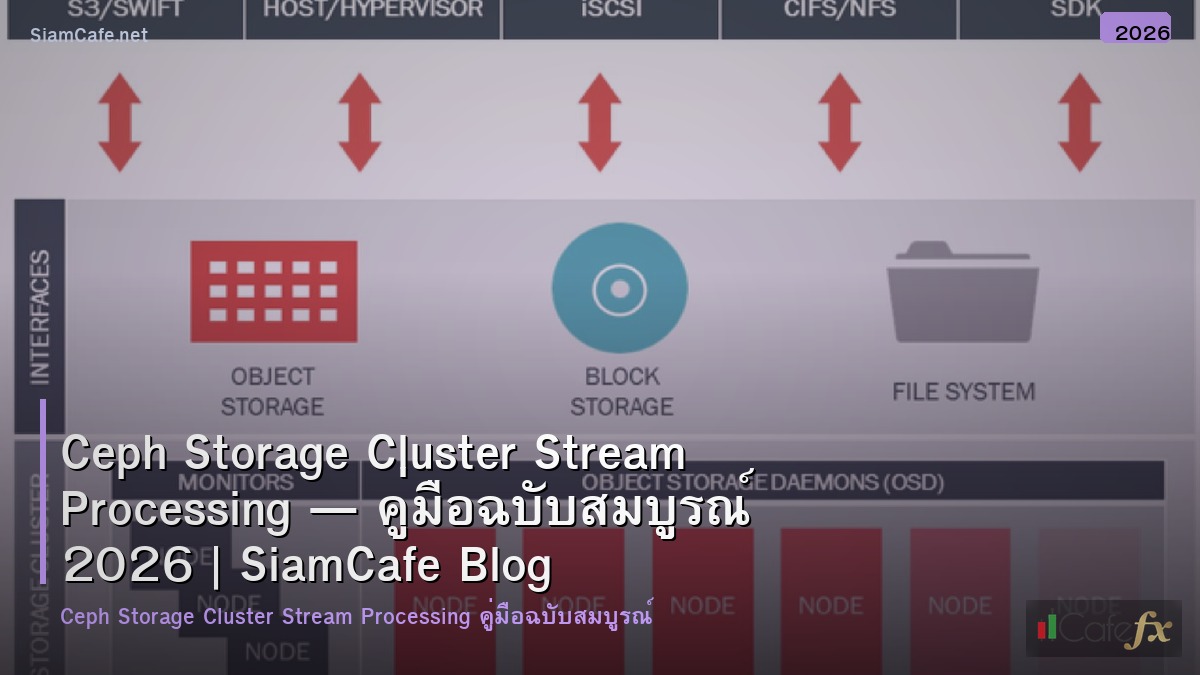
Ceph Storage Cluster Stream Processing RADOS RGW Object Storage Kafka Flink Spark Real-time Analytics S3 API Block CephFS Production
| Component | Ceph Type | Stream Use Case | Protocol | Performance |
|---|---|---|---|---|
| Event Store | RGW (Object) | เก็บ Raw Events จาก Kafka | S3 API | High throughput write |
| Kafka Storage | RBD (Block) | Kafka Broker data directory | Block device | Low latency I/O |
| Shared Data | CephFS (File) | Shared config/model files | POSIX mount | Concurrent access |
| Archive | RGW + Lifecycle | Cold storage for old events | S3 API | Cost optimized |
| Checkpoint | RGW (Object) | Flink/Spark checkpoints | S3 API | Reliable storage |
Cluster Setup
# === Ceph Cluster Setup ===
# Bootstrap cluster on first node
# cephadm bootstrap --mon-ip 10.0.1.10 \
# --initial-dashboard-user admin \
# --initial-dashboard-password secret123
# Add nodes
# ceph orch host add node2 10.0.1.11
# ceph orch host add node3 10.0.1.12
# Add OSDs (auto-detect available disks)
# ceph orch apply osd --all-available-devices
# Or add specific disks
# ceph orch daemon add osd node1:/dev/sdb
# ceph orch daemon add osd node2:/dev/sdb
# ceph orch daemon add osd node3:/dev/sdb
# Create pools
# ceph osd pool create stream-data 128 128
# ceph osd pool set stream-data size 3
# ceph osd pool set stream-data min_size 2
# Enable RGW for S3 API
# ceph orch apply rgw stream-gw --placement="3 node1 node2 node3" --port=7480
# Create S3 user
# radosgw-admin user create --uid=stream-user --display-name="Stream User"
# radosgw-admin key create --uid=stream-user --key-type=s3
from dataclasses import dataclass
@dataclass
class CephComponent:
component: str
count: str
role: str
resource: str
components = [
CephComponent("MON (Monitor)", "3 (odd number)", "Cluster state, quorum", "2 CPU, 4GB RAM"),
CephComponent("MGR (Manager)", "2 (active-standby)", "Dashboard, metrics, modules", "2 CPU, 4GB RAM"),
CephComponent("OSD (Object Store)", "3+ per node", "Store actual data", "1 CPU + 4GB RAM per OSD"),
CephComponent("RGW (RADOS Gateway)", "3 (load balanced)", "S3/Swift API endpoint", "4 CPU, 8GB RAM"),
CephComponent("MDS (Metadata)", "2 (if CephFS)", "CephFS metadata", "4 CPU, 8GB RAM"),
]
print("=== Ceph Components ===")
for c in components:
print(f" [{c.component}] Count: {c.count}")
print(f" Role: {c.role}")
print(f" Resource: {c.resource}")
Stream Processing Integration
# === Kafka + Ceph Integration ===
# Kafka Connect S3 Sink (to Ceph RGW)
# connector.class=io.confluent.connect.s3.S3SinkConnector
# tasks.max=3
# topics=events, logs, metrics
# s3.bucket.name=stream-events
# s3.region=default
# store.url=http://ceph-rgw:7480
# flush.size=10000
# rotate.interval.ms=60000
# storage.class=io.confluent.connect.s3.storage.S3Storage
# format.class=io.confluent.connect.s3.format.parquet.ParquetFormat
# partitioner.class=io.confluent.connect.storage.partitioner.TimeBasedPartitioner
# path.format='year'=YYYY/'month'=MM/'day'=dd/'hour'=HH
# partition.duration.ms=3600000
# locale=en-US
# timezone=Asia/Bangkok
# Flink with Ceph S3 Checkpoint
# flink-conf.yaml:
# state.backend: rocksdb
# state.checkpoints.dir: s3://flink-checkpoints/
# s3.endpoint: http://ceph-rgw:7480
# s3.path-style-access: true
# s3.access-key: ACCESS_KEY
# s3.secret-key: SECRET_KEY
# Python — Write to Ceph via boto3
# import boto3
#
# s3 = boto3.client('s3',
# endpoint_url='http://ceph-rgw:7480',
# aws_access_key_id='ACCESS_KEY',
# aws_secret_access_key='SECRET_KEY',
# )
#
# # Write event batch
# s3.put_object(
# Bucket='stream-events',
# Key=f'events/2024/01/15/batch-001.parquet',
# Body=parquet_data
# )
#
# # List recent events
# response = s3.list_objects_v2(
# Bucket='stream-events',
# Prefix='events/2024/01/15/',
# )
@dataclass
class StreamPipeline:
stage: str
tool: str
ceph_usage: str
data_format: str
throughput: str
pipeline = [
StreamPipeline("Ingest", "Kafka", "RBD for broker storage", "Avro/JSON", "100K events/s"),
StreamPipeline("Buffer", "Kafka Connect", "S3 Sink to RGW", "Parquet", "50K events/s"),
StreamPipeline("Process", "Flink/Spark", "S3 checkpoint + state", "Internal", "30K events/s"),
StreamPipeline("Store", "Ceph RGW", "Object storage (S3)", "Parquet/ORC", "1 GB/s write"),
StreamPipeline("Query", "Trino/Presto", "S3 scan on RGW", "SQL over Parquet", "GB/s scan"),
StreamPipeline("Archive", "Lifecycle Policy", "Move to erasure-coded pool", "Same", "Automated"),
]
print("\n=== Stream Pipeline ===")
for s in pipeline:
print(f" [{s.stage}] Tool: {s.tool}")
print(f" Ceph: {s.ceph_usage}")
print(f" Format: {s.data_format} | Throughput: {s.throughput}")
Monitoring and Operations
# === Ceph Monitoring ===
# Essential commands
# ceph status # Overall health
# ceph health detail # Detailed health info
# ceph osd stat # OSD status
# ceph osd tree # OSD topology
# ceph df # Storage usage
# ceph osd pool stats # Pool statistics
# rados bench -p stream-data 60 write # Write benchmark
# rados bench -p stream-data 60 seq # Read benchmark
# Prometheus metrics endpoint
# ceph mgr module enable prometheus
# curl http://ceph-mgr:9283/metrics
# Grafana dashboards:
# - Ceph Cluster Overview
# - Ceph OSD Performance
# - Ceph RGW Performance
# - Ceph Pool Statistics
@dataclass
class AlertRule:
metric: str
condition: str
severity: str
action: str
alerts = [
AlertRule("ceph_health_status", "!= HEALTH_OK", "CRITICAL",
"Check ceph health detail, fix warnings"),
AlertRule("ceph_osd_up", "< total_osds", "CRITICAL",
"Check failed OSD, replace disk if needed"),
AlertRule("ceph_osd_pgs_degraded", "> 0 for 10min", "WARNING",
"Wait for recovery or check OSD status"),
AlertRule("ceph_pool_used_bytes", "> 80% capacity", "WARNING",
"Add OSDs or clean old data"),
AlertRule("ceph_rgw_req_latency", "> 500ms p99", "WARNING",
"Check RGW load, add more instances"),
AlertRule("ceph_osd_apply_latency_ms", "> 100ms", "WARNING",
"Check disk health, consider SSD upgrade"),
AlertRule("ceph_slow_requests", "> 0", "WARNING",
"Investigate blocked operations"),
]
print("Monitoring Alerts:")
for a in alerts:
print(f" [{a.metric}] {a.condition}")
print(f" Severity: {a.severity}")
print(f" Action: {a.action}")
# Capacity Planning
capacity = {
"Raw Storage": "3 nodes × 4 disks × 4TB = 48TB raw",
"Usable (3x replication)": "48TB / 3 = 16TB usable",
"Usable (EC 4+2)": "48TB × 4/6 = 32TB usable",
"Daily Ingestion": "~50GB/day stream data",
"Retention": "16TB / 50GB = ~320 days (replication)",
"Growth Plan": "Add 1 node per quarter as needed",
}
print(f"\n\nCapacity Planning:")
for k, v in capacity.items():
print(f" [{k}]: {v}")
เคล็ดลับ
- Pool: ใช้ Replicated Pool สำหรับ Hot Data, Erasure Coded สำหรับ Archive
- RGW: Deploy RGW อย่างน้อย 3 ตัว Load Balance ด้วย HAProxy
- OSD: ใช้ SSD สำหรับ WAL/DB แยกจาก HDD สำหรับ Data
- Network: แยก Public Network และ Cluster Network สำหรับ Replication
- Benchmark: ทำ rados bench ก่อน Production วัด IOPS Throughput
Ceph Storage Cluster คืออะไร
Open Source Distributed Storage Object Block File Scale Commodity Hardware Self-healing CRUSH OSD MON MGR OpenStack Kubernetes Enterprise
ใช้ Ceph กับ Stream Processing อย่างไร
RGW S3 Object Storage Kafka Flink Spark Bucket Notification Pipeline Lifecycle Cold Storage RBD Kafka Broker CephFS Shared Data Checkpoint
ตั้ง Cluster อย่างไร
3 Nodes cephadm bootstrap host add OSD Pool Replication size 3 RGW S3 API radosgw-admin user Dashboard ceph status Health
Monitor Performance อย่างไร
ceph status health osd stat df Dashboard Prometheus Grafana IOPS Throughput Latency Alert OSD Down Disk Full Slow Requests PG Recovery
สรุป
Ceph Storage Cluster Stream Processing RADOS RGW S3 Kafka Flink Spark Object Block CephFS Monitoring Prometheus Grafana Capacity Planning Production