Ceph Storage Cluster Distributed System คืออะไร
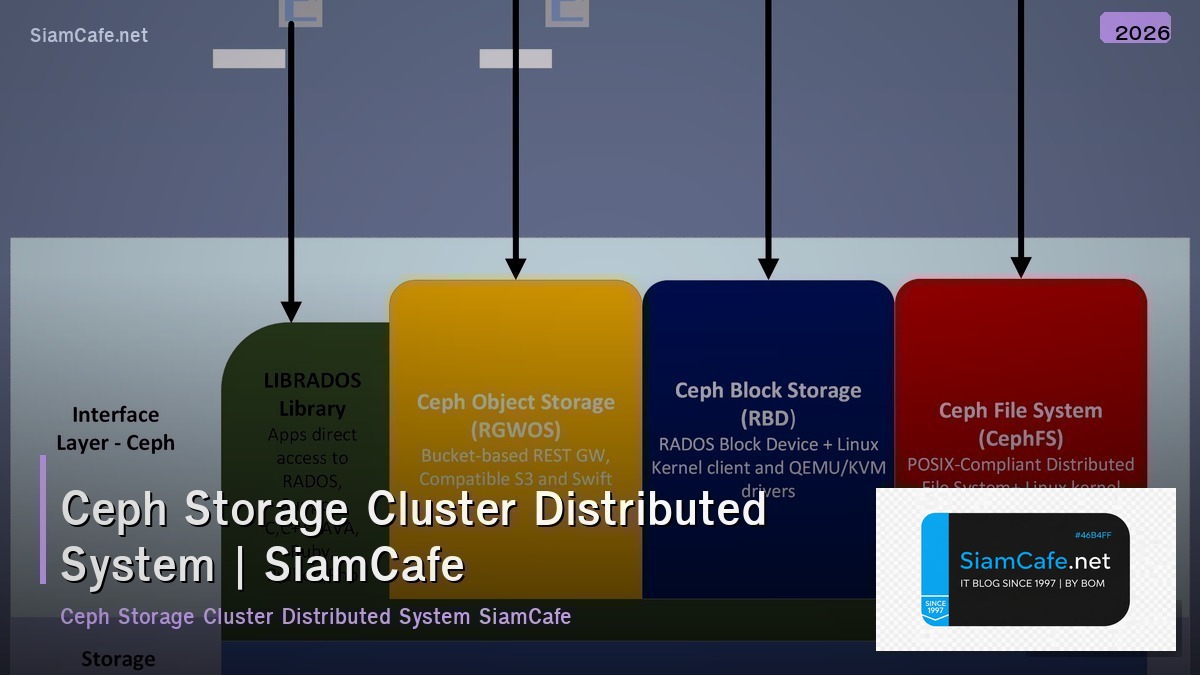

Ceph เป็น open source distributed storage system ที่ให้บริการ object storage, block storage และ file system บน cluster เดียวกัน ออกแบบมาให้ไม่มี single point of failure สามารถ scale ออกได้หลายพัน nodes รองรับ exabyte-scale data Ceph ใช้ CRUSH algorithm สำหรับ data placement ทำให้กระจายข้อมูลอัตโนมัติ self-healing เมื่อ disk หรือ node fail และ rebalancing เมื่อเพิ่ม/ลบ hardware เป็น storage backend ยอดนิยมสำหรับ OpenStack, Kubernetes (Rook-Ceph) และ private cloud
Ceph Architecture
# ceph_arch.py — Ceph storage architecture
import json
class CephArchitecture:
COMPONENTS = {
"mon": {
"name": "MON (Monitor)",
"role": "เก็บ cluster map, quorum consensus, health monitoring",
"count": "3 หรือ 5 (odd number สำหรับ quorum)",
"resources": "CPU: 1-2 cores, RAM: 2-4 GB, Disk: SSD 50GB",
},
"osd": {
"name": "OSD (Object Storage Daemon)",
"role": "เก็บข้อมูลจริง, replication, recovery, rebalancing",
"count": "1 OSD ต่อ 1 disk (HDD/SSD/NVMe)",
"resources": "CPU: 1-2 cores/OSD, RAM: 4-8 GB/OSD",
},
"mgr": {
"name": "MGR (Manager)",
"role": "Monitoring, dashboard, orchestration, telemetry",
"count": "2 (active + standby)",
"resources": "CPU: 1-2 cores, RAM: 2-4 GB",
},
"mds": {
"name": "MDS (Metadata Server)",
"role": "Metadata สำหรับ CephFS (file system)",
"count": "1+ (เฉพาะเมื่อใช้ CephFS)",
"resources": "CPU: 2-4 cores, RAM: 4-8 GB",
},
"rgw": {
"name": "RGW (RADOS Gateway)",
"role": "S3/Swift compatible object storage API",
"count": "2+ (load balanced)",
"resources": "CPU: 2-4 cores, RAM: 4-8 GB",
},
}
STORAGE_TYPES = {
"rbd": {"name": "RBD (RADOS Block Device)", "use": "Block storage สำหรับ VMs, Kubernetes PVs", "protocol": "RADOS native"},
"cephfs": {"name": "CephFS", "use": "POSIX file system shared across clients", "protocol": "FUSE / Kernel driver"},
"rgw": {"name": "RGW (Object Storage)", "use": "S3-compatible object storage", "protocol": "HTTP REST API"},
}
def show_components(self):
print("=== Ceph Components ===\n")
for key, comp in self.COMPONENTS.items():
print(f"[{comp['name']}]")
print(f" Role: {comp['role']}")
print(f" Count: {comp['count']}")
print(f" Resources: {comp['resources']}")
print()
def show_storage(self):
print("=== Storage Types ===")
for key, st in self.STORAGE_TYPES.items():
print(f" [{st['name']}] {st['use']}")
arch = CephArchitecture()
arch.show_components()
arch.show_storage()
Cluster Deployment
# deploy.py — Ceph cluster deployment
import json
class CephDeploy:
CEPHADM = """
# cephadm — Official deployment tool (recommended)
# Step 1: Install cephadm
curl --silent --remote-name --location https://download.ceph.com/rpm-reef/el9/noarch/cephadm
chmod +x cephadm
./cephadm install
# Step 2: Bootstrap first MON
cephadm bootstrap \\
--mon-ip 10.0.0.1 \\
--initial-dashboard-user admin \\
--initial-dashboard-password secret123 \\
--cluster-network 10.0.1.0/24
# Step 3: Add hosts
ceph orch host add node2 10.0.0.2
ceph orch host add node3 10.0.0.3
# Step 4: Add OSDs (auto-detect available disks)
ceph orch apply osd --all-available-devices
# Step 5: Add MONs (3 total)
ceph orch apply mon --placement="node1, node2, node3"
# Step 6: Add MGRs
ceph orch apply mgr --placement="node1, node2"
# Step 7: Verify
ceph status
ceph osd tree
ceph health detail
"""
ROOK_CEPH = """
# Rook-Ceph on Kubernetes
# Step 1: Install Rook operator
helm repo add rook-release https://charts.rook.io/release
helm install rook-ceph rook-release/rook-ceph \\
--namespace rook-ceph --create-namespace
# Step 2: Create CephCluster
kubectl apply -f - <

CRUSH Algorithm & Data Placement
# crush.py — CRUSH algorithm and data placement
import json
import random
class CRUSHAlgorithm:
CONCEPTS = {
"crush_map": {
"name": "CRUSH Map",
"description": "แผนที่ hierarchical ของ cluster: root → datacenter → rack → host → OSD",
"purpose": "กำหนดว่า data จะถูกเก็บที่ไหน โดยกระจายตาม failure domains",
},
"placement_groups": {
"name": "Placement Groups (PGs)",
"description": "หน่วยกลางสำหรับ map objects ไป OSDs",
"formula": "PGs = (OSDs × 100) / replicas, ปัดเป็น power of 2",
},
"crush_rules": {
"name": "CRUSH Rules",
"description": "กฎสำหรับกำหนด data placement policy",
"example": "replicate ข้าม host (ไม่เก็บ replica บน host เดียวกัน)",
},
}
FAILURE_DOMAINS = """
CRUSH Hierarchy:
root default
├── datacenter dc1
│ ├── rack rack1
│ │ ├── host node1
│ │ │ ├── osd.0 (ssd 1TB)
│ │ │ └── osd.1 (hdd 4TB)
│ │ └── host node2
│ │ ├── osd.2 (ssd 1TB)
│ │ └── osd.3 (hdd 4TB)
│ └── rack rack2
│ ├── host node3
│ └── host node4
└── datacenter dc2
└── rack rack3
├── host node5
└── host node6
"""
def show_concepts(self):
print("=== CRUSH Concepts ===\n")
for key, concept in self.CONCEPTS.items():
print(f"[{concept['name']}]")
print(f" {concept['description']}")
print()
def show_hierarchy(self):
print("=== CRUSH Hierarchy ===")
print(self.FAILURE_DOMAINS)
def simulate_placement(self):
print("=== Data Placement Simulation ===")
print(" Object: photo.jpg → PG 3.1a → OSD [2, 5, 8]")
print(" Object: video.mp4 → PG 3.2b → OSD [0, 4, 7]")
print(" Object: doc.pdf → PG 3.0c → OSD [1, 3, 6]")
print(" → Replicas spread across different hosts/racks ✓")
crush = CRUSHAlgorithm()
crush.show_concepts()
crush.show_hierarchy()
crush.simulate_placement()
Monitoring & Operations
# monitoring.py — Ceph monitoring and operations
import json
import random
class CephMonitoring:
def cluster_status(self):
print("=== Ceph Cluster Status ===\n")
osds = random.randint(12, 48)
metrics = {
"Health": random.choice(["HEALTH_OK", "HEALTH_OK", "HEALTH_WARN"]),
"MONs": "3 (quorum: node1, node2, node3)",
"MGRs": "2 (active: node1, standby: node2)",
"OSDs": f"{osds} up, {osds} in",
"Total capacity": f"{osds * 4} TB",
"Used": f"{random.randint(20, 60)}%",
"PGs": f"{random.randint(128, 512)} active+clean",
"Objects": f"{random.randint(100, 500)}K",
}
for m, v in metrics.items():
print(f" {m}: {v}")
def useful_commands(self):
print(f"\n=== Essential Commands ===")
cmds = [
"ceph status # Overall status",
"ceph osd tree # OSD hierarchy",
"ceph df # Disk usage",
"ceph osd pool ls detail # Pool details",
"ceph health detail # Health warnings",
"ceph osd perf # OSD performance",
"ceph pg stat # PG statistics",
"rados bench 60 write -p pool # Benchmark",
]
for cmd in cmds:
print(f" $ {cmd}")
def performance(self):
print(f"\n=== Performance Metrics ===")
metrics = {
"Read IOPS": f"{random.randint(5000, 50000):,}",
"Write IOPS": f"{random.randint(2000, 20000):,}",
"Read throughput": f"{random.randint(500, 3000)} MB/s",
"Write throughput": f"{random.randint(200, 1500)} MB/s",
"Avg read latency": f"{random.uniform(0.5, 5):.1f} ms",
"Avg write latency": f"{random.uniform(1, 10):.1f} ms",
}
for m, v in metrics.items():
print(f" {m}: {v}")
mon = CephMonitoring()
mon.cluster_status()
mon.useful_commands()
mon.performance()
Troubleshooting & Best Practices
# best_practices.py — Ceph best practices
import json
class CephBestPractices:
PRACTICES = {
"hardware": {
"name": "Hardware",
"tips": [
"OSD: ใช้ SSD/NVMe สำหรับ WAL+DB, HDD สำหรับ data",
"Network: 10 GbE minimum, 25 GbE recommended",
"MON: ใช้ SSD สำหรับ monitor store",
"RAM: 4-8 GB per OSD",
],
},
"pools": {
"name": "Pool Configuration",
"tips": [
"ใช้ Erasure Coding สำหรับ cold data (ประหยัด space)",
"ใช้ Replication (3x) สำหรับ hot data (เร็วกว่า)",
"ตั้ง PG count ถูกต้อง: (OSDs × 100) / replicas",
"แยก pool ตาม workload (SSD pool, HDD pool)",
],
},
"operations": {
"name": "Operations",
"tips": [
"Monitor cluster health ตลอด (Prometheus + Grafana)",
"ไม่เกิน 80% capacity (recovery ต้องใช้ space)",
"Upgrade ทีละ node (rolling upgrade)",
"ทดสอบ recovery ด้วยการ simulate OSD failure",
],
},
}
COMMON_ISSUES = {
"slow_ops": {"problem": "Slow OSD operations", "fix": "ตรวจ disk health (smartctl), network latency, OSD logs"},
"nearfull": {"problem": "OSD nearfull warning", "fix": "เพิ่ม OSDs, ลบ data, reweight OSDs"},
"pg_degraded": {"problem": "PGs degraded/undersized", "fix": "ตรวจ OSD status, รอ recovery, ceph pg repair"},
}
def show_practices(self):
print("=== Best Practices ===\n")
for key, practice in self.PRACTICES.items():
print(f"[{practice['name']}]")
for tip in practice["tips"][:3]:
print(f" • {tip}")
print()
def show_issues(self):
print("=== Common Issues ===")
for key, issue in self.COMMON_ISSUES.items():
print(f" [{issue['problem']}] → {issue['fix']}")
bp = CephBestPractices()
bp.show_practices()
bp.show_issues()
FAQ - คำถามที่พบบ่อย
Q: Ceph ต้อง minimum กี่ nodes?
A: Production: 3 nodes minimum (สำหรับ 3x replication) Lab/Test: 1 node ได้ (single node cluster) แนะนำ: 3-5 nodes สำหรับ small production Ceph ใช้ replication factor 3 (default) ต้องมีอย่างน้อย 3 hosts
Q: Ceph กับ GlusterFS อันไหนดีกว่า?
A: Ceph: ดีกว่าสำหรับ block storage (RBD), object storage (S3), cloud integration GlusterFS: ง่ายกว่า, ดีสำหรับ file storage (NFS replacement) ใช้ Ceph: Kubernetes (Rook), OpenStack, need block+object+file ใช้ GlusterFS: simple file sharing, NAS replacement
Q: Rook-Ceph กับ standalone Ceph อันไหนดี?
A: Rook-Ceph: ดีถ้า workload อยู่บน Kubernetes ทั้งหมด Kubernetes-native management, auto-healing Standalone: ดีถ้ามี workload นอก K8s (VMs, bare metal) มี control มากกว่า, performance tuning ง่ายกว่า
Q: Erasure Coding กับ Replication ต่างกันอย่างไร?
A: Replication 3x: เก็บ 3 copies, ใช้ space 3x, เร็ว, simple Erasure Coding (4+2): เก็บ data+parity, ใช้ space 1.5x, ช้ากว่า ใช้ Replication: hot data, random I/O, small objects ใช้ EC: cold data, sequential I/O, large objects, archive