Betteruptime Production Setup Guide — ตั้งค่า
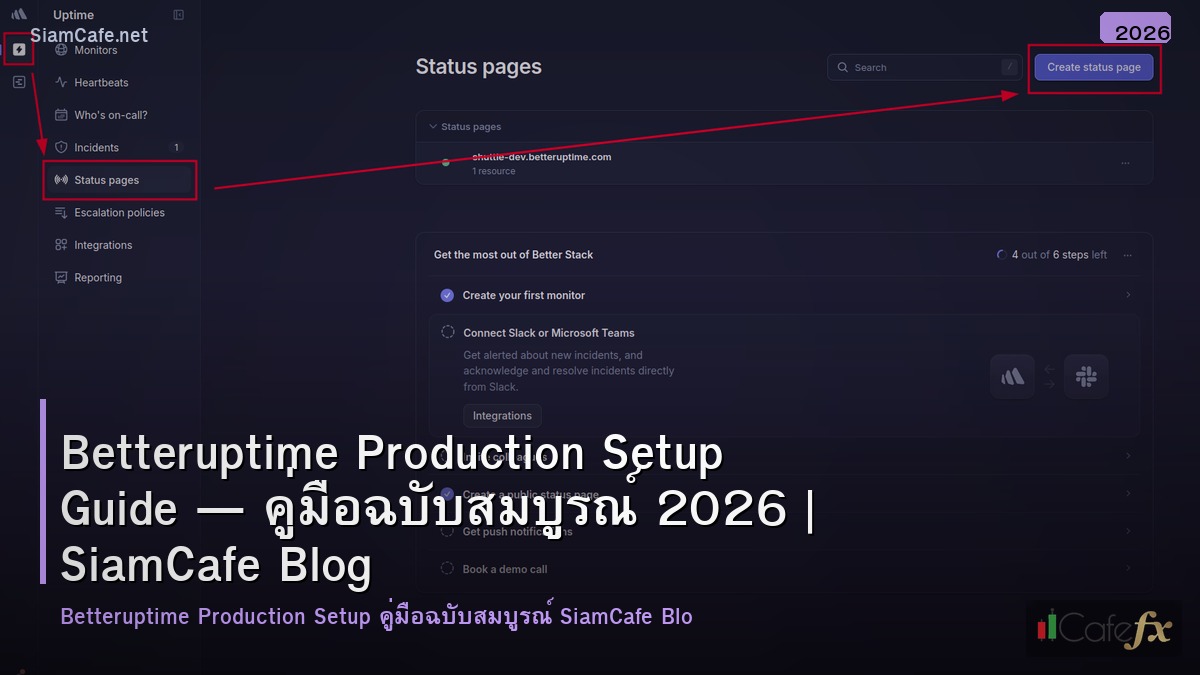

Better Uptime คืออะไรและเหมาะกับระบบแบบไหน

Better Uptime เป็นแพลตฟอร์ม Incident Management และ Uptime Monitoring ที่รวม monitoring, alerting, on-call scheduling และ status pages ไว้ในเครื่องมือเดียว ออกแบบมาสำหรับทีม DevOps และ SRE ที่ต้องการระบบแจ้งเตือนที่เร็วและเชื่อถือได้
Better Uptime รองรับ monitor หลายประเภทได้แก่ HTTP(S) Monitor ที่ตรวจสอบ response code และ keyword, TCP Monitor สำหรับเช็คว่า port เปิดอยู่, Ping (ICMP) Monitor, DNS Monitor, UDP Monitor, Heartbeat Monitor สำหรับ cron job และ batch process และ Keyword Monitor ที่ตรวจสอบว่าหน้าเว็บมีข้อความที่กำหนด
เหมาะสำหรับ production environment ที่มี SLA commitment เพราะสามารถวัด uptime percentage ได้แม่นยำ สร้าง incident timeline อัตโนมัติ และมี status page ที่แสดงสถานะระบบให้ลูกค้าเห็น
ข้อดีเมื่อเทียบกับ UptimeRobot หรือ Pingdom คือ Better Uptime มี incident management ในตัว รองรับ on-call rotation ที่ซับซ้อน มี status page ที่ปรับแต่งได้สวย และ API ที่ครบถ้วนสำหรับ automation
สร้าง Account และตั้งค่า Monitors แรก
ใช้ Better Uptime API สำหรับตั้งค่า monitors แบบ Infrastructure as Code
# ตั้งค่า API Token

export BU_TOKEN="your-betteruptime-api-token"

export BU_API="https://betteruptime.com/api/v2"


# สร้าง Monitor Group

curl -X POST "$BU_API/monitor-groups" \

  -H "Authorization: Bearer $BU_TOKEN" \

  -H "Content-Type: application/json" \

  -d '{

    "name": "Production Services",

    "sort_index": 0

  }'


# สร้าง HTTP Monitor สำหรับ API หลัก

curl -X POST "$BU_API/monitors" \

  -H "Authorization: Bearer $BU_TOKEN" \

  -H "Content-Type: application/json" \

  -d '{

    "monitor_type": "status",

    "url": "https://api.example.com/health",

    "pronounceable_name": "Production API",

    "check_frequency": 30,

    "request_timeout": 15,

    "confirmation_period": 0,

    "http_method": "get",

    "expected_status_codes": [200],

    "regions": ["us", "eu", "ap", "au"],

    "monitor_group_id": "GROUP_ID",

    "recovery_period": 180,

    "paused": false,

    "follow_redirects": true,

    "remember_cookies": false,

    "verify_ssl": true,

    "maintenance_from": null

  }'


# สร้าง Keyword Monitor ที่ตรวจสอบเนื้อหาเว็บ

curl -X POST "$BU_API/monitors" \

  -H "Authorization: Bearer $BU_TOKEN" \

  -H "Content-Type: application/json" \

  -d '{

    "monitor_type": "keyword",

    "url": "https://www.example.com",

    "pronounceable_name": "Homepage Content",

    "check_frequency": 60,

    "request_timeout": 30,

    "required_keyword": "Welcome to Example",

    "regions": ["us", "eu", "ap"]

  }'


# ดูรายการ Monitors ทั้งหมด

curl -s "$BU_API/monitors" \

  -H "Authorization: Bearer $BU_TOKEN" | python3 -m json.tool
ตั้งค่า HTTP, TCP และ Heartbeat Monitors
ตั้งค่า monitor สำหรับทุก component ใน production stack
ตั้งค่า Heartbeat สำหรับ cron job
# เพิ่ม heartbeat ping ท้าย cron job # crontab -e # Daily backup — ส่ง heartbeat เมื่อ backup สำเร็จ 0 2 * * * /opt/scripts/backup.sh && curl -s https://betteruptime.com/api/v1/heartbeat/YOUR_HEARTBEAT_TOKEN # Hourly report — ส่ง heartbeat พร้อม exit code 0 * * * * /opt/scripts/report.sh; curl -s "https://betteruptime.com/api/v1/heartbeat/YOUR_TOKEN?status=$?" # สร้าง wrapper script สำหรับ heartbeat cat > /usr/local/bin/heartbeat-wrap << 'EOF' #!/bin/bash # Usage: heartbeat-wrap [args...] HB_URL="$1"; shift "$@" EXIT_CODE=$? if [ $EXIT_CODE -eq 0 ]; then curl -sf "$HB_URL" > /dev/null else curl -sf "?status=" > /dev/null fi exit $EXIT_CODE EOF chmod +x /usr/local/bin/heartbeat-wrap # ใช้งาน # heartbeat-wrap "https://betteruptime.com/api/v1/heartbeat/TOKEN" /opt/scripts/backup.shสร้าง On-Call Schedule และ Escalation Policy
ตั้งค่า on-call rotation สำหรับทีม DevOps
# สร้าง On-Call Calendar

curl -X POST "$BU_API/on-call-calendars" \

  -H "Authorization: Bearer $BU_TOKEN" \

  -H "Content-Type: application/json" \

  -d '{

    "name": "DevOps Primary On-Call",

    "default_calendar_id": null

  }'


# เพิ่ม On-Call Rotation

curl -X POST "$BU_API/on-call-calendars/CALENDAR_ID/on-call-users" \

  -H "Authorization: Bearer $BU_TOKEN" \

  -H "Content-Type: application/json" \

  -d '{

    "user_id": "USER_1_ID",

    "starts_at": "2026-03-01T00:00:00Z",

    "rotation_period": "1_week",

    "rotation_day": "monday"

  }'


# สร้าง Escalation Policy

curl -X POST "$BU_API/policies" \

  -H "Authorization: Bearer $BU_TOKEN" \

  -H "Content-Type: application/json" \

  -d '{

    "name": "Production Critical",

    "repeat_count": 5,

    "repeat_delay": 300,

    "steps": [

      {

        "step_type": "on_call_calendar",

        "wait_before": 0,

        "on_call_calendar_id": "CALENDAR_ID",

        "urgency_id": 1

      },

      {

        "step_type": "slack_integration",

        "wait_before": 60,

        "slack_id": "SLACK_ID"

      },

      {

        "step_type": "all_team_members",

        "wait_before": 300,

        "urgency_id": 1

      },

      {

        "step_type": "email",

        "wait_before": 600,

        "email": "engineering-leads@example.com"

      }

    ]

  }'


# กำหนด Escalation Policy ให้ Monitor Group

curl -X PATCH "$BU_API/monitor-groups/GROUP_ID" \

  -H "Authorization: Bearer $BU_TOKEN" \

  -H "Content-Type: application/json" \

  -d '{

    "policy_id": "POLICY_ID"

  }'
ตั้งค่า Status Page สำหรับ Production
สร้าง Public Status Page ให้ลูกค้าดูสถานะระบบ
# สร้าง Status Page

curl -X POST "$BU_API/status-pages" \

  -H "Authorization: Bearer $BU_TOKEN" \

  -H "Content-Type: application/json" \

  -d '{

    "company_name": "Example Corp",

    "subdomain": "status-example",

    "company_url": "https://www.example.com",

    "timezone": "Asia/Bangkok",

    "subscribable": true,

    "hide_from_search_engines": false,

    "custom_css": "",

    "google_analytics_id": "G-XXXXXXXXXX",

    "announcement": "",

    "announcement_visible": false

  }'


# สร้าง Section

curl -X POST "$BU_API/status-pages/STATUS_PAGE_ID/sections" \

  -H "Authorization: Bearer $BU_TOKEN" \

  -H "Content-Type: application/json" \

  -d '{

    "name": "Core Services",

    "position": 0

  }'


curl -X POST "$BU_API/status-pages/STATUS_PAGE_ID/sections" \

  -H "Authorization: Bearer $BU_TOKEN" \

  -H "Content-Type: application/json" \

  -d '{

    "name": "Infrastructure",

    "position": 1

  }'


# เพิ่ม Monitor เข้า Status Page

curl -X POST "$BU_API/status-pages/STATUS_PAGE_ID/resources" \

  -H "Authorization: Bearer $BU_TOKEN" \

  -H "Content-Type: application/json" \

  -d '{

    "resource_id": "MONITOR_ID_1",

    "resource_type": "Monitor",

    "public_name": "API Server",

    "status_page_section_id": "SECTION_1_ID",

    "widget_type": "history"

  }'


# ตั้งค่า Custom Domain สำหรับ Status Page

# 1. เพิ่ม CNAME record: status.example.com -> statuspage.betteruptime.com

# 2. อัพเดท Status Page

curl -X PATCH "$BU_API/status-pages/STATUS_PAGE_ID" \

  -H "Authorization: Bearer $BU_TOKEN" \

  -H "Content-Type: application/json" \

  -d '{

    "custom_domain": "status.example.com"

  }'
เชื่อมต่อ Integration กับ Slack PagerDuty และ Webhook
ตั้งค่า integrations สำหรับแจ้งเตือนผ่านหลายช่องทาง
Terraform Configuration สำหรับ Better Uptime
# main.tf — Better Uptime Infrastructure as Code

terraform {

  required_providers {

    betteruptime = {

      source  = "BetterStackHQ/better-uptime"

      version = "~> 0.5"

    }

  }

}


provider "betteruptime" {

  api_token = var.betteruptime_token

}


resource "betteruptime_monitor" "api" {

  url                  = "https://api.example.com/health"

  monitor_type         = "status"

  pronounceable_name   = "Production API"

  check_frequency      = 30

  request_timeout      = 15

  expected_status_codes = [200]

  regions              = ["us", "eu", "ap"]

  verify_ssl           = true

  policy_id            = betteruptime_policy.critical.id

}


resource "betteruptime_monitor" "database" {

  url                = "db-primary.internal:5432"

  monitor_type       = "tcp"

  pronounceable_name = "PostgreSQL Primary"

  check_frequency    = 30

  regions            = ["us"]

  policy_id          = betteruptime_policy.critical.id

}


resource "betteruptime_heartbeat" "backup" {

  name   = "Daily DB Backup"

  period = 86400

  grace  = 3600

}


resource "betteruptime_policy" "critical" {

  name         = "Production Critical"

  repeat_count = 5

  repeat_delay = 300


  steps {

    type        = "slack_integration"

    wait_before = 0

    slack_id    = var.slack_channel_id

  }


  steps {

    type        = "all_team_members"

    wait_before = 300

    urgency_id  = 1

  }

}


resource "betteruptime_status_page" "main" {

  company_name = "Example Corp"

  subdomain    = "status-example"

  timezone     = "Asia/Bangkok"

  subscribable = true

}


# terraform init && terraform plan && terraform apply
FAQ คำถามที่พบบ่อย
Q: Better Uptime ฟรีใช้ได้กี่ monitors?
A: แผน Hobby (ฟรี) รองรับ 10 monitors, check frequency ทุก 3 นาที มี email และ Slack alerts พื้นฐาน แผน Startup เริ่มต้นที่ $24/เดือน รองรับ 50 monitors, check ทุก 30 วินาที และมี on-call scheduling สำหรับ production ที่ต้องการ SLA แนะนำแผน Business ขึ้นไป
Q: Better Uptime ตรวจสอบจาก region ไหนบ้าง?
A: รองรับการตรวจสอบจากหลาย region ทั่วโลกได้แก่ North America (US East, US West), Europe (EU West, EU Central), Asia Pacific (Singapore, Tokyo, Sydney) และ South America ตั้งค่าได้ว่าจะตรวจจาก region ไหนและใช้หลาย region ร่วมกันเพื่อลด false positive
Q: Confirmation Period คืออะไร?
A: Confirmation Period คือช่วงเวลาที่ Better Uptime จะรอก่อนแจ้งเตือน เช่นตั้ง 60 วินาที หมายความว่าหลังตรวจพบ downtime จะรออีก 60 วินาทีแล้วตรวจซ้ำ ถ้ายัง down อยู่ถึงจะแจ้งเตือน ช่วยลด false positive จาก network glitch ชั่วคราว แนะนำตั้ง 0-60 วินาทีสำหรับ critical services
Q: สามารถ monitor internal services ที่ไม่มี public IP ได้ไหม?
A: ได้ โดยใช้ Heartbeat Monitor ให้ service ส่ง HTTP request ออกมาหา Better Uptime endpoint ทุกช่วงเวลาที่กำหนด ถ้าไม่ส่งภายในเวลาจะถือว่า service down หรือใช้ Better Uptime Agent ที่ติดตั้งบน server ภายใน network เพื่อ monitor TCP/ICMP โดยไม่ต้องเปิด port จากภายนอก